'%3e%3cg%20transform='matrix(0.737731,0,0,0.737731,1584.657279,93.052323)'%3e%3cg%20transform='matrix(1,0,0,1,-73.197369,-28.78343)'%3e%3cg%20transform='matrix(2.327683,0,0,2.327683,-115.888888,-940.785017)'%3e%3cpath%20d='M610.12,610.782L535.09,610.782L535.09,570.757L618.413,570.757L610.12,610.782ZM628.935,570.757L697.713,570.757C709.523,570.757%20720.131,571.523%20729.536,573.054C738.94,574.585%20746.923,577.373%20753.485,581.42C760.046,585.466%20765.077,591.043%20768.576,598.151C772.076,605.26%20773.825,614.391%20773.825,625.545C773.825,632.107%20772.841,638.504%20770.873,644.737C768.904,650.971%20766.006,656.548%20762.179,661.469C758.351,666.39%20753.758,670.491%20748.4,673.772C743.041,677.052%20736.863,679.13%20729.864,680.005L729.864,680.661C741.018,683.723%20749.603,689.574%20755.617,698.213C761.632,706.852%20764.639,716.858%20764.639,728.231C764.639,740.917%20762.179,752.071%20757.258,761.695C752.337,771.318%20745.721,779.301%20737.409,785.644C729.098,791.987%20719.584,796.798%20708.867,800.079C698.15,803.36%20686.886,805%20675.076,805L580.368,805L581.484,799.615L609.457,665.57L687.543,665.57C696.947,665.57%20705.094,663%20711.984,657.86C718.873,652.72%20722.318,645.011%20722.318,634.731C722.318,625.545%20719.858,619.257%20714.937,615.867C710.015,612.477%20703.399,610.782%20695.088,610.782L620.636,610.782L628.935,570.757ZM638.101,764.975L672.779,764.975C684.59,764.975%20694.268,761.804%20701.814,755.461C709.359,749.119%20713.132,739.714%20713.132,727.247C713.132,721.123%20711.875,716.312%20709.359,712.812C706.844,709.313%20703.618,706.633%20699.681,704.774C695.744,702.915%20691.37,701.767%20686.558,701.33C681.747,700.892%20677.044,700.673%20672.451,700.673L651.88,700.673L638.101,764.975Z'%20style='fill:rgb(25,23,20);'/%3e%3c/g%3e%3cg%20transform='matrix(1,0,0,1,0,220.238764)'%3e%3cpath%20d='M1259.334,480.922L1129.63,480.922L1129.63,387.757L1278.681,388.212L1259.334,480.922Z'%20style='fill:rgb(0,120,111);'/%3e%3c/g%3e%3cg%20transform='matrix(1,0,0,1,0,452.077913)'%3e%3cpath%20d='M1210.953,480.922L1129.63,480.922L1129.63,387.757L1230.395,387.757L1210.953,480.922Z'%20style='fill:rgb(0,120,111);'/%3e%3c/g%3e%3cg%20transform='matrix(1,0,0,1,0,336.158338)'%3e%3cpath%20d='M1235.144,480.922L1129.63,480.922L1129.63,387.757L1254.586,387.757L1235.144,480.922Z'%20style='fill:rgb(0,120,111);'/%3e%3c/g%3e%3c/g%3e%3c/g%3e%3c/g%3e%3c/svg%3e)
Stop discovering the missing 4 kg on the morning of the batch.
The stock sheet says one thing, the production plan another, and the order still gets typed from memory on Sunday evening. Then Thursday’s batch is short 4 kg of habanero, the fast vendor is out, and the week reorganizes itself around a shortage that was knowable ten days earlier.
The Buying screen does that cross-checking for you. BatchDash reads your planned batches and your restock levels, subtracts what the shelf holds and what is already on order, and lays out only what is left to buy, one decision per vendor. You arrive with the thinking done; the choices stay yours.
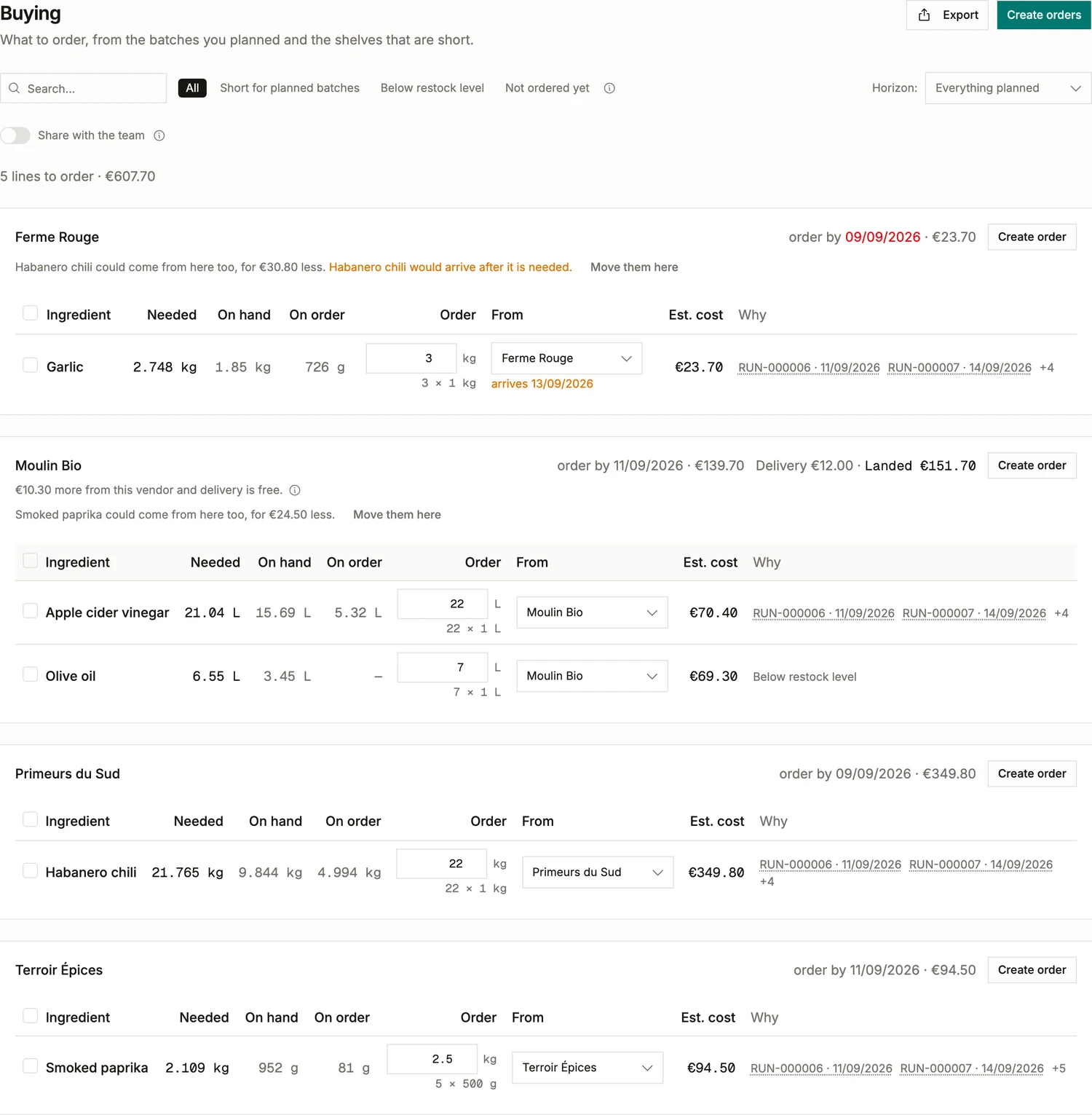
One card per vendor, with the deadline on it
You stop assembling orders and start approving them. What is left to buy arrives grouped by the vendor it would come from, and every quantity is already a real order: whole packs, the vendor’s minimum honored, enough to clear the shortfall rather than land exactly on it. Each card knows the last day to order so the delivery still beats the batch, and says what that card costs. Filters narrow the list to what is short for planned batches, what has dropped under its restock level, or what nobody has ordered yet.
Every line says why it is there
Needed, on hand, on order, order this much: the arithmetic sits on the row, so a quantity is never a number you have to take on faith. The Why column names the batches waiting on it, with their dates, and links to each one. A line that no batch asked for says Below restock instead, because that is a different reason and should read like one. Overrule any quantity and the rest of the math follows it.
BatchDash optimizes for the batch date, then the price
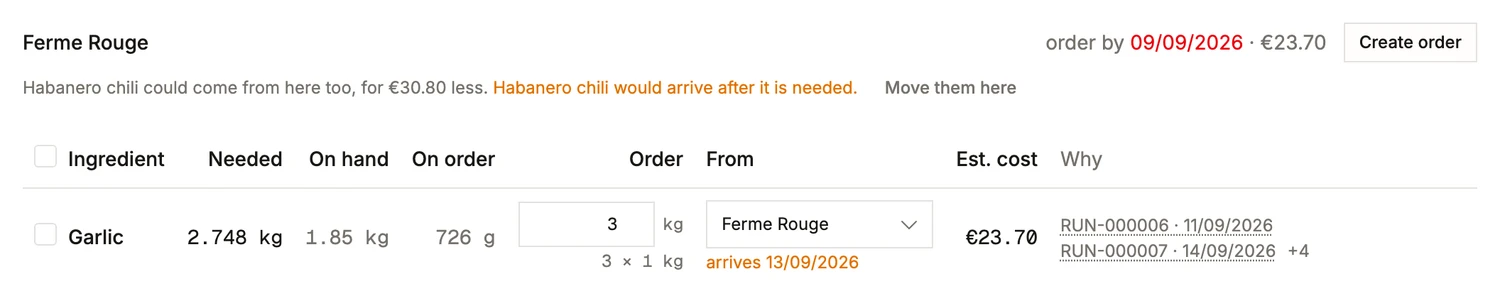
The cheapest line-by-line answer is often the worst basket, so the default vendor is picked the way a good buyer picks:
- Among vendors that can deliver by the day the batch needs it, the cheapest wins. A ten-day supplier does not win a batch due Friday.
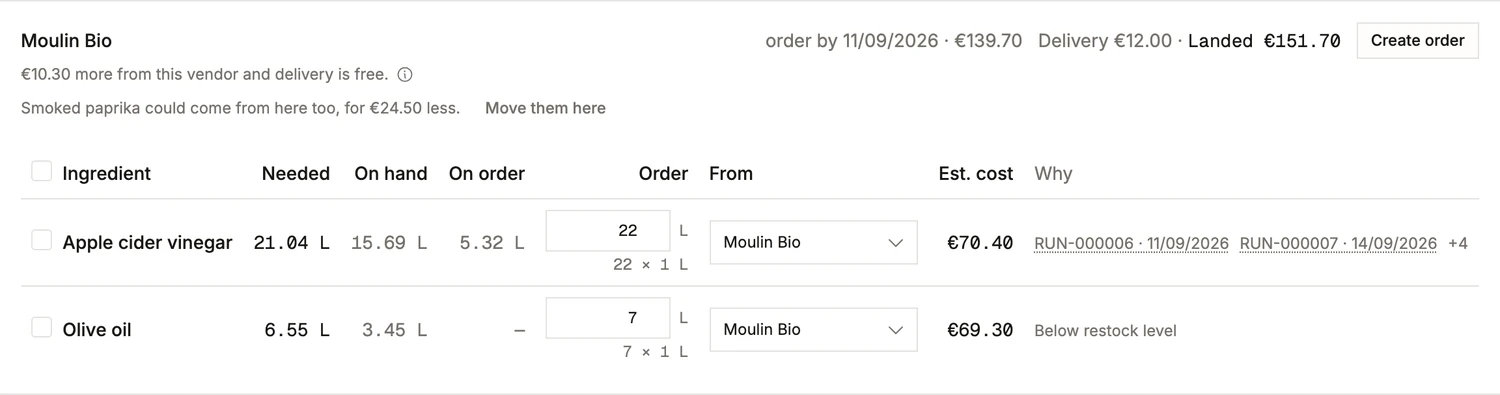
- When one vendor could also cover lines sitting on another card, the card says what consolidating would cost or save, in euros, before you move anything.
- It also says when the saving is a trap: moving the habanero here saves €30.80 and lands after the batch needs it, so the offer arrives with the reason to refuse it.
Delivery is part of the price, until it is not
A vendor charging €12 to deliver is not the cheapest vendor at the same unit price, so the card carries both figures: what the goods cost, and what lands. And when a free-delivery threshold is within reach it says so in the only terms that matter, which is how much more it would take. Another €10.30 at this vendor and the charge disappears. That is usually one more line you were going to order anyway.
One click writes the draft orders
Tick the lines you want and Create orders writes one draft purchase order per vendor, quantities and prices carried over. Nothing is emailed, nothing is committed; a person reviews and sends. If a colleague is doing the ordering today, share the list and every tick and quantity saves as they work.
Then it arrives, and rarely exactly
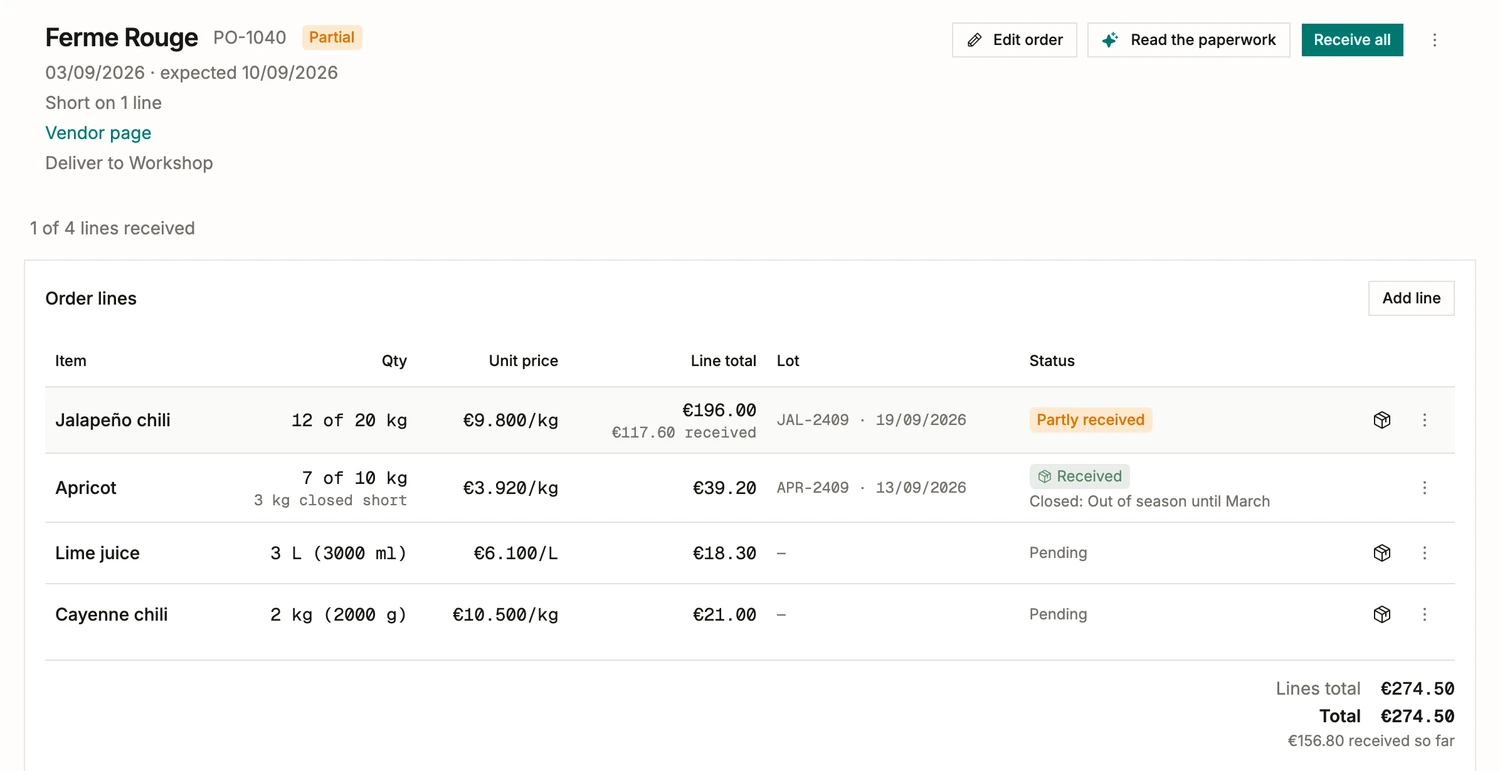
An order stays a document until something turns up. Receive a line and it books at what you actually paid, with the supplier’s lot and its best-before, so the ledger and the trace both get what they need from the same act. Twelve of the twenty kilos came: the line says so and the order reads Partial. The apricots are not coming at all before March, so you close that line short with the reason in your own words and it stops asking. The invoice can be photographed rather than typed, which is its own story.