'%3e%3cg%20transform='matrix(0.737731,0,0,0.737731,1584.657279,93.052323)'%3e%3cg%20transform='matrix(1,0,0,1,-73.197369,-28.78343)'%3e%3cg%20transform='matrix(2.327683,0,0,2.327683,-115.888888,-940.785017)'%3e%3cpath%20d='M610.12,610.782L535.09,610.782L535.09,570.757L618.413,570.757L610.12,610.782ZM628.935,570.757L697.713,570.757C709.523,570.757%20720.131,571.523%20729.536,573.054C738.94,574.585%20746.923,577.373%20753.485,581.42C760.046,585.466%20765.077,591.043%20768.576,598.151C772.076,605.26%20773.825,614.391%20773.825,625.545C773.825,632.107%20772.841,638.504%20770.873,644.737C768.904,650.971%20766.006,656.548%20762.179,661.469C758.351,666.39%20753.758,670.491%20748.4,673.772C743.041,677.052%20736.863,679.13%20729.864,680.005L729.864,680.661C741.018,683.723%20749.603,689.574%20755.617,698.213C761.632,706.852%20764.639,716.858%20764.639,728.231C764.639,740.917%20762.179,752.071%20757.258,761.695C752.337,771.318%20745.721,779.301%20737.409,785.644C729.098,791.987%20719.584,796.798%20708.867,800.079C698.15,803.36%20686.886,805%20675.076,805L580.368,805L581.484,799.615L609.457,665.57L687.543,665.57C696.947,665.57%20705.094,663%20711.984,657.86C718.873,652.72%20722.318,645.011%20722.318,634.731C722.318,625.545%20719.858,619.257%20714.937,615.867C710.015,612.477%20703.399,610.782%20695.088,610.782L620.636,610.782L628.935,570.757ZM638.101,764.975L672.779,764.975C684.59,764.975%20694.268,761.804%20701.814,755.461C709.359,749.119%20713.132,739.714%20713.132,727.247C713.132,721.123%20711.875,716.312%20709.359,712.812C706.844,709.313%20703.618,706.633%20699.681,704.774C695.744,702.915%20691.37,701.767%20686.558,701.33C681.747,700.892%20677.044,700.673%20672.451,700.673L651.88,700.673L638.101,764.975Z'%20style='fill:rgb(25,23,20);'/%3e%3c/g%3e%3cg%20transform='matrix(1,0,0,1,0,220.238764)'%3e%3cpath%20d='M1259.334,480.922L1129.63,480.922L1129.63,387.757L1278.681,388.212L1259.334,480.922Z'%20style='fill:rgb(0,120,111);'/%3e%3c/g%3e%3cg%20transform='matrix(1,0,0,1,0,452.077913)'%3e%3cpath%20d='M1210.953,480.922L1129.63,480.922L1129.63,387.757L1230.395,387.757L1210.953,480.922Z'%20style='fill:rgb(0,120,111);'/%3e%3c/g%3e%3cg%20transform='matrix(1,0,0,1,0,336.158338)'%3e%3cpath%20d='M1235.144,480.922L1129.63,480.922L1129.63,387.757L1254.586,387.757L1235.144,480.922Z'%20style='fill:rgb(0,120,111);'/%3e%3c/g%3e%3c/g%3e%3c/g%3e%3c/g%3e%3c/svg%3e)
Wired to the shelf.
A Shopify shop and a workshop run two stock systems that never talk. Online orders get retyped after dinner, or not at all. The shop keeps selling jars that were never made, and the first sign of trouble is an oversold weekend.
Connect the shop once, on Shopify’s own authorize page. From then on its orders arrive as sales orders that reserve stock, and the shop is only offered what you can actually ship.
Every pull, on the record
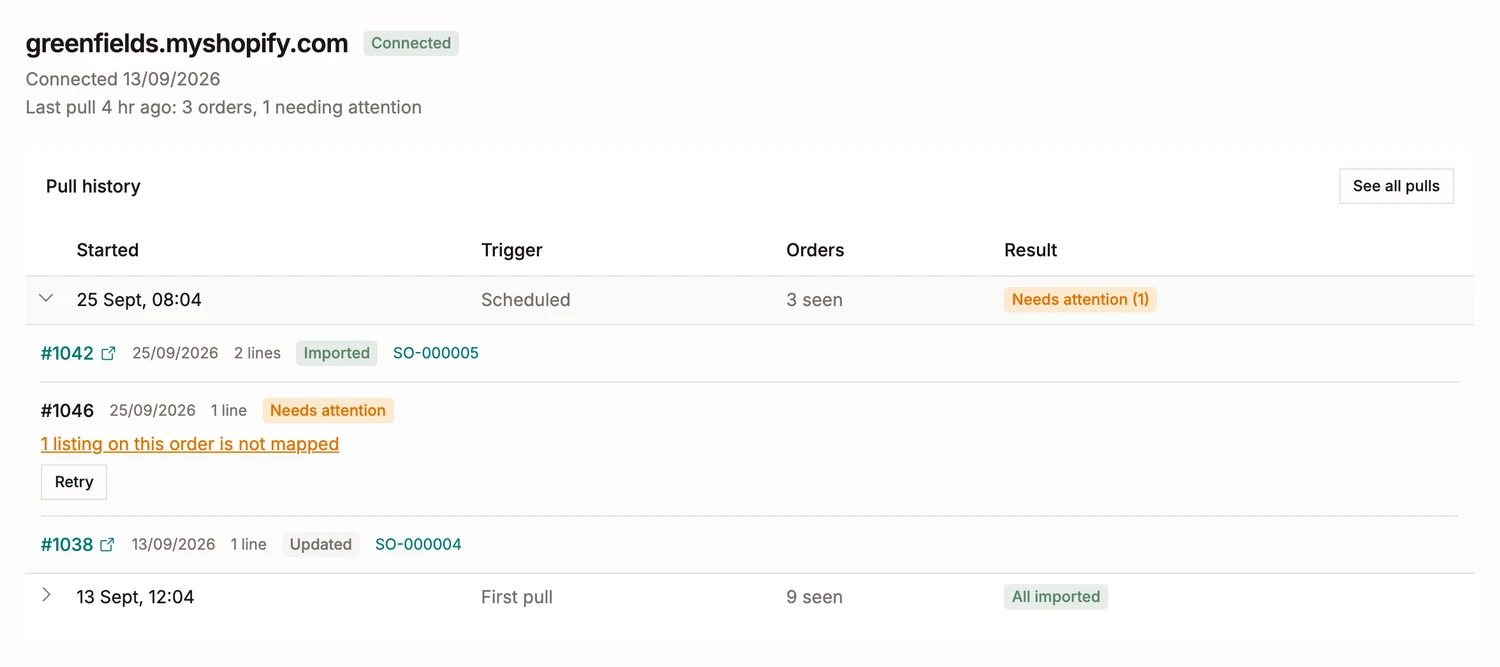
Orders are pulled on a schedule and on demand, and every pull answers for itself. This morning’s saw 3 orders: it imported #1042 as a confirmed sales order, applied the edit a buyer made on another, and held one whole because its listing is not mapped yet. The waiting row names the listing, links to the mapping queue filtered to it, and a Retry button finishes the job. No order half-imports, and no order ever imports twice.
One loop, both directions
An imported order is a normal sales order: reference minted, the buyer kept as a customer, the Shopify number linked back to the shop’s admin. From there, the rest of the system already knows what to do.
- Confirming reserves stock the moment an order arrives, so the weekend’s online sales hold their jars before you open the workshop.
- Stock push writes one figure, Available. After a production day the jar listing reads 22; once a wholesale order promises 30 of them, the next push writes the honest zero.
- A batch held for its release check is invisible to the shop. Releasing it is what puts it on sale.
Your shop stays yours
BatchDash writes exactly one thing to Shopify: inventory quantities, for the listings you mapped, at the location you chose. Push starts off, runs on a button when you want it, and goes automatic within minutes when you trust it.
Prices, titles, images and the shop’s continue-selling policy are never touched. When the shop cancels or refunds an order, pull history says so in plain words and leaves your figures to you.