'%3e%3cg%20transform='matrix(0.737731,0,0,0.737731,1584.657279,93.052323)'%3e%3cg%20transform='matrix(1,0,0,1,-73.197369,-28.78343)'%3e%3cg%20transform='matrix(2.327683,0,0,2.327683,-115.888888,-940.785017)'%3e%3cpath%20d='M610.12,610.782L535.09,610.782L535.09,570.757L618.413,570.757L610.12,610.782ZM628.935,570.757L697.713,570.757C709.523,570.757%20720.131,571.523%20729.536,573.054C738.94,574.585%20746.923,577.373%20753.485,581.42C760.046,585.466%20765.077,591.043%20768.576,598.151C772.076,605.26%20773.825,614.391%20773.825,625.545C773.825,632.107%20772.841,638.504%20770.873,644.737C768.904,650.971%20766.006,656.548%20762.179,661.469C758.351,666.39%20753.758,670.491%20748.4,673.772C743.041,677.052%20736.863,679.13%20729.864,680.005L729.864,680.661C741.018,683.723%20749.603,689.574%20755.617,698.213C761.632,706.852%20764.639,716.858%20764.639,728.231C764.639,740.917%20762.179,752.071%20757.258,761.695C752.337,771.318%20745.721,779.301%20737.409,785.644C729.098,791.987%20719.584,796.798%20708.867,800.079C698.15,803.36%20686.886,805%20675.076,805L580.368,805L581.484,799.615L609.457,665.57L687.543,665.57C696.947,665.57%20705.094,663%20711.984,657.86C718.873,652.72%20722.318,645.011%20722.318,634.731C722.318,625.545%20719.858,619.257%20714.937,615.867C710.015,612.477%20703.399,610.782%20695.088,610.782L620.636,610.782L628.935,570.757ZM638.101,764.975L672.779,764.975C684.59,764.975%20694.268,761.804%20701.814,755.461C709.359,749.119%20713.132,739.714%20713.132,727.247C713.132,721.123%20711.875,716.312%20709.359,712.812C706.844,709.313%20703.618,706.633%20699.681,704.774C695.744,702.915%20691.37,701.767%20686.558,701.33C681.747,700.892%20677.044,700.673%20672.451,700.673L651.88,700.673L638.101,764.975Z'%20style='fill:rgb(25,23,20);'/%3e%3c/g%3e%3cg%20transform='matrix(1,0,0,1,0,220.238764)'%3e%3cpath%20d='M1259.334,480.922L1129.63,480.922L1129.63,387.757L1278.681,388.212L1259.334,480.922Z'%20style='fill:rgb(0,120,111);'/%3e%3c/g%3e%3cg%20transform='matrix(1,0,0,1,0,452.077913)'%3e%3cpath%20d='M1210.953,480.922L1129.63,480.922L1129.63,387.757L1230.395,387.757L1210.953,480.922Z'%20style='fill:rgb(0,120,111);'/%3e%3c/g%3e%3cg%20transform='matrix(1,0,0,1,0,336.158338)'%3e%3cpath%20d='M1235.144,480.922L1129.63,480.922L1129.63,387.757L1254.586,387.757L1235.144,480.922Z'%20style='fill:rgb(0,120,111);'/%3e%3c/g%3e%3c/g%3e%3c/g%3e%3c/g%3e%3c/svg%3e)
You already sold those jars. Twice.
A shop orders thirty jars for Friday. The promise lives in a text message, the jars sit on the shelf looking available, and the Saturday market sells twelve of them again. You find out on packing day, with the box already open.
BatchDash writes the promise down as a sales order. Confirming holds the stock against the shelf, shipping draws the actual batches, and the ledger keeps who bought what, on which day, at which price.
One document, from the phone call to the box
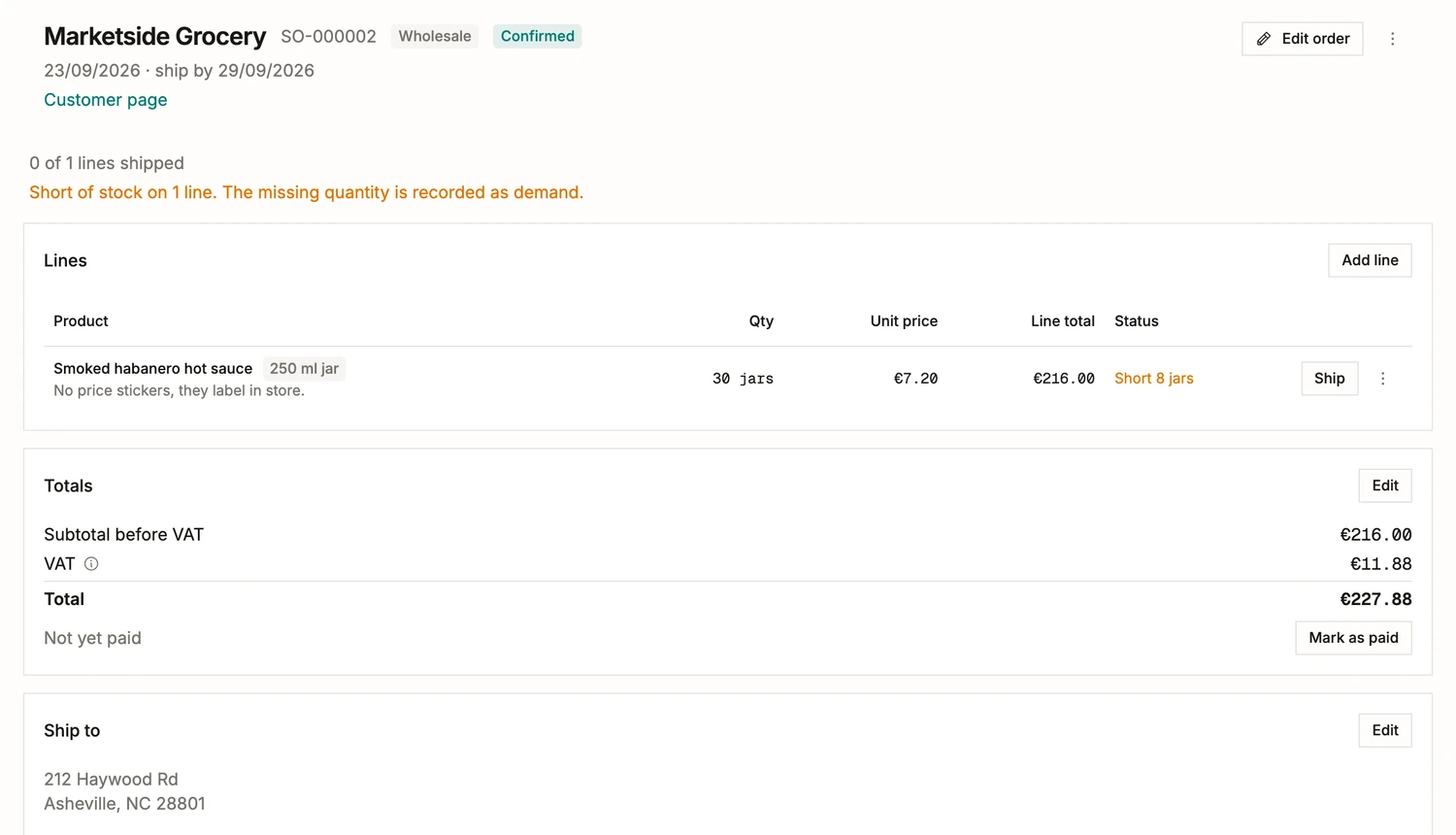
The whole order sits on one screen, in the order you would say it out loud. Who it is for and on what terms, the day it has to leave, the line in the product’s own unit at the price you agreed, and the buyer’s own instruction on the line where the person packing will read it. Under the header comes the state: one line, nothing shipped, and the shelf eight jars below the thirty that were promised. Discount and shipping are written as amounts, so the total adds up in front of the buyer. The address is copied onto the order as written, and editing the customer next year never rewrites what shipped this year.
Confirming makes the shelf tell the truth
From Confirm until each line ships, the order’s quantities count as reserved on their products. Reserved is computed from the open orders every time it is shown and never stored, so it cannot drift away from what is actually promised.
- The product page reads "30 reserved for 1 sales order", and the link opens the orders holding them.
- Confirming past what you have is allowed. The missing eight jars become demand, which is the number that sizes your next batch on the planner.
- A batch on hold, waiting for its release check, is never counted as reserved and never ships. The release gate wins over the promise.
Shipping is a ledger entry
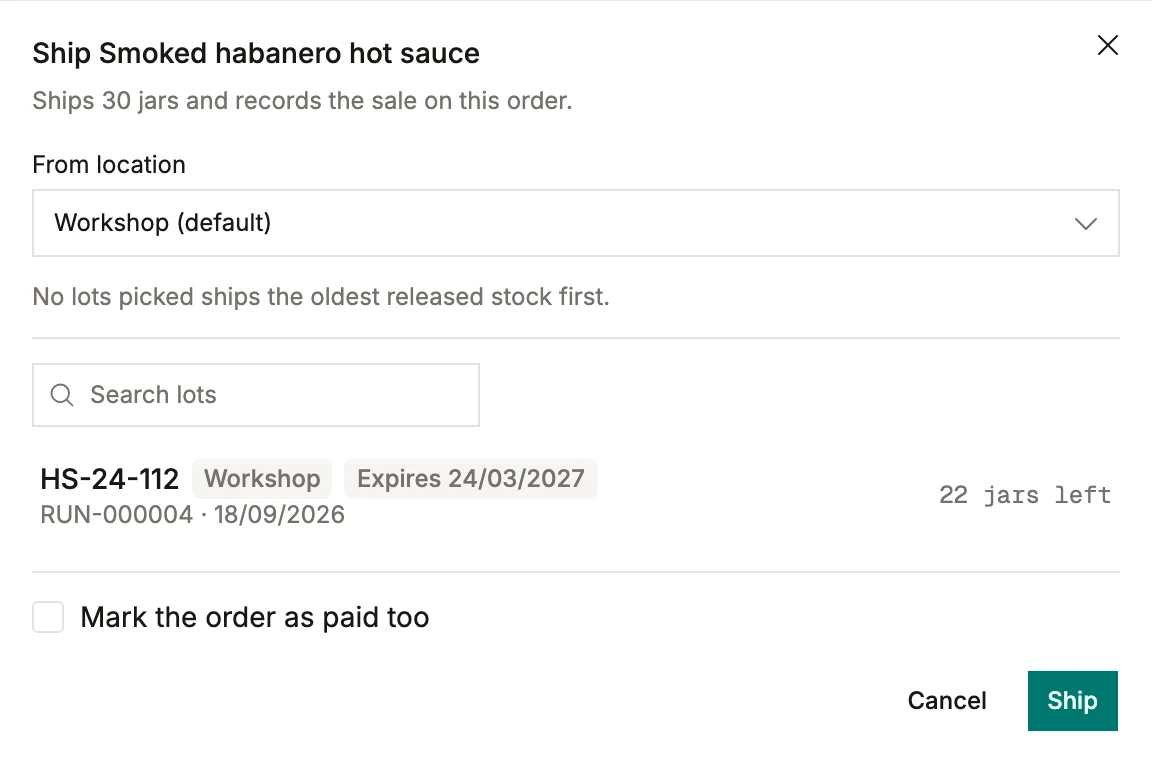
Ship a line and name the batches going in the box, or name none and the released stock closest to its date goes first, which is what most Fridays want. Batches on hold are listed and grayed out instead of hidden, because you can see those jars on the shelf and leaving them out would read as a bug. The shelf it leaves from is a field, so a lot in the van is never confused with a lot in the fridge. The movement books at your weighted average cost, with the line’s price and the order’s reference on the row, so margin per product is read off sales that actually happened.
And then, whether they have paid
Paid is a flag with a date on it, kept apart from where the order stands, because a shipped order can go unpaid for a month and a deposit can land before anything leaves. Mark it from the totals block, where the amount is, or tick the box in the ship dialog when the parcel and the money change hands together. The list has an Unpaid filter, which on a Monday morning is the only screen you want.
A sale with no name gets the same document
Leave the customer empty and you get a walk-in order: the same lines, the same reservation, the same lot draw, filed under its own reference. Market stalls and door sales stop being the part of the business nobody can reconstruct in January.
Recording a sale straight off a product page stays exactly as it is, under "Record what leaves". An order writes down a promise; that one writes down something that already happened. Both land on the same ledger.
Afterwards, the customer file holds it
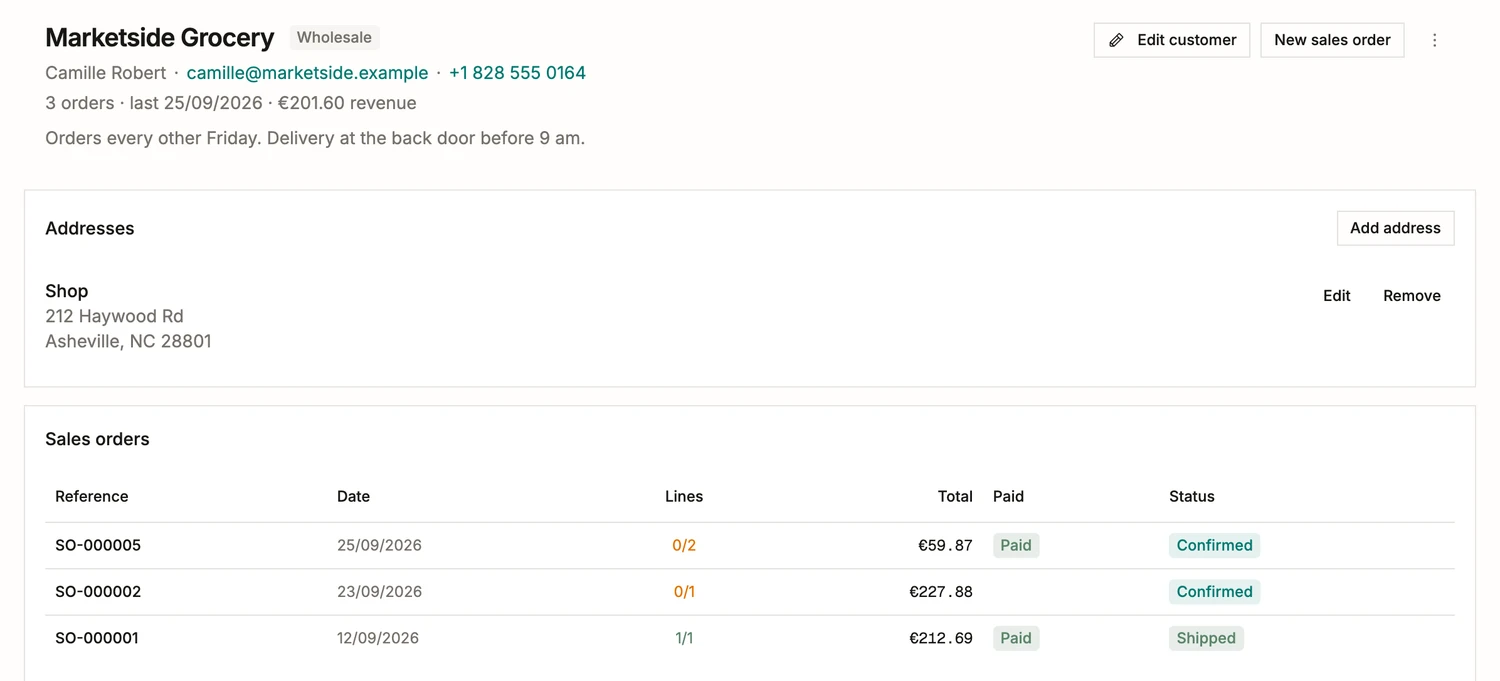
Every customer page carries what you know about them: how to reach them, how they buy, what they have spent with you, and the standing instruction somebody wrote down once so nobody has to remember it. Below that sits every order they have placed, with how much of each one shipped and whether it was paid. Writing the next one, the price fills itself in: the trade price for a customer on wholesale terms, with the last price you actually agreed one tap underneath. Returns are one action on a shipped line, back into stock on the batch it left from or written off.