'%3e%3cg%20transform='matrix(0.737731,0,0,0.737731,1584.657279,93.052323)'%3e%3cg%20transform='matrix(1,0,0,1,-73.197369,-28.78343)'%3e%3cg%20transform='matrix(2.327683,0,0,2.327683,-115.888888,-940.785017)'%3e%3cpath%20d='M610.12,610.782L535.09,610.782L535.09,570.757L618.413,570.757L610.12,610.782ZM628.935,570.757L697.713,570.757C709.523,570.757%20720.131,571.523%20729.536,573.054C738.94,574.585%20746.923,577.373%20753.485,581.42C760.046,585.466%20765.077,591.043%20768.576,598.151C772.076,605.26%20773.825,614.391%20773.825,625.545C773.825,632.107%20772.841,638.504%20770.873,644.737C768.904,650.971%20766.006,656.548%20762.179,661.469C758.351,666.39%20753.758,670.491%20748.4,673.772C743.041,677.052%20736.863,679.13%20729.864,680.005L729.864,680.661C741.018,683.723%20749.603,689.574%20755.617,698.213C761.632,706.852%20764.639,716.858%20764.639,728.231C764.639,740.917%20762.179,752.071%20757.258,761.695C752.337,771.318%20745.721,779.301%20737.409,785.644C729.098,791.987%20719.584,796.798%20708.867,800.079C698.15,803.36%20686.886,805%20675.076,805L580.368,805L581.484,799.615L609.457,665.57L687.543,665.57C696.947,665.57%20705.094,663%20711.984,657.86C718.873,652.72%20722.318,645.011%20722.318,634.731C722.318,625.545%20719.858,619.257%20714.937,615.867C710.015,612.477%20703.399,610.782%20695.088,610.782L620.636,610.782L628.935,570.757ZM638.101,764.975L672.779,764.975C684.59,764.975%20694.268,761.804%20701.814,755.461C709.359,749.119%20713.132,739.714%20713.132,727.247C713.132,721.123%20711.875,716.312%20709.359,712.812C706.844,709.313%20703.618,706.633%20699.681,704.774C695.744,702.915%20691.37,701.767%20686.558,701.33C681.747,700.892%20677.044,700.673%20672.451,700.673L651.88,700.673L638.101,764.975Z'%20style='fill:rgb(25,23,20);'/%3e%3c/g%3e%3cg%20transform='matrix(1,0,0,1,0,220.238764)'%3e%3cpath%20d='M1259.334,480.922L1129.63,480.922L1129.63,387.757L1278.681,388.212L1259.334,480.922Z'%20style='fill:rgb(0,120,111);'/%3e%3c/g%3e%3cg%20transform='matrix(1,0,0,1,0,452.077913)'%3e%3cpath%20d='M1210.953,480.922L1129.63,480.922L1129.63,387.757L1230.395,387.757L1210.953,480.922Z'%20style='fill:rgb(0,120,111);'/%3e%3c/g%3e%3cg%20transform='matrix(1,0,0,1,0,336.158338)'%3e%3cpath%20d='M1235.144,480.922L1129.63,480.922L1129.63,387.757L1254.586,387.757L1235.144,480.922Z'%20style='fill:rgb(0,120,111);'/%3e%3c/g%3e%3c/g%3e%3c/g%3e%3c/g%3e%3c/svg%3e)
One email about one jar. You have the answer before lunch.
A customer writes about a jar from March. Which batch? Which chili delivery? Which other jars? On binders and a text thread, that is an afternoon of archaeology with a deadline on it, and everyone in the workshop knows it.
In BatchDash the answer already exists: every batch records the lots that went in and books its output under a lot code, as a side effect of just running production. Tracing is typing one code and reading.
One code, and the trail opens both ways
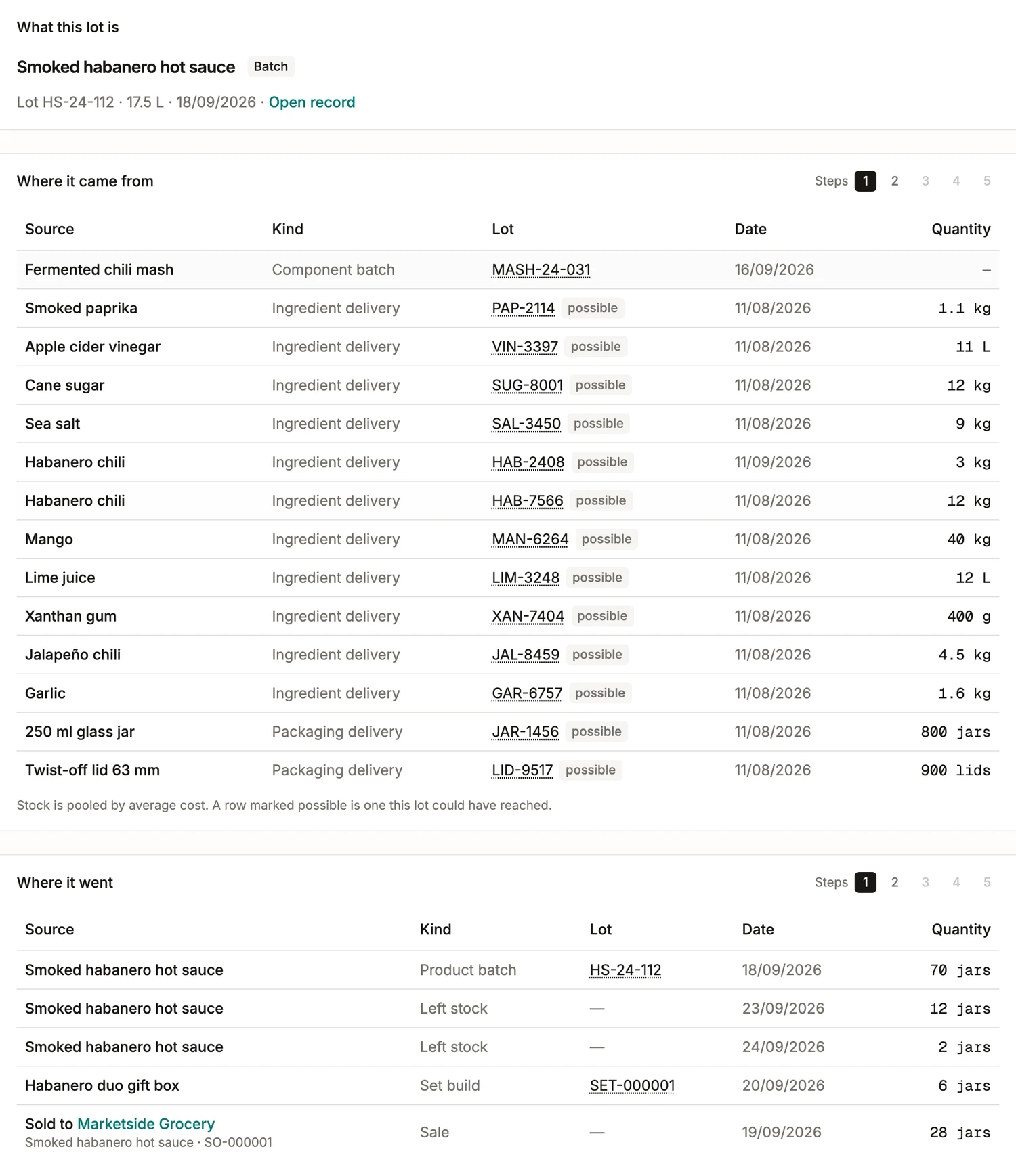
Type the lot off a label, a delivery note or a batch record. The screen names what the lot is, then opens in both directions at once: what it came from, and where it went. Every row is a real record you can open rather than a report line: the delivery, the purchase order, the batch, the movement, the sale. Push either side a step deeper when the question needs it.
One delivery, followed to the shops that bought it
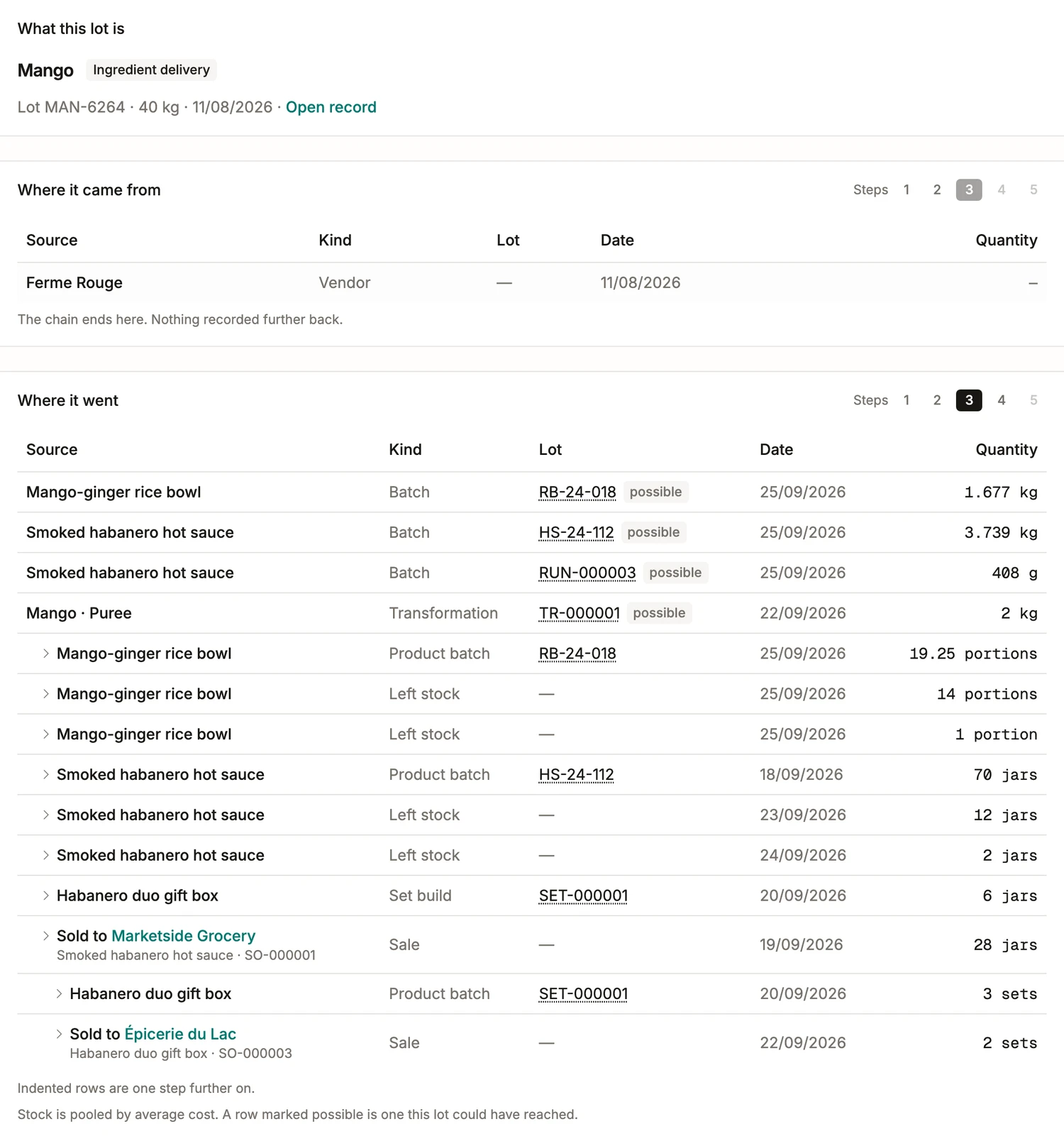
Ferme Rouge calls about a mango delivery. Type the lot they read out, MAN-6264, and the screen has the whole shape of it: 40 kg delivered on 08/08/2026, the supplier behind it, and three steps of where it went, opened as far as the question needs.
- Four things took some of it: a rice bowl batch at 1.677 kg, the hot sauce at 3.739 kg, an earlier sauce at 408 g, and 2 kg turned into a mango purée with a lot code of its own.
- What those became is the next step in: 19.25 portions, 70 jars, 12 and then 2 more gone off the shelf, 6 packed into a gift box, and 28 sold to Marketside Grocery on SO-000001.
- And one step further, because a jar can reach somebody inside something else: the gift box is its own lot, three were built, and two of them went to Épicerie du Lac on SO-000003.
As deep as you ask, and says where it cannot be sure
Both walks open one level at a time, up to five, so the screen answers the question you actually asked instead of burying it:
- A made component traces straight through: the jar knows its mash batch, and the mash knows its chilis.
- Ingredient stock is pooled at average cost, so a lot cannot always be pinned to one batch. A row it could have reached is marked possible instead of claimed.
- A trace that overclaims is worse than no trace at all when somebody is deciding what to withdraw.
Who has it, and what you can still stop
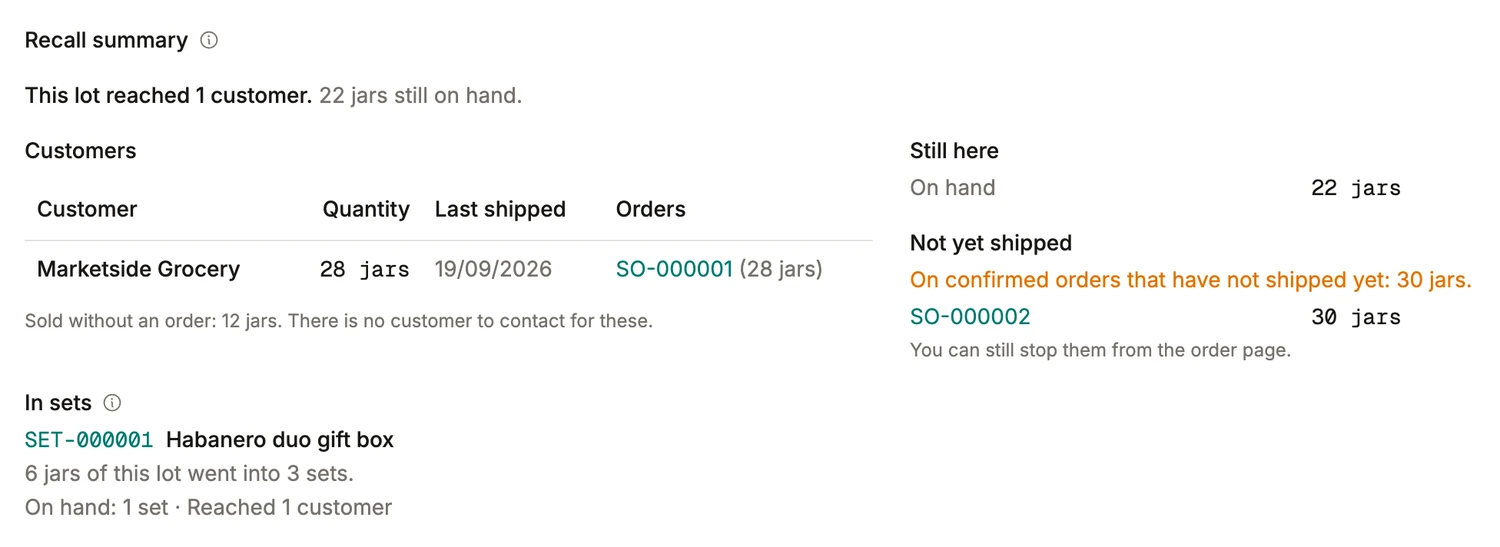
This is the half a spreadsheet never has. The lot reached one customer, who took 28 jars on an order you can open from the row. Twelve more were sold without an order, and the screen says plainly that there is nobody to contact for those. Twenty-two are still on your own shelf. And thirty are sitting on a confirmed order that has not shipped yet, which you can still stop from the order page. Six went into a gift box, and the set knows it.
The mock recall, run cold
The exercise a food standard sets is this one: take a lot, name everything that went into it, name everywhere it went, and make the quantities reconcile. BRCGS gives four hours for it, mass balance included. Here it is a search and a read, which is what makes it something you can rehearse on a Tuesday.
- It starts at either end. Your own lot code answers a customer; a supplier’s delivery code answers the call you did not plan for.
- The quantities reconcile because each one is a movement in the ledger: what came in, what a batch drew, what left the shelf, what a customer took.
- The whole walk exports as a file, with the order and the customer on every sale it names, so the auditor, the QA department asking or your own insurer gets a document rather than a screenshot.
The code they quote is the code you search
The customer’s email quotes something printed on the jar. That something is the batch’s own lot, put on the label by the editor reading it off the record, which is why pasting it into the search finds the batch on the first try. No parallel numbering scheme, no lookup sheet taped inside a cupboard door.