
Tracing a lot
You learn a supplier has recalled one delivery of chili. The question is which of your batches it is in, and where those batches went. Trace answers both, from one box, in one page.
Open it from Production → Trace, or from the Trace a lot button on the made-components page.
What you can type
Section titled “What you can type”Any code your records carry:
- a batch lot, like
HS-24-112 - a batch reference, like
RUN-000004 - a pack fill’s reference, like
PACK-000001, which is also the lot its packs carry unless you typed one - a transformation’s reference, like
TR-000001, which is also the lot of what it made unless you typed one - the lot you wrote on a delivery when you logged it, for an ingredient or for a product you buy
- the lot you wrote on a line while you weighed it
- the lot on a packaging item
- the lot of stock you added by hand or imported as opening stock
You do not have to know it exactly. Type two characters and the box offers what your workspace actually has, matched anywhere in the code, each one saying which kind of record it came off. 0014 finds RUN-000014. That helps when someone read you half a code over the phone.
A code nothing suggests still traces as typed, and the page says plainly when nothing carries it.
BatchDash works out which record a code names. If more than one carries it (you reused it, a batch booked jars and bulk under one lot, or two suppliers stamped the same code), you get one tab per record and the page traces the one you are on, one at a time.
It never mixes them. Two records under one code are two histories, and rows from both in one table would read as a single chain that you could not take apart again. Switch tabs and the whole answer below changes: what this lot is, the recall summary, both directions. The steps you asked for stay where you set them, the address bar follows the tab, and Export writes the file for the record on screen.
The cards
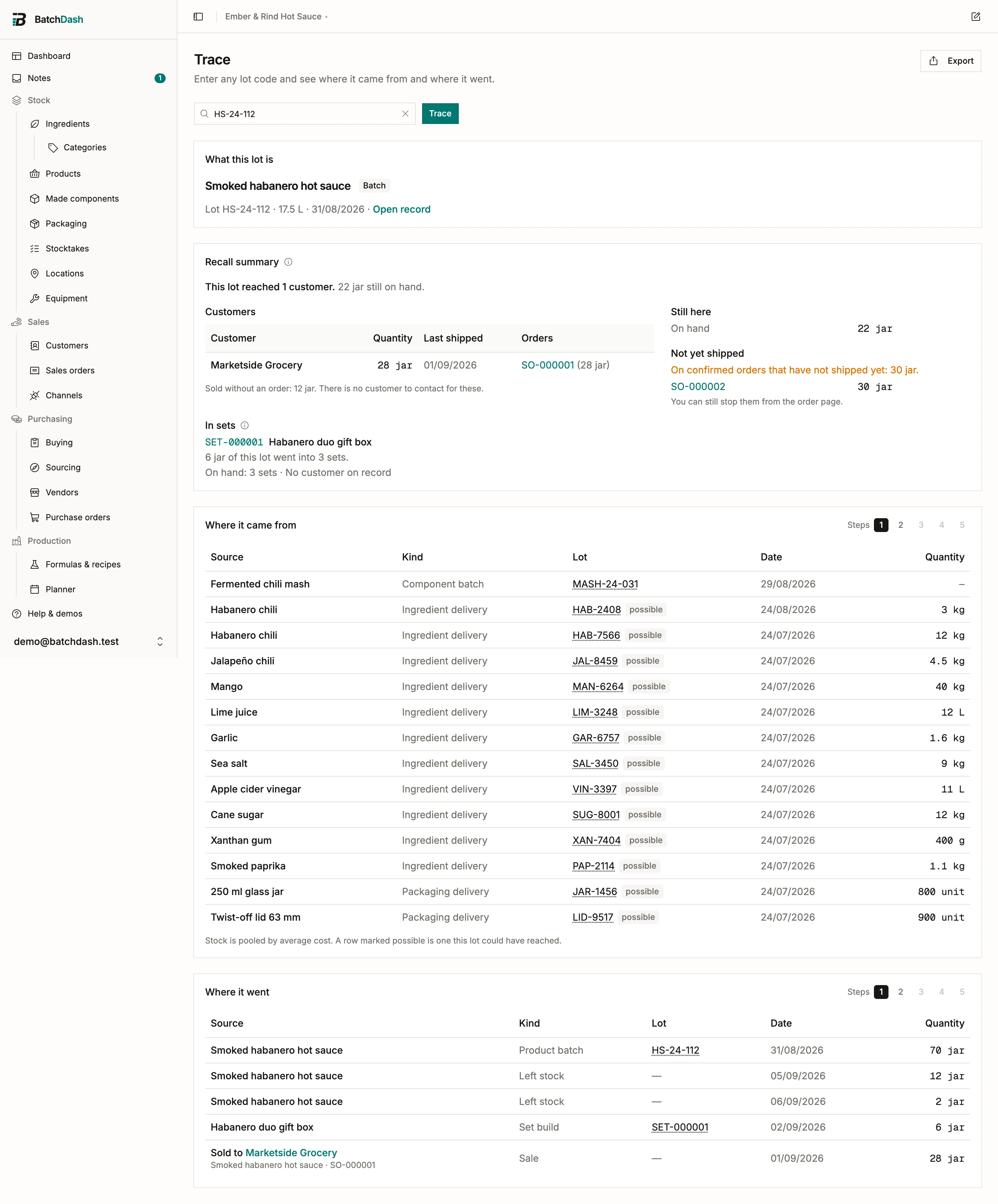
Section titled “The cards”What this lot is names the record: an ingredient delivery, a packaging delivery, a component batch, a product batch, a product delivery, a batch, a pack fill, or a transformation (pitted cherries made from cherries, when your plan includes ingredient variants). It carries the quantity, the date, and a link to the record itself. A lot with nothing on file behind it says so under its name: Opening stock, on hand since a date with no batch or delivery record behind it, or No batch record, made on a day its inputs were not recorded. There is nothing further back to show for those.
Recall summary appears under it when the code names a batch or a product lot. It answers the recall question in one card, and has its own section below.
Where it came from is one step backwards. For a batch, that is the input lots you captured, the lot-marked deliveries of everything else it consumed, and the made components it drew. For a pack fill, the batches of each part it drew (a batch you picked by hand is recorded; the rest is what the automatic order took) and the deliveries its box could have come from. For a transformation, the source lots you named, and for the part you did not name, the lot-marked deliveries it could have come from. For a delivery, it is the vendor and the purchase order. A product you buy ready-made traces the same way: its delivered lot goes back to the vendor and the order it came on, and forward to every customer who received it.
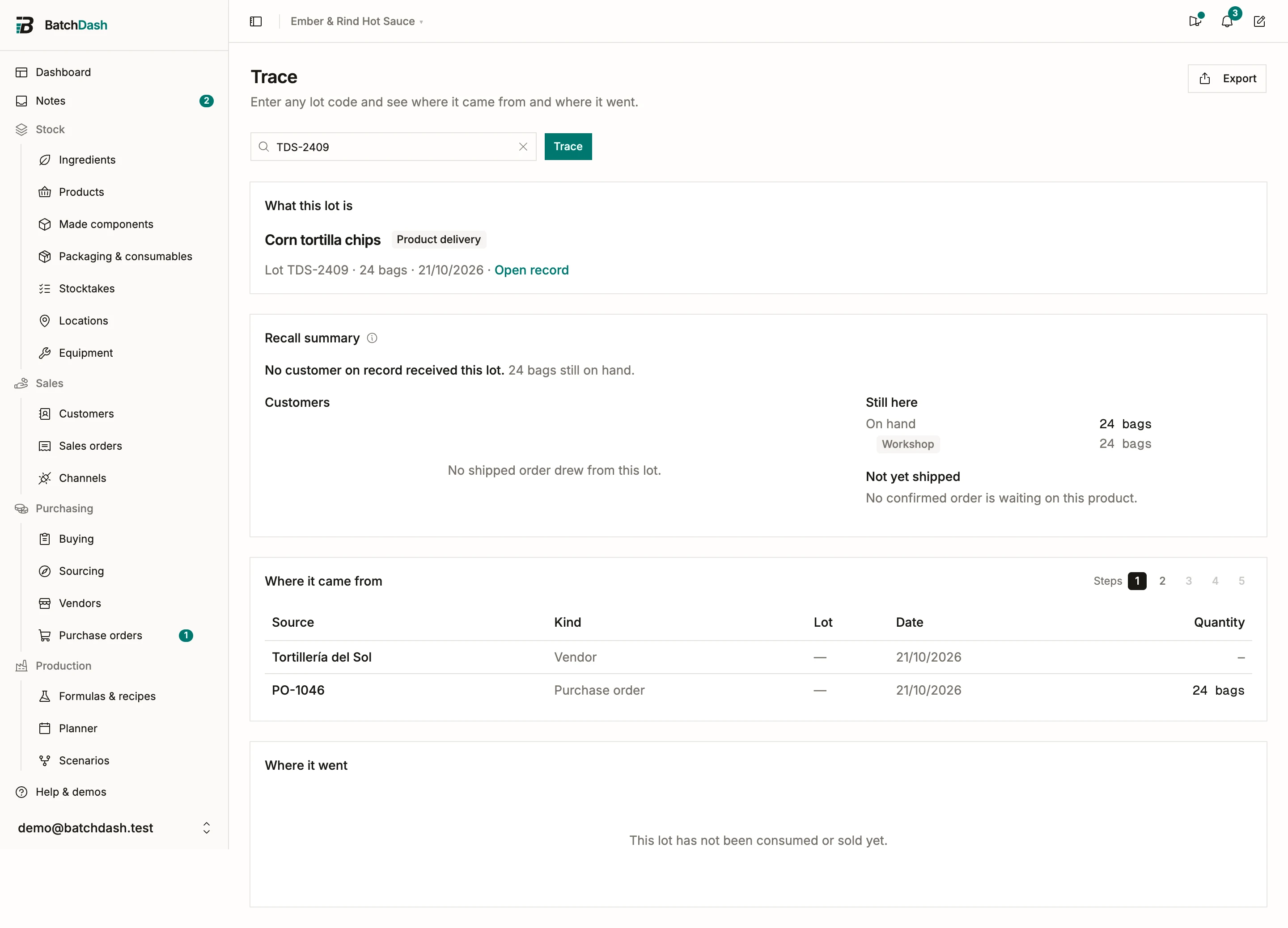
Where it went is one step forwards. For a batch, the stock it booked. For a booked batch, the later batches that drew it, the pack fills that boxed it, and anything sold, spoiled or sampled. A sale shipped from a sales order reads “Sold to” the customer, with the order’s reference under it; clicking the row opens the order, and clicking the name opens the customer. A sale you recorded with Sold on the product page stays an anonymous stock-out. For a transformation, the batches that wrote its lot down, the ones that drew the variant after it, and a later transformation that named its lot. For a delivery, the batches and transformations that consumed that ingredient after it landed. One exception keeps two crates apart: a batch whose recorded lots account for all of that ingredient it used is listed under the deliveries it named and left off the others. Name 1 kg of the 4 kg a batch used and it stays possible everywhere else, because the other 3 kg could be from any crate.
Click any row to open the record behind it. Click the lot code in a row to trace that code instead, which is how you follow a chain without copying codes back into the box. When the code names several records, the link opens on the tab of the record that row is about.
Recorded and possible
Section titled “Recorded and possible”Two kinds of link end up in those tables, and the page keeps them apart.
A recorded link is a fact your records hold: a batch booked its output, an order received a delivery, you named the tub of component a batch drew, you typed a lot against a line while you weighed it, or you named the lots a transformation came from.
A possible link is what average-cost stock allows. Your ingredients are pooled: three deliveries of habanero sit in one shelf figure, and the ledger never says which jar came out of which pallet. So a lot cannot be tied to one batch, only to every batch that could hold it. Rows like that are marked possible, and the card says so underneath.
For a recall you want every batch the lot could be in. For a claim about one batch you want only what is recorded. The page never shows a possible link as recorded.
A customer’s name does not change a row’s kind. Knowing who bought a jar is not knowing which batch filled it, so a sale from pooled stock stays possible even when the order names the buyer.
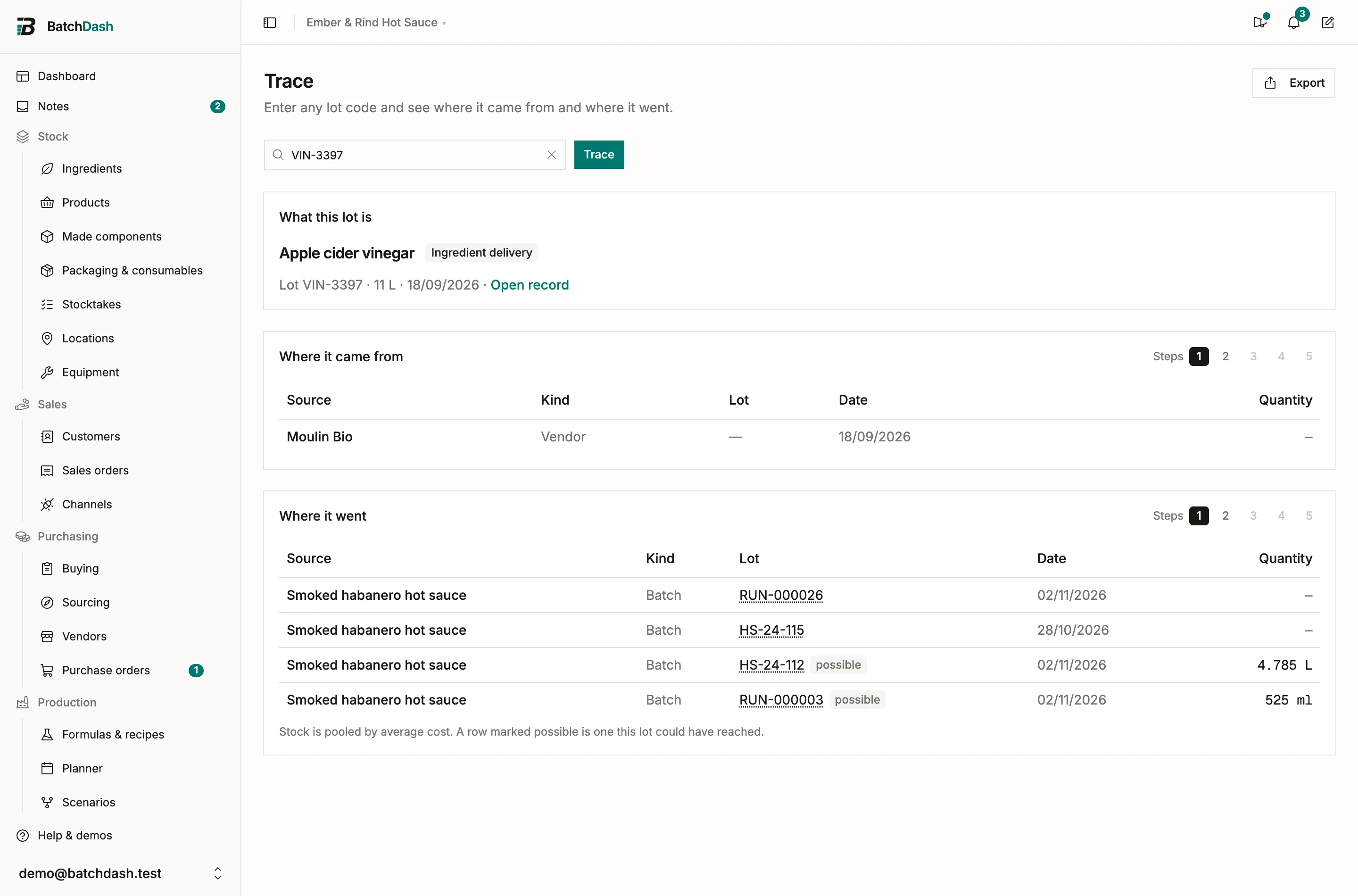
An addition to a batch is an input like its lines. The lot you name for it is a recorded link, so a recall from that lot finds the batch: lot VIN-3397 of apple cider vinegar lists HS-24-115, the hot sauce RUN-000023 made with two passes of it. An addition with no lot named leaves the batch possible on that ingredient’s other deliveries. See additions and corrective actions.
Two habits turn possible into recorded, and both take seconds:
- Record the lots on a line while you weigh it. See executing a run.
- Name the batches when you take a component from stock, rather than typing a total. See planning a run.
Answering a recall
Section titled “Answering a recall”When the code names a batch or a product lot, a Recall summary card sits under the identity card. It reads the same records as the tables below and says, in one line, how many customers the lot reached and how much of it is still on hand.
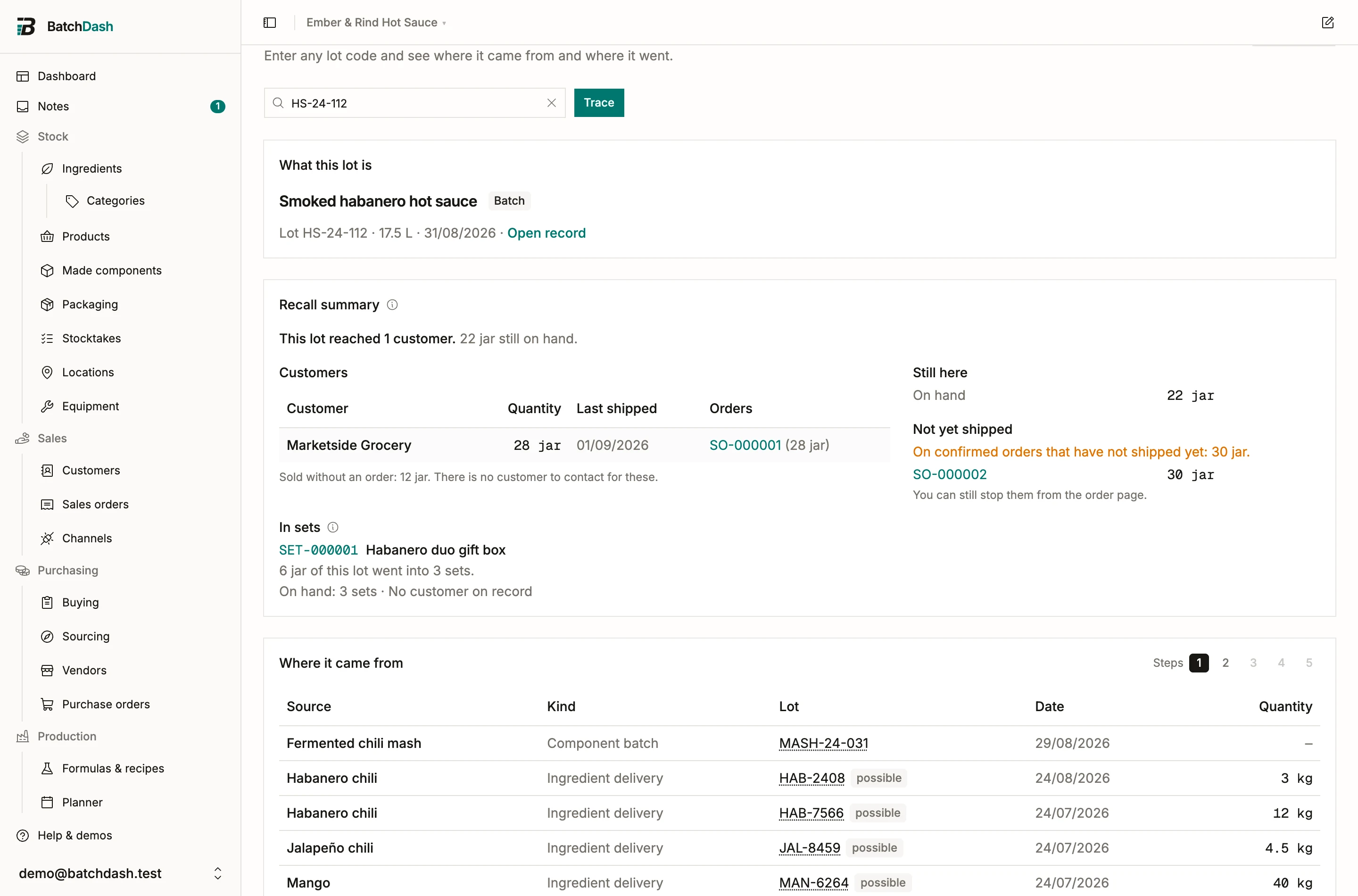
Customers lists everyone who received recorded units: the customer, the quantity, the last date it shipped, and each order with the quantity it took. Click the customer to open their page, or an order reference to open the order. An order with no customer (a market sale you still wrote up as an order) is listed by its reference. If some units came back, the order shows “returned” beside its quantity. Returns are counted on the order line; the page never guesses which lot they belonged to.
Two lines under the table cover what the list cannot show. “Up to 3 more customers may hold units from pooled stock” counts the sales of this product that the ledger could not pin to any lot; their rows are marked possible in the table below, and a customer’s name never promotes them. A sale you shipped by naming another batch is left out: you said which jars those were, and they were not these. A sale the app only assumed came from a batch still counts, because an assumption may not rule a batch out. “Sold without an order” is what left through Sold on the product page: a quantity, with nobody to call.
Still here is what never left: the lot’s units on hand, and how many of those are held. A held lot cannot ship, so those units are already contained.
Not yet shipped names the confirmed orders of this product that have not shipped, each linked. It is counted for the whole product, because an order promises jars, not a lot. It is also the one part of a recall that is prevention: open the order and stop it before the box closes.
The card is a summary. Everything you do about it happens on the records it links to.
Following the chain further
Section titled “Following the chain further”A lot sits in a chain. One step back from a batch is what went into it; two steps is what went into those. Each card has a Steps control reading 1 to 5, and picking a number follows that many links. New rows arrive indented, one notch per step.
Steps past the end of the chain are greyed out, so the control also answers “is there any more of this?” before you press it. The two directions move independently: following the past further does not change what is on screen for the future.
Exporting
Section titled “Exporting”Export writes both directions into one CSV. Every row carries a direction column (subject, backward, forward), the level it was found at, a certainty column reading recorded or possible, and three trailing columns order, customer and customer_email, filled on sales that shipped from a sales order. It is the file you hand an inspector, and the call list of a real recall.
The customer columns are filled only if you can see sales orders in this workspace. Exporting is part of the data import and export capability, so the button only appears if your plan includes it.
What it does not do
Section titled “What it does not do”Trace follows a lot to the customer named on the sales order, and no further: it does not know who bought from that shop. Sales you recorded with Sold on the product page, before or instead of using sales orders, stay anonymous. A fill you reverted is not a record either: its packs never existed, so its reference traces to nothing. The same goes for a transformation you undid.