
Replenishment rules
The purchasing side of running out was already handled: set a restock level on an ingredient and Buying proposes the order. A replenishment rule does the same for what you make. When the 250 ml jars fall below the level you chose, BatchDash plans as many batches of the recipe, at the size you brew, as it takes to bring them back to that level, each one a run produced as that format. The runs land in your list and in the planner’s tray, and nothing else happens until you give them a day.
Set up the rule
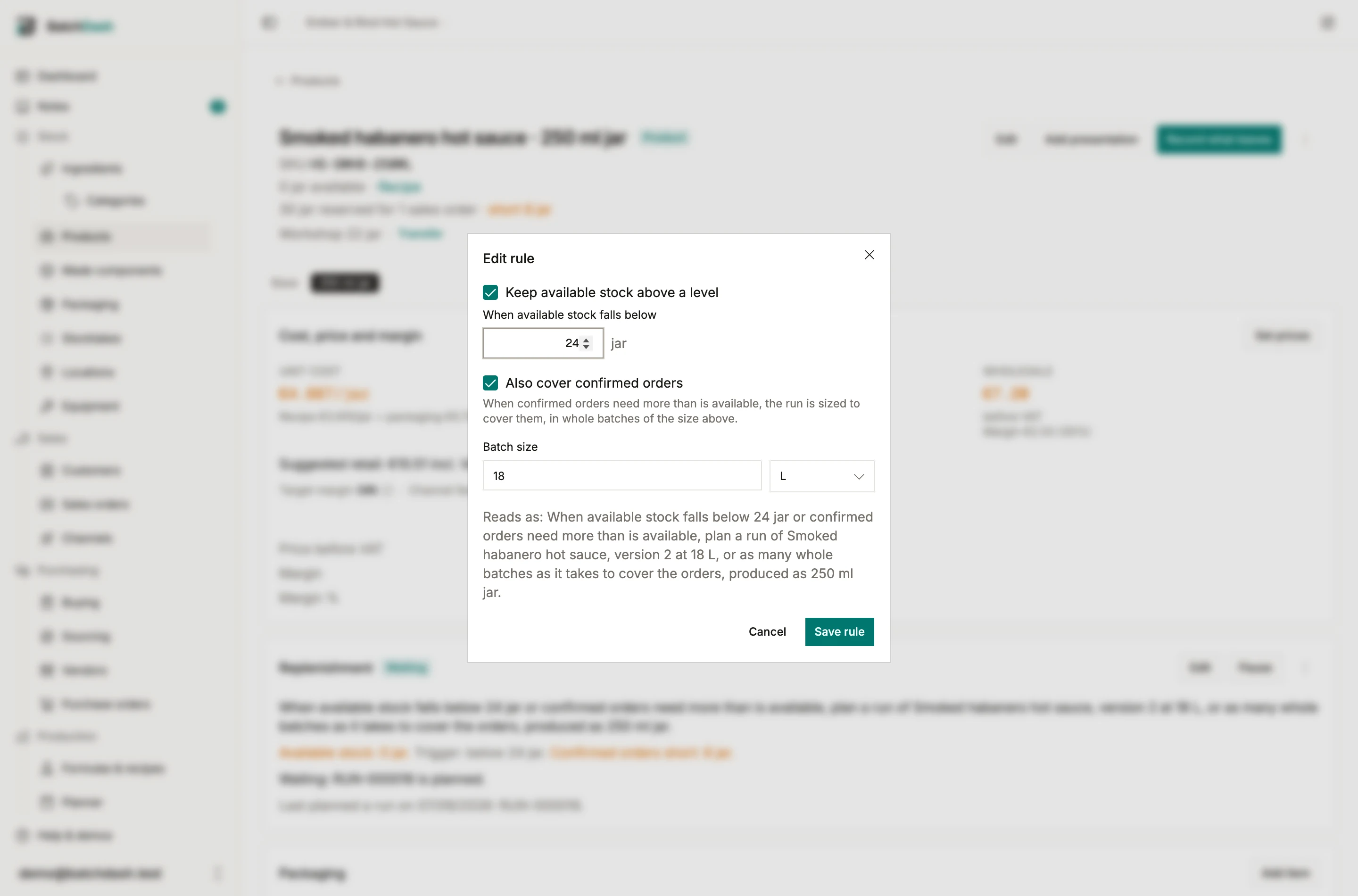
Section titled “Set up the rule”Open the product and find the Replenishment card, under cost and margin. Set up rule asks two things:
- The level available stock must fall below, in the product’s own unit.
- The batch size to plan, the same control as the New run dialog. It is seeded from the last batch you planned into this format. It cannot be more than the recipe’s most you can make in one go, when the recipe has one: the dialog says so and offers the limit.
Where you use sales orders, two switches join them: Keep available stock above a level, ticked unless you untick it for a product you only make to order, and Also cover confirmed orders. The section below explains them.
The dialog reads the rule back as one sentence while you type, so what will be saved is read before it is saved.
The recipe version is not a field. The rule always plans the recipe in use at the moment it fires: the version you wrote, or with versions on, the one marked current or accepted. Promoting a version next month is automatically what the next batch plans from. The format is not a field either: the rule belongs to the product page it was written on.
A rule needs a recipe to plan. A product whose recipe has no ingredient line yet has no batch rule to offer; write the first line and the card offers one (a product before its recipe). A product you buy, or one waiting for its recipe that a vendor already sells you, carries the other kind of rule in the same card, the one that prepares a draft purchase order (automatic draft orders).
What the card tells you
Section titled “What the card tells you”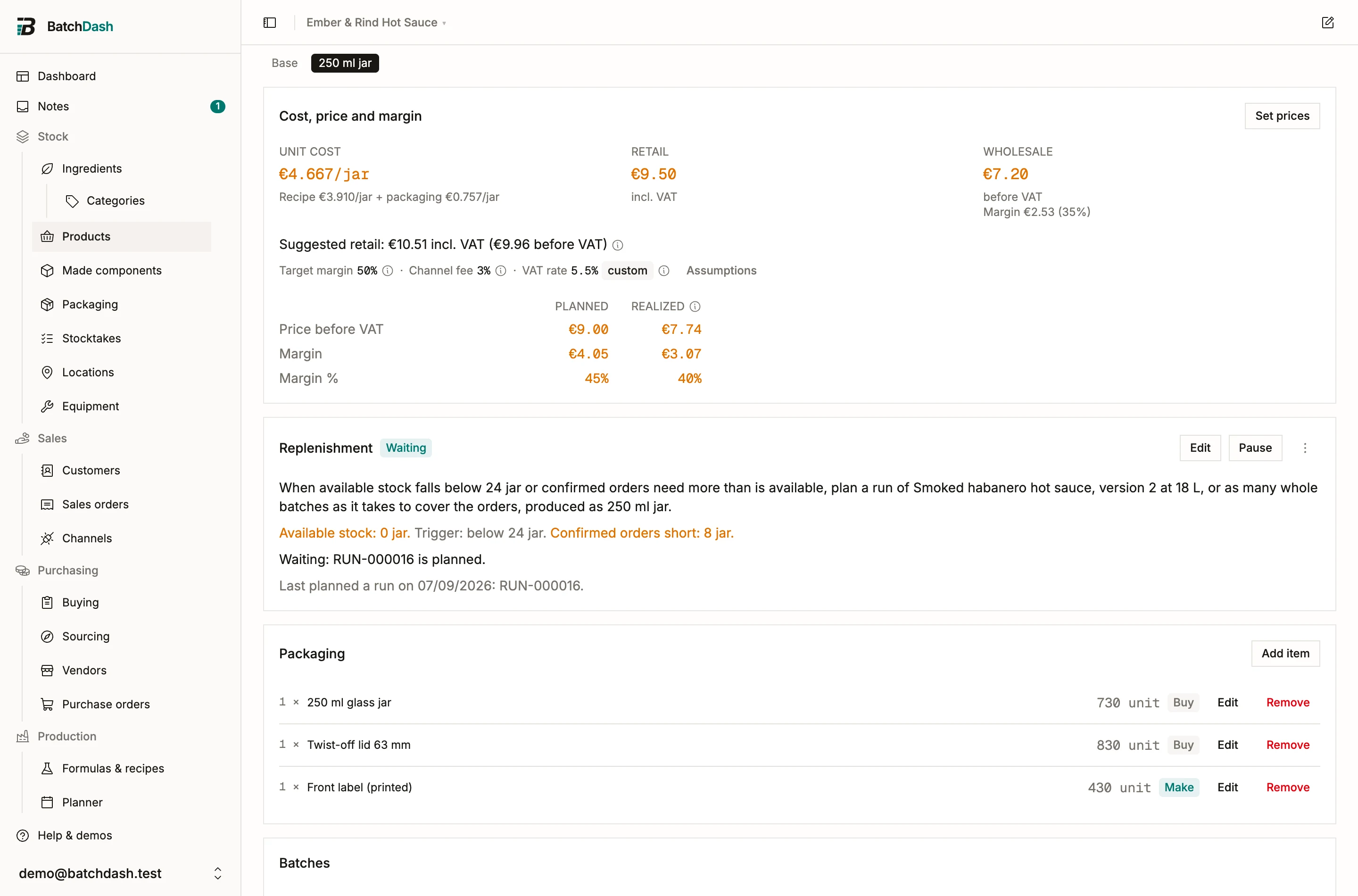
Under the sentence, the card says where things stand:
- Available stock against the trigger, and the confirmed-orders shortfall when the rule covers orders. Available is what the product page shows in its header: on hand, minus held, minus what open batches and confirmed orders have spoken for. Each figure turns amber when it is the one that is short.
- What is planned against the orders, when the rule covers them: “Planned: 600 g in 3 runs.”, then each open run of the product as a link, with its day or “needs a date”. What no run covers yet reads “Not planned yet” in amber; the rule plans it at the next check.
- The state. One of these:
| State | Meaning |
|---|---|
| Armed | Watching. It will plan runs the next time available stock is below the trigger. |
| Waiting | It planned runs and waits on them; the card lists each one. If stock drops further, or orders grow, while they are open, it plans the difference. |
| Waiting: available stock has not come back above 24 jar since the last proposal. | You abandoned the run it planned. It stays quiet until stock recovers and dips again. |
| Waiting: RUN-000133 was abandoned. | You abandoned one of the runs it planned for the orders. It leaves that share unplanned until the orders are covered, and still plans for new ones. |
| Paused. | You paused it. Resume when you want it watching again. |
| Paused: this product has no recipe yet. | Its recipe has lost its last ingredient line, so there is nothing to make. Add a line and it resumes on its own. |
| Paused: the recipe has no current version. | It stopped itself: with versions on, no version is in use to plan. Give the recipe a current version and it resumes on its own. |
| Paused: the batch is above the most this recipe makes in one go. | Someone lowered the recipe’s limit after the rule was saved. Edit the rule’s batch size, or the recipe, and it resumes on its own. |
| Paused: run references are set by hand in this organization. | Every run needs a reference and a rule will not invent one. Switch production references back to automatic in your organization settings. |
| Paused: this product is archived. | An archived product is not made. Restore it and the rule resumes. |
- The last run it planned, with its date and reference, while no run is listed above.
When it fires
Section titled “When it fires”A rule plans when one of its triggers is met (available stock below the level, or confirmed orders short) and nothing has paused it. It plans as many runs of one batch as it takes to bring available stock back to the level, and to cover the confirmed orders when it covers them, counting what every open run of the product will make, including one you planned yourself: 87 jars against a level of 400, with batches of 20, plans 16 runs. It is checked every few minutes, so expect the runs within minutes of the sale that crossed the line. A rule starts at most once a day, and plans at most 20 runs a day for one product.
Firing disarms the rule. It arms again when every trigger it has is clear (stock back up to the level, and no shortfall on the orders), or when the runs it planned are done. So if you abandon a proposal, the rule takes that as “not now” and stays quiet until stock genuinely recovers and dips again. If you complete the runs and stock is somehow still short, it may propose again, because that shortage is real and new.
If stock drops further, or orders arrive, while its runs are open, the rule plans the difference at once, on top of the runs already planned, without waiting for the next day.
The run it plans
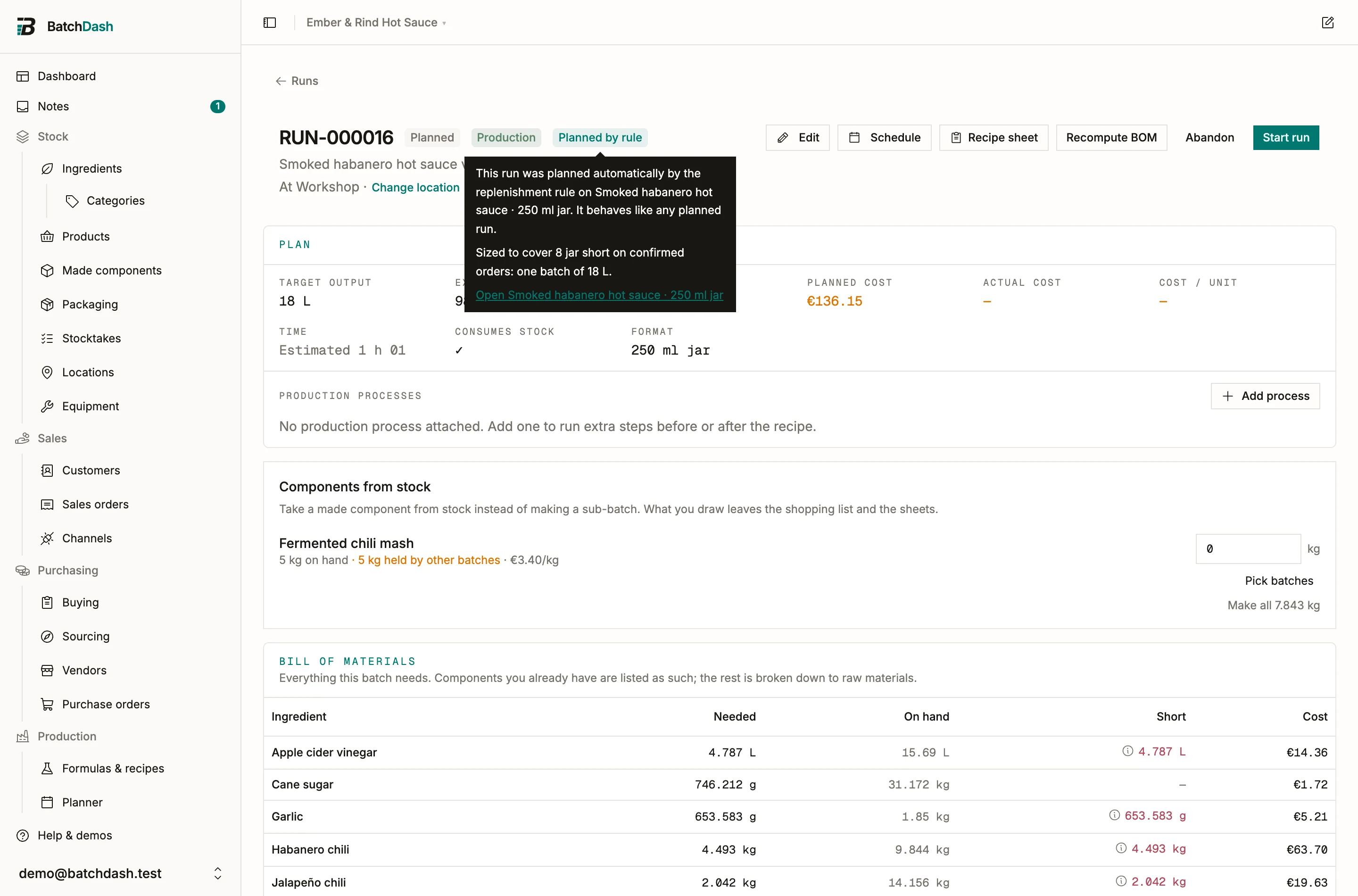
Section titled “The run it plans”An ordinary production run: the recipe in use, the rule’s batch size as target output, produced as the product’s format, consuming stock, with its bill of materials, its shortfalls and its shopping list like any planned run. The only difference is the Planned by rule chip next to its status, which it keeps for its whole life; the chip’s tip names the product and links back to it.
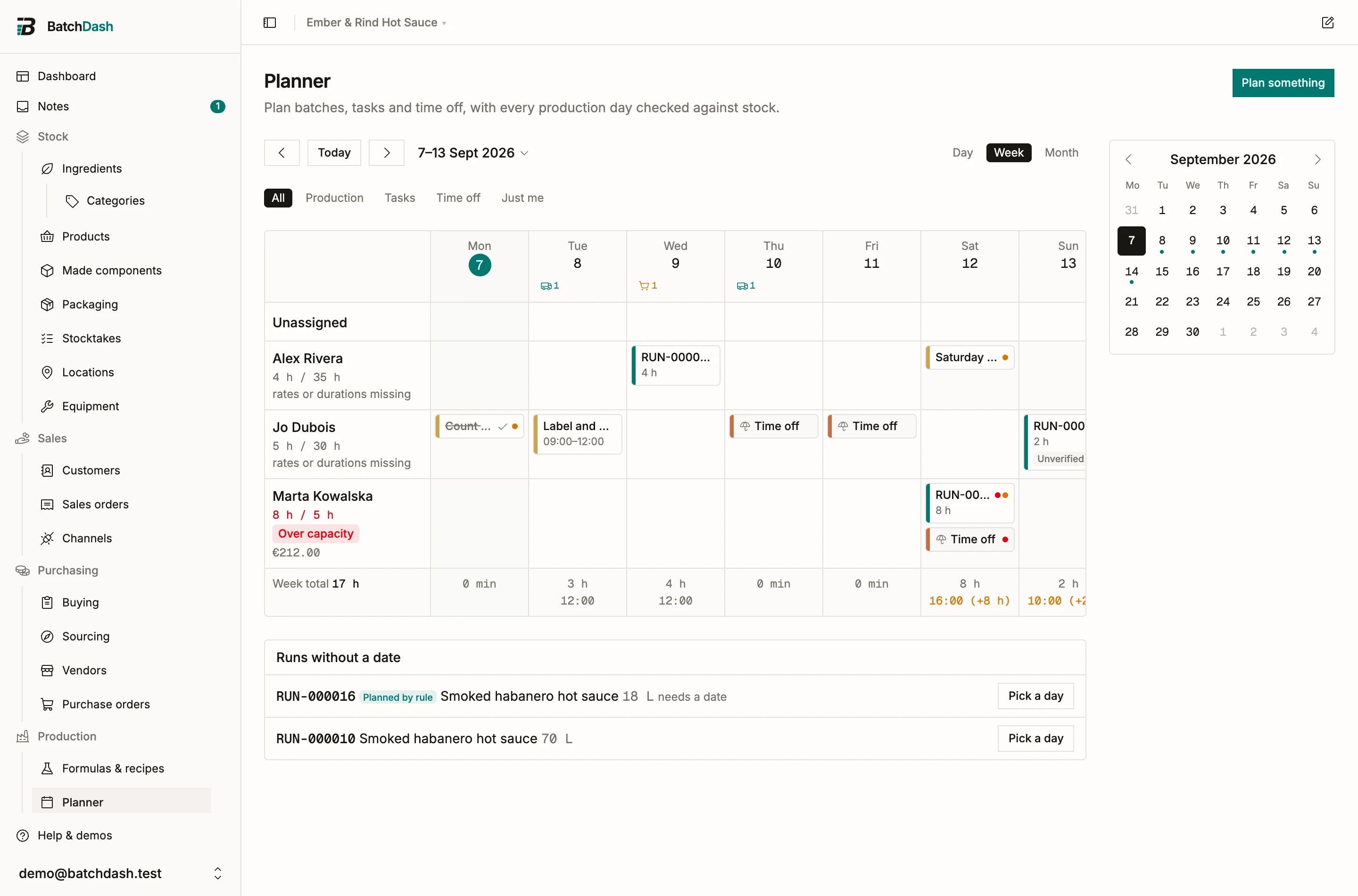
It lands without a date. The rule knows what to make; only you know when there is a free kettle and a free morning. It waits in the Runs without a date tray of the planner, marked “needs a date”. Drag it onto a day, edit it, or abandon it, exactly like a run you planned yourself.
Covering confirmed orders
Section titled “Covering confirmed orders”A rule can also watch your sales orders. Tick Also cover confirmed orders and the rule fires when confirmed orders need more than is available, the “short” figure the product page and the order already show. It plans as many runs of the size you set as covering that shortfall takes, one batch each: 300 jars short and a batch of 72 plans five runs. Each can take its own day, and when the kettle allows two in one go, combine them. Any open run of the product counts, including one you planned yourself, so the rule never plans what is already coming.
A batch is counted in the product’s own unit: a quiche sold by the gram makes 200 g of product from a 200 g batch. A product counted in jars needs a fill size on its format, or a portion size on the recipe, for a batch to be counted in jars. When it cannot be counted, the rule plans one batch at a time and waits for it, and the card says why.
A made-to-order product needs no level at all: untick Keep available stock above a level and the rule only answers orders.
The card then reads both figures, and each run’s chip says how many batches the rule planned and for what shortfall.
What a rule never does
Section titled “What a rule never does”A rule creates planned runs. It never starts one, never completes one, never moves stock and never signs anything. A production run is a record of something that physically happened, and it is trustworthy because a person did each step and said so.
Pausing, editing, deleting
Section titled “Pausing, editing, deleting”Pause stops the rule watching until you Resume; both are one click and move no data. Edit changes the triggers or the batch size and re-arms the rule. Delete rule, in the card’s menu, removes the rule; runs it already planned are kept.
Read next: planning a run, then planning production for the day it lands on.