
Sourcing
A sourcing project is one search for one thing to buy: an ingredient nobody has bought before, a jar whose supplier raised their minimum, a mixer that is dying. The search follows one loop. You state the need, collect candidates, record what they quote, test samples, compare, then adopt the winner. Everything along the way stays on the project, so a teammate picks up where you left off, and in two years you can still read why the runner-up lost.
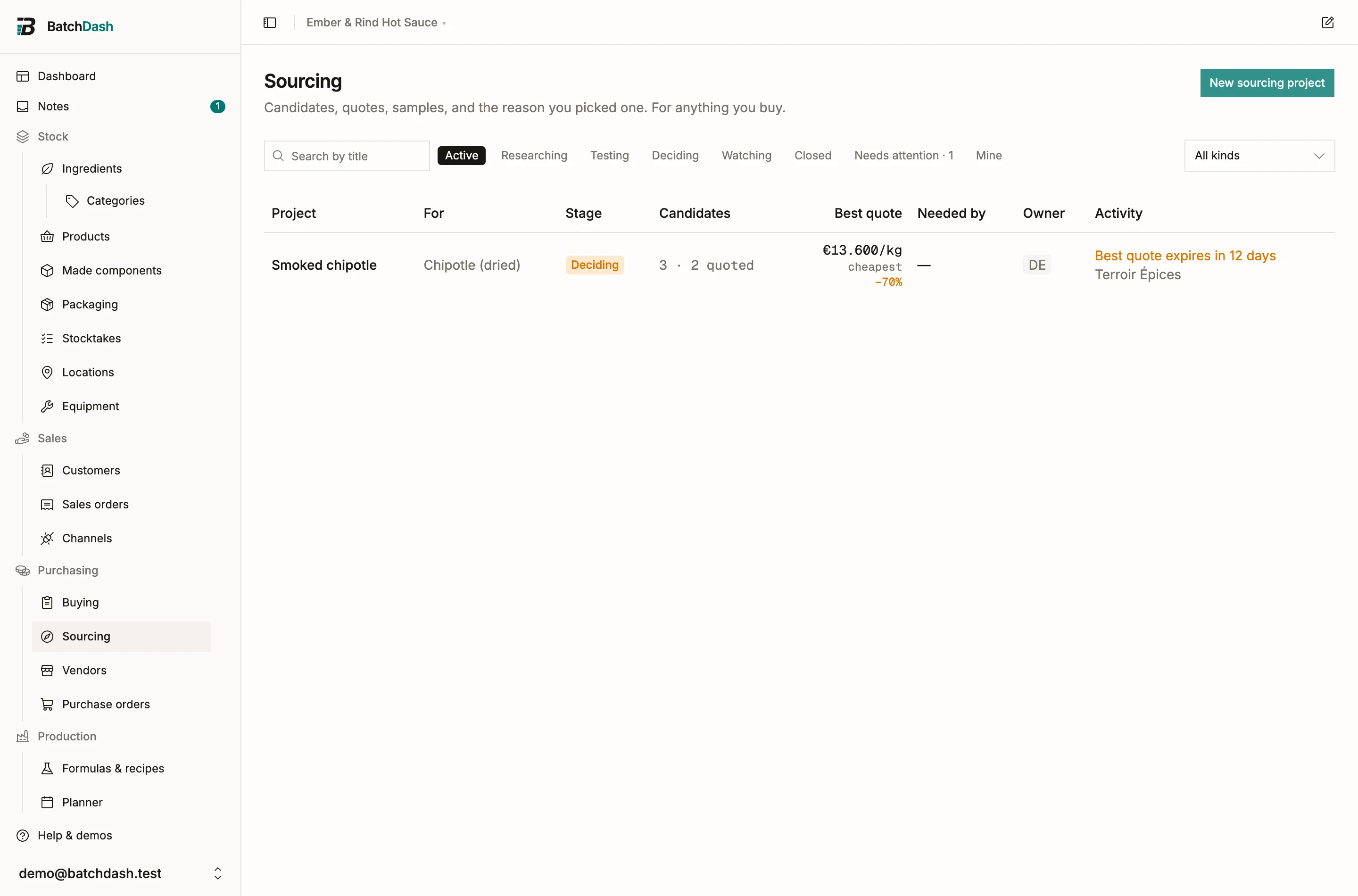
Projects move through stages you set by hand: Researching, Testing, Deciding, then Adopted or Dropped. Watching is the parking spot for “ask again in spring”. The Needs attention filter collects what rots silently: quotes about to expire and samples that never arrived.
Start a project
Section titled “Start a project”- On the Sourcing page, click New sourcing project. You can also start from the thing itself: Source this in the ⋮ menu of any ingredient or packaging page (Source a replacement on a machine), in the header’s Sourcing popover, or on the Source it line an ingredient with no live offer shows in its offers section.
- Pick what kind of thing you are after: an ingredient, packaging, equipment, or something else entirely, like a lab or a co-packer.
- Say what you need in the brief. The quantity matters more than it looks: every figure on the project is worked out for an order that actually covers it, whole packs and all, which is what makes a 5 kg distributor and a pallet manufacturer comparable. Set how often you buy beside it (“every 1 quarter”) when the purchase repeats. That is the window a supplier’s “500 kg a quarter” gets held against, and without it a stated capacity is just a note.
- Add a target cost if the formula gives you one, per the unit you think in: €14 a kilo is fine on something you stock in grams. Every figure on the project then reads per that unit, and each quote says what covering your needed quantity would cost there, whole packs and delivery included. Tick the paperwork the search must come home with: spec, allergen statement, COA, certificates. Each candidate shows which of those documents has actually landed.
From a recipe
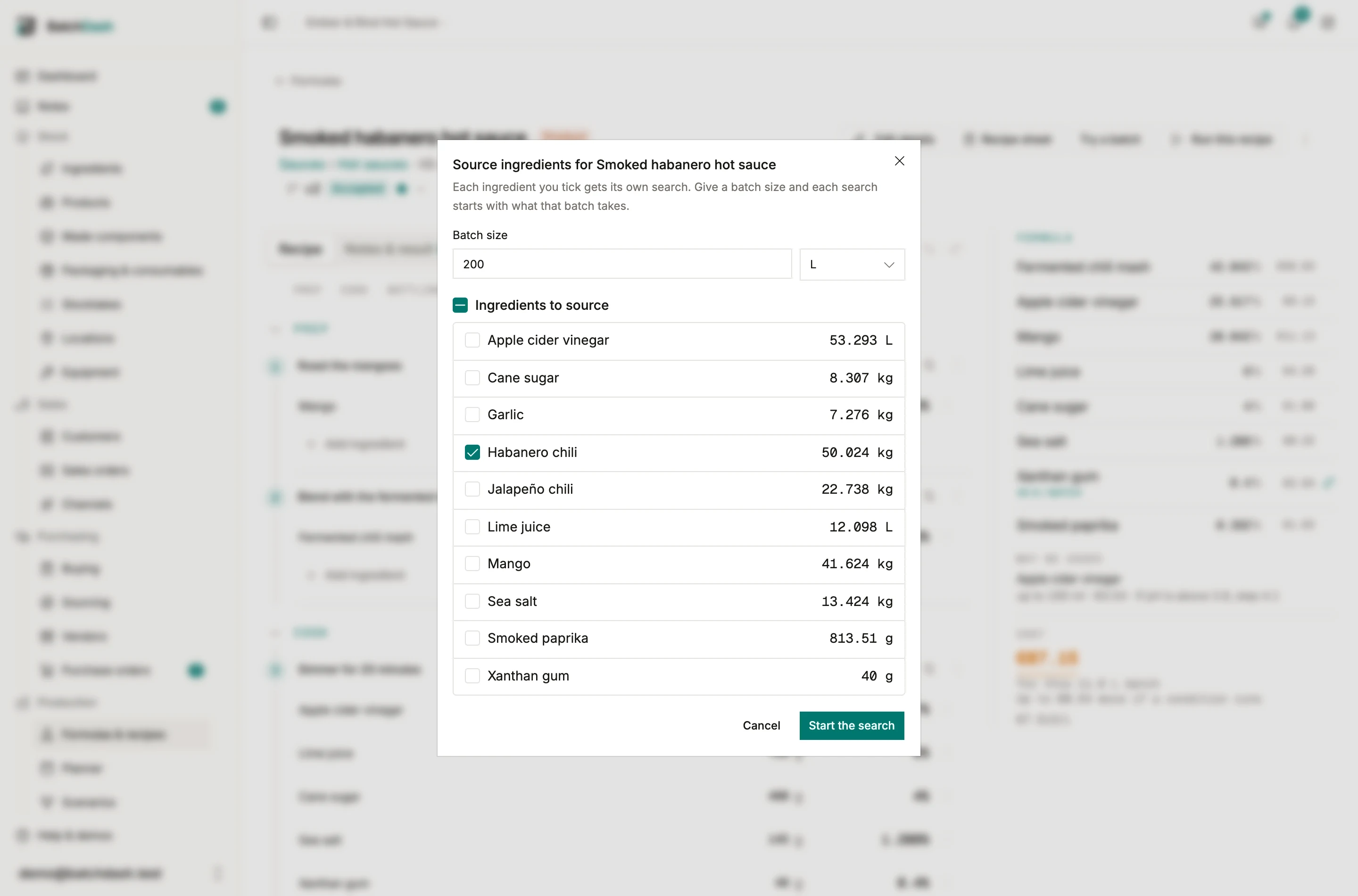
Section titled “From a recipe”A recipe is often where the need shows up: the new hot sauce takes 25 kg of chipotle a batch, and nobody sells you chipotle yet. On the recipe’s page, open ⋮ and choose Source ingredients. Type a batch size, in the recipe’s unit or in portions, and the list shows what that batch takes of each ingredient you buy. A component you make yourself counts through its own recipe: a ganache in the bar lists its cream and its chocolate. Free ingredients such as tap water are left out.
Tick one ingredient or several and start. Each gets its own search, linked to the ingredient, with that quantity as its need and the recipe and batch size in its brief. An ingredient already being sourced names the search that is open for it, so you can join that one instead.
Collect candidates and quotes
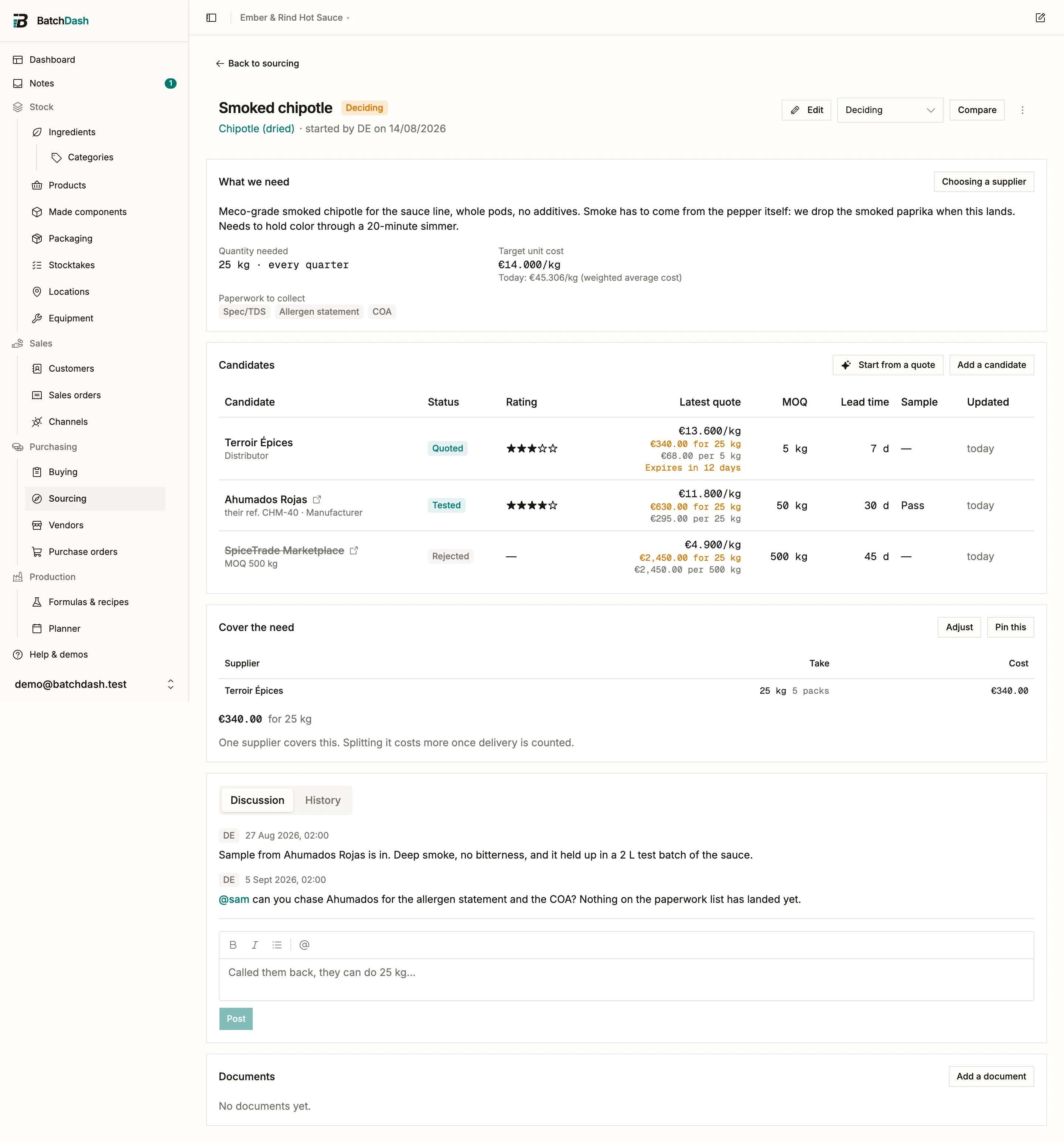
Section titled “Collect candidates and quotes”A candidate needs a name; a link helps. Everything else can arrive later on the candidate’s own page: contact details, country, their product reference, and every price they give as a dated quote row with its pack, minimum order, lead time, validity, and a link to the listing the price came from. When you adopt that quote, the link becomes the vendor offer’s.
Two things on a quote are worth typing even when they feel like admin.
How delivery is charged. One charge per order, per pack, per unit, in bands by order value or by quantity, or nothing at all. “We’ll quote carriage separately” is its own option and is never read as free: the landed figure leaves it out and says so. Any of them can be waived above an order value. Getting this right is what stops a €40 delivery being counted once per sack the moment anybody multiplies a per-kilo rate out.
What they will actually sell. Minimum order has always been there; the ceiling is new. Most per order is a hard bound on one order. Most per period is capacity, stated over a week, month, quarter or year, and it is scaled to your own buying rhythm: 100 kg a month is 303 kg to a workshop buying quarterly. A supplier who caps at 200 kg is not a supplier who can answer a 500 kg brief, and recording that is what keeps them from winning a comparison they cannot deliver.
The tier field records which rung of the supply ladder a candidate sits on. A repacker sells you 100 g tomorrow at four times the price; a manufacturer sells a pallet next month at a quarter of it. Two prices that look incomparable usually just come from different rungs.
When a supplier answers, do not retype their email:
- Click Read a quote on the candidate (or Start from a quote on the project) and paste the message, or hand over the PDF they attached or a photo of the quote. A scanned PDF reads fine, and the file is filed with the project’s documents either way.
- The reading comes back as a draft beside the original text, field by field: price, pack, minimum, lead time, validity, payment terms.
- Keep the fields that are right, correct the ones that are not, and save. A price in a foreign currency is never converted for you: the original wording lands in “as quoted” and the working figures stay yours to confirm.
Each read spends one AI capture from your plan’s monthly allowance, whether or not you keep the result. The meter is on your billing page.
Samples
Section titled “Samples”The sample block on each candidate records the request date, the arrival, the verdict and what it cost. A sample requested three weeks ago with nothing received puts the project in Needs attention, because ghosted samples are how searches stall.
If you evaluated the sample in a test batch, link the run: the verdict then points at the exact batch that proves it. For packaging the block is a pre-production sample, and pass means two things at once: the piece itself is right, and your formula behaves in it. Re-test whenever the vendor changes anything about the piece.
Compare and decide
Section titled “Compare and decide”From two quoted candidates on, Compare lays out the classic matrix: status, rating, unit cost and landed estimate re-based into your own stock unit, minimum, lead time, quote age, sample result, paperwork, tier.
The header carries the benchmark. “Today: €8.40 / kg” is what the thing actually costs you now, from your weighted average cost or your best live offer, and a candidate beating it shows the difference in percent. Expired quotes render struck through and stay out of the math. A candidate you have ruled out keeps their price on their own row, where the note saying why they are out is worth more beside a figure than alone, but they no longer speak for what the search costs.
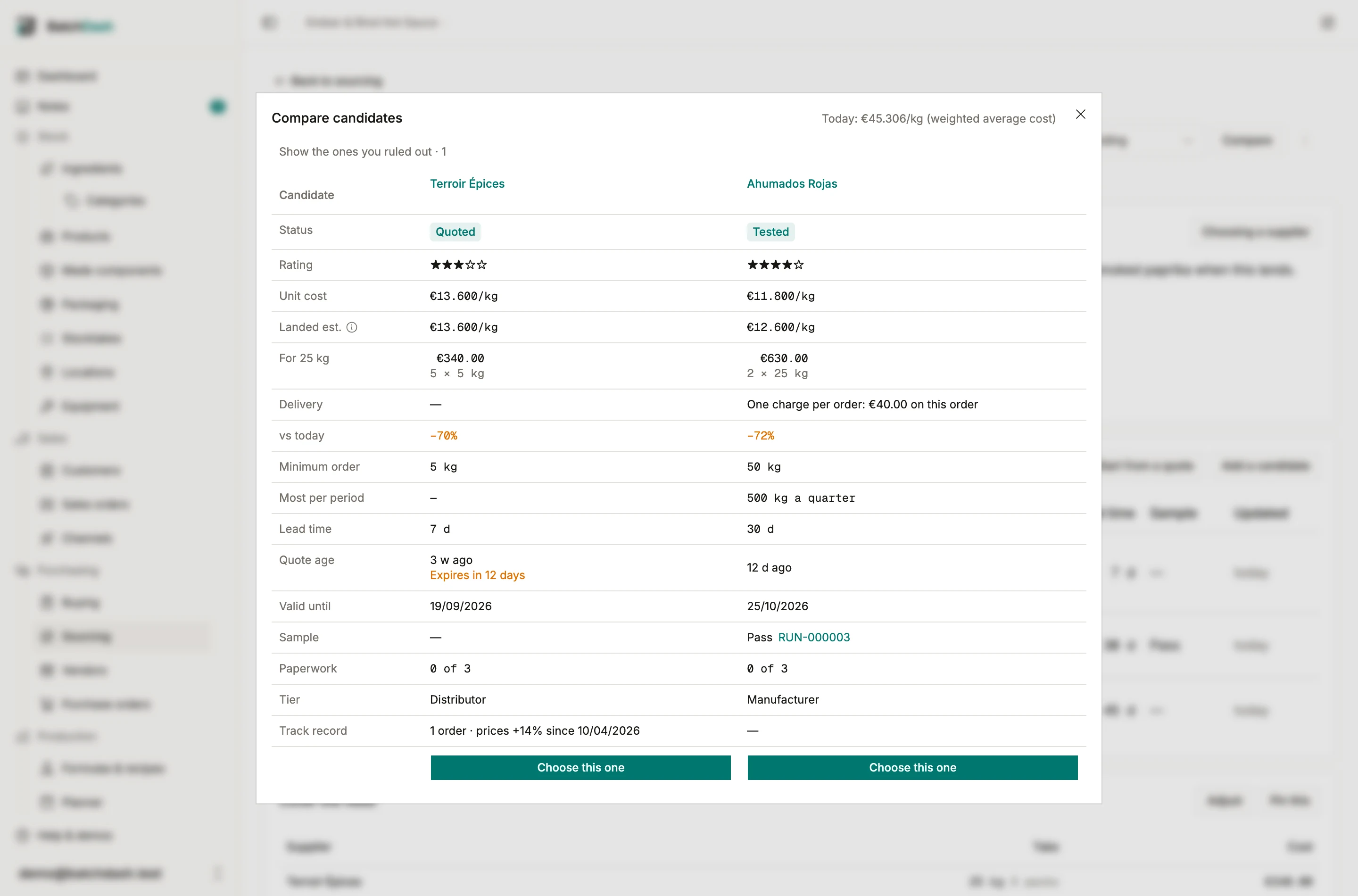
Beside the leading figure, a short line says which criterion put it there: “cheapest”, or “cheapest of the ones that arrive in time”. A default you cannot explain is one you cannot trust.
How a supplier gets picked
Section titled “How a supplier gets picked”Sourcing and Buying run on one rule, set in Organization → Settings → Suppliers. It is an ordered list, not a scoreboard: the top criterion decides, and each one under it only reorders suppliers that came out close on the one above.
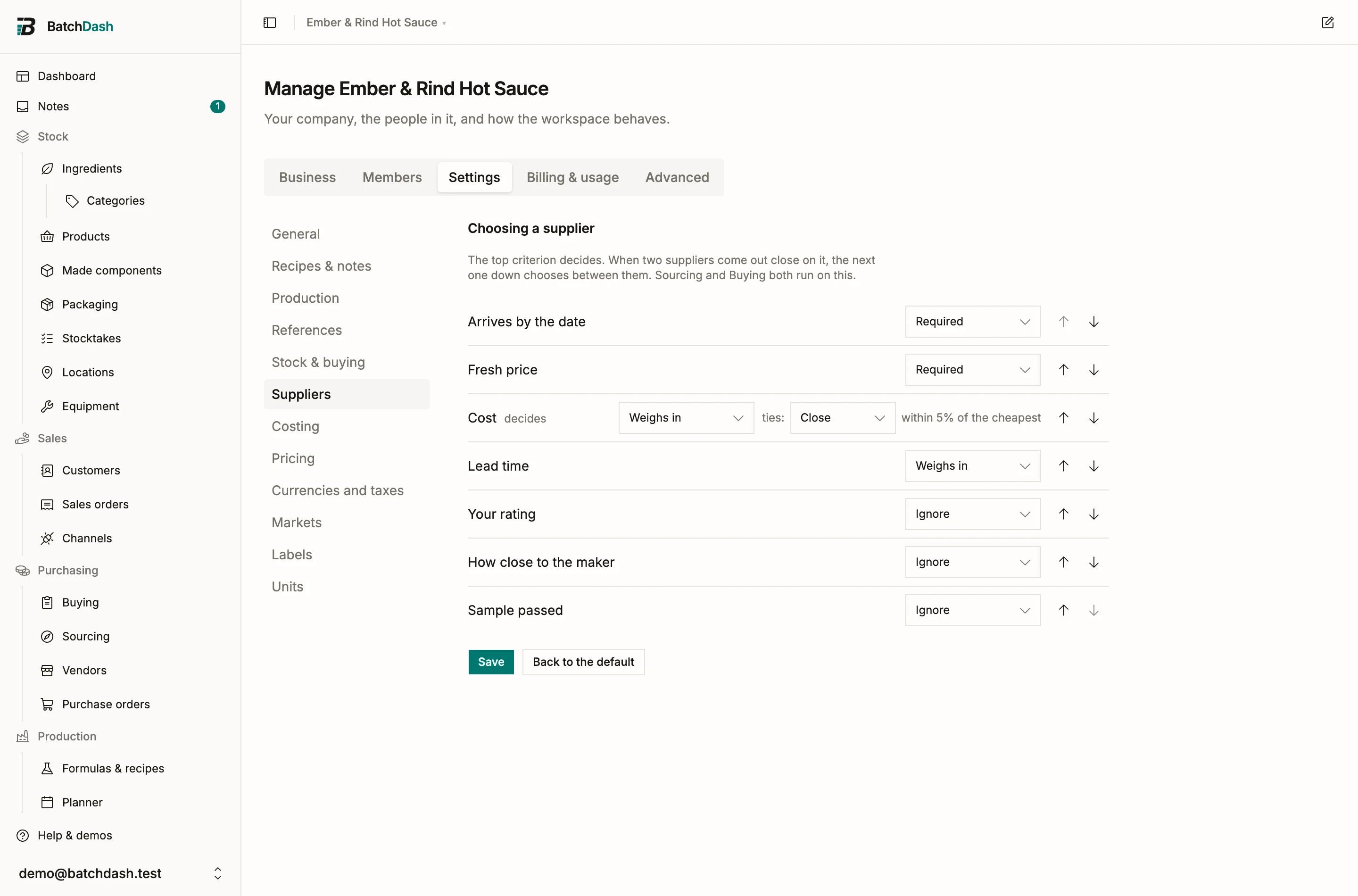
Out of the box: it has to arrive by the date, a stale price is not evidence of a cheaper one, then cheapest.
- Cost, lead time, your rating and how close to the maker a supplier sits can be ordered by.
- Arriving by the date, a current price and a passed sample can be required instead. A requirement nobody meets steps aside rather than emptying the page: when nothing arrives in time you are late either way, so the soonest wins and the page says that is why.
- “How close counts as a tie” is a choice of three, and what each means in that criterion’s own units is printed next to it. Leave it at exact and the criterion below never gets a turn, because two prices are never exactly equal.
- A blank never counts against anybody. A vendor nobody has timed is not a slow vendor.
One search can choose differently without changing it for every other one: Choosing a supplier on the brief card sets a rule for that project alone, and clearing it goes back to following the workspace.
Cover the need
Section titled “Cover the need”Once the brief says how much you need, the project works out the cheapest way to actually get it and shows it under the candidates.
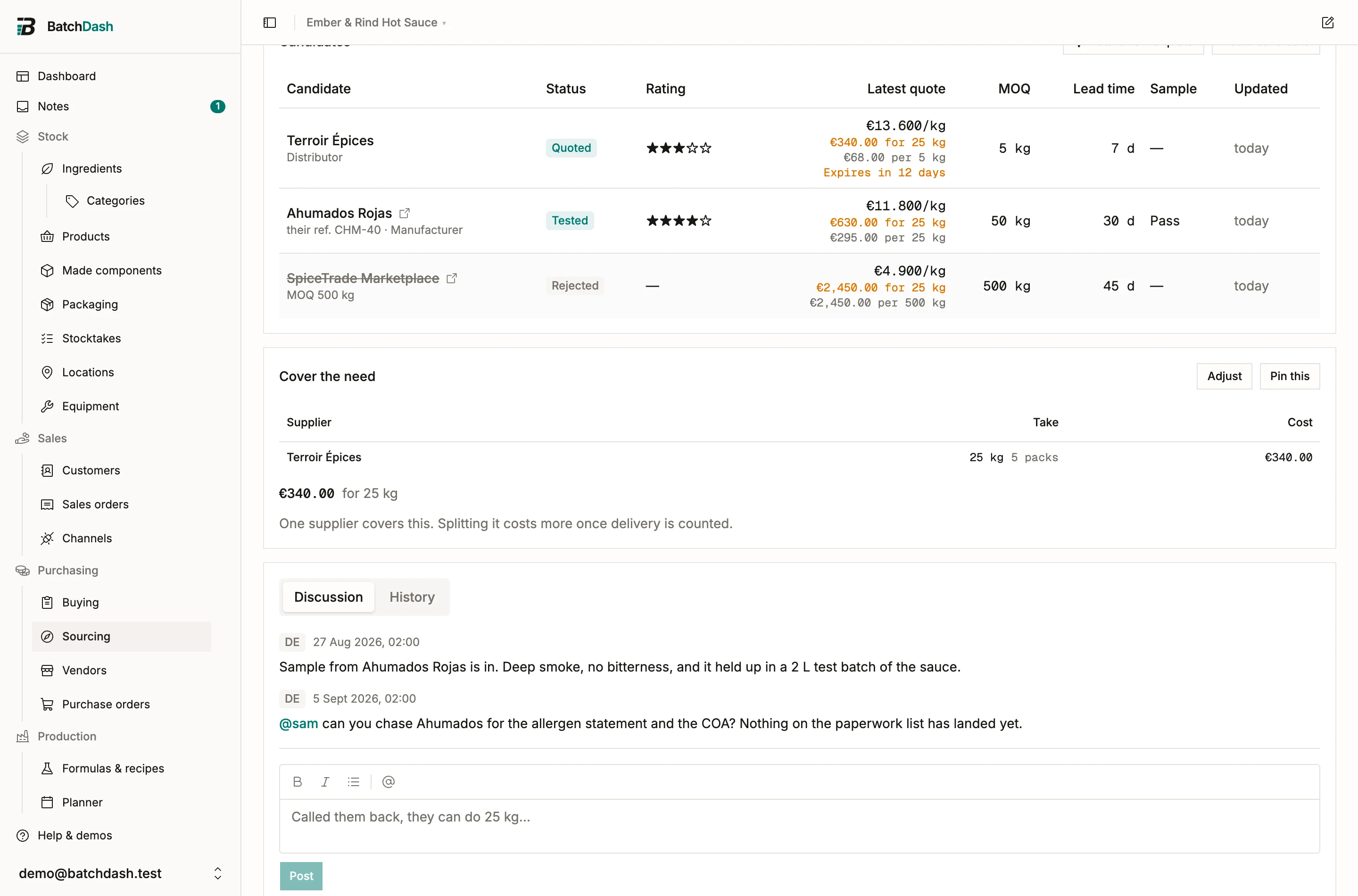
Packs are whole things, so this is not a rate multiplied out. Needing 1 kg from someone who bags 250 g is four bags; needing 12.3 kg from someone who sacks 25 is one sack and 12.7 kg left over, and the card says both. Where one supplier cannot cover it alone, or two pack sizes fit the need better together, it splits across as many as it takes and prints what one supplier alone would have cost beside it.
Delivery is per order, so every supplier added costs one. A third source has to earn its carriage, which is why the cheapest rate on the page does not always appear in the plan.
Pin this turns the suggestion into a decision. The quantities and figures freeze, so a month later the card still reads the way it was agreed, and it tells you when a price has moved underneath it rather than quietly showing different numbers. Adjust sets the quantities by hand; a supplier’s own minimum and ceiling still apply, so what you pin is always an order they would accept.
Choose this one in the comparison, or Adopt on the candidate’s page, turns the winner into real records: a vendor carrying the contact details you typed once, the ingredient or machine if your catalog never held it, and a vendor offer taken from the chosen quote. The dialog says it plainly: this becomes the price Buying uses.
A quote is typed in your base currency. When the vendor you adopt invoices in another one, the dialog asks for the price they charge in theirs rather than carrying the quote’s figure over. That holds for a vendor the adoption creates: Invoices in sits beside its name when your plan includes buying in other currencies. The quote’s delivery charge is carried onto the vendor only when both are in the same currency.
The one required field is the decision note. A short paragraph on why this one won, kept on the project next to the runners-up and their rejection reasons.
Adopting can close the project, or leave it open when you want a second source: adopt another candidate later, then close.
Discussion and history
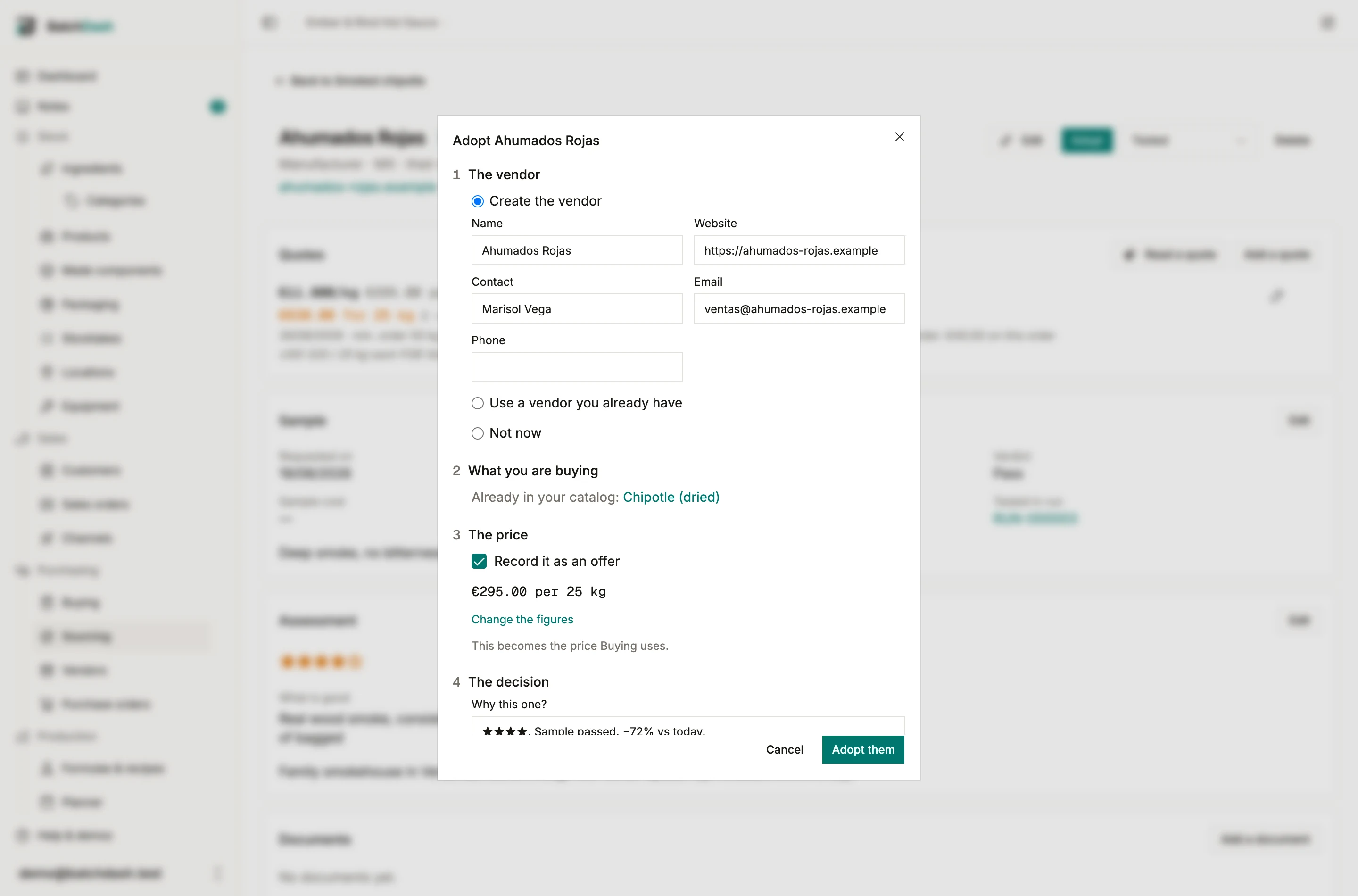
Section titled “Discussion and history”The project carries two readings of the same trail. Discussion is what people wrote: the call you made, the sample you promised to chase, the colleague you tagged with @. It opens first, because coming back to a search usually means wanting the last thing somebody said.
History is everything that happened, your comments among it. Every stage change, quote, sample verdict and adoption, in order, with who did it and when. Nothing in it can be edited, which is what makes it worth reading a year later.
The sourcing log
Section titled “The sourcing log”Not every finding deserves a project. “Out of stock until March, offered jalapeño instead” is a ten-second note made with the supplier still on the phone, and it goes in the Sourcing block at the bottom of a Buying line sheet or in the ingredient page’s Sourcing popover. Every entry is shared with the whole team and carries its time.
When one project is open for the ingredient, the block posts your line into that project’s discussion; otherwise it lands in the ingredient’s own log. Notes you previously kept in the line sheet’s sourcing box were moved into this log automatically, word for word, and the originals were archived in Notes.
Where to look
Section titled “Where to look”Finding candidates is the one step the product cannot do for you. What works in practice:
- Ingredient directories and marketplaces: Knowde, IngredientsOnline and Gather for food; Knowde, Covalo, SpecialChem and UL Prospector for cosmetics. Most list suppliers with spec sheets and a sample request form.
- Trade shows, for the conversations no directory holds.
- The manufacturer themselves: when their minimum is a pallet, ask who distributes them in your country. A manufacturer would rather name a distributor than lose you.
These are places practitioners actually search, worth trying before an open-ended web search. None of them is affiliated with BatchDash.