
Executing a run
Click Start run when you are ready to make the batch. Starting freezes the recipe sheet and the bill of materials. From this point the run documents what you actually did, and later recipe edits cannot move your targets mid-batch.
Work from the recipe sheet
Section titled “Work from the recipe sheet”The Recipe sheet lays out the batch at the run’s scale: sub-batches to prepare first, then the final assembly, with scaled quantities and the method. Print it and take it to the bench, or capture directly on screen. It comes from the same engine as work orders.
Capture as you go
Section titled “Capture as you go”The capture section follows the batch, part by part:
- What went in. Each ingredient shows its planned quantity next to an Actual field. Weigh, type, done. What you type here is what the batch becomes: completion consumes stock, prices the batch and orders the label’s declaration from these amounts, and a line you leave blank keeps its planned quantity. The Lot cell opens a picker rather than a text field, because a line is rarely one lot: you finish the open sack and start the next. See below.
- Made on the day. A row whose ingredient makes a variant for this batch, cherries to pit, reads “to make Cherries · Pitted” and has an Obtained box beside Actual: weigh what the source gave, all of it, not only what the recipe took. What you type there is also a weighing: it teaches the variant what 100 g of cherries gives, lists on the pitted cherries’ Weighings card as “batch RUN-000042”, and goes when you clear the box.
- Standing in. When the plan took another variant of an ingredient because the one the recipe names was short, that variant has its own row, reading “stands in for Shea butter”. Weigh it against itself: what you type there is what the batch consumed of it, and what its label declares.
- Additions. Add to this batch, under the planned lines, records what went in beyond the plan, with why. See additions and corrective actions.
- Checks. One row per checkpoint, grouped under the step it belongs to, with a counter for what is left on that step. See below.
- Who worked on it, and for how long. Add people from your operator roster at any point, on a test run too; anyone staffed on the batch in the planner is already there. With the full cost model, this is also where you record how long the batch took, once it has started. Type the duration the way you say it (
3:20,3h20, or200for plain minutes); the elapsed time is offered as a link, never filled in for you, because a batch that spanned a weekend did not take 64 hours. Each person then carries their own minutes, defaulting to the whole duration. A step whose tools are costed by the hour gets its own minutes field, with a start/stop timer beside it. See what counts in a unit cost. - What came out. Observed output, with the yield answering back next to it: what this batch got, what the recipe expects, and what you planned to make.
- How it went. A tasting score from 1 to 10, tasting notes, process notes, and defects.
Everything saves as you type.
Test runs capture the same parts. A test batch consumes no stock and seals no record, but its pH is still a measurement someone took, and a finished test run keeps everything you recorded on its page.
Recording checks
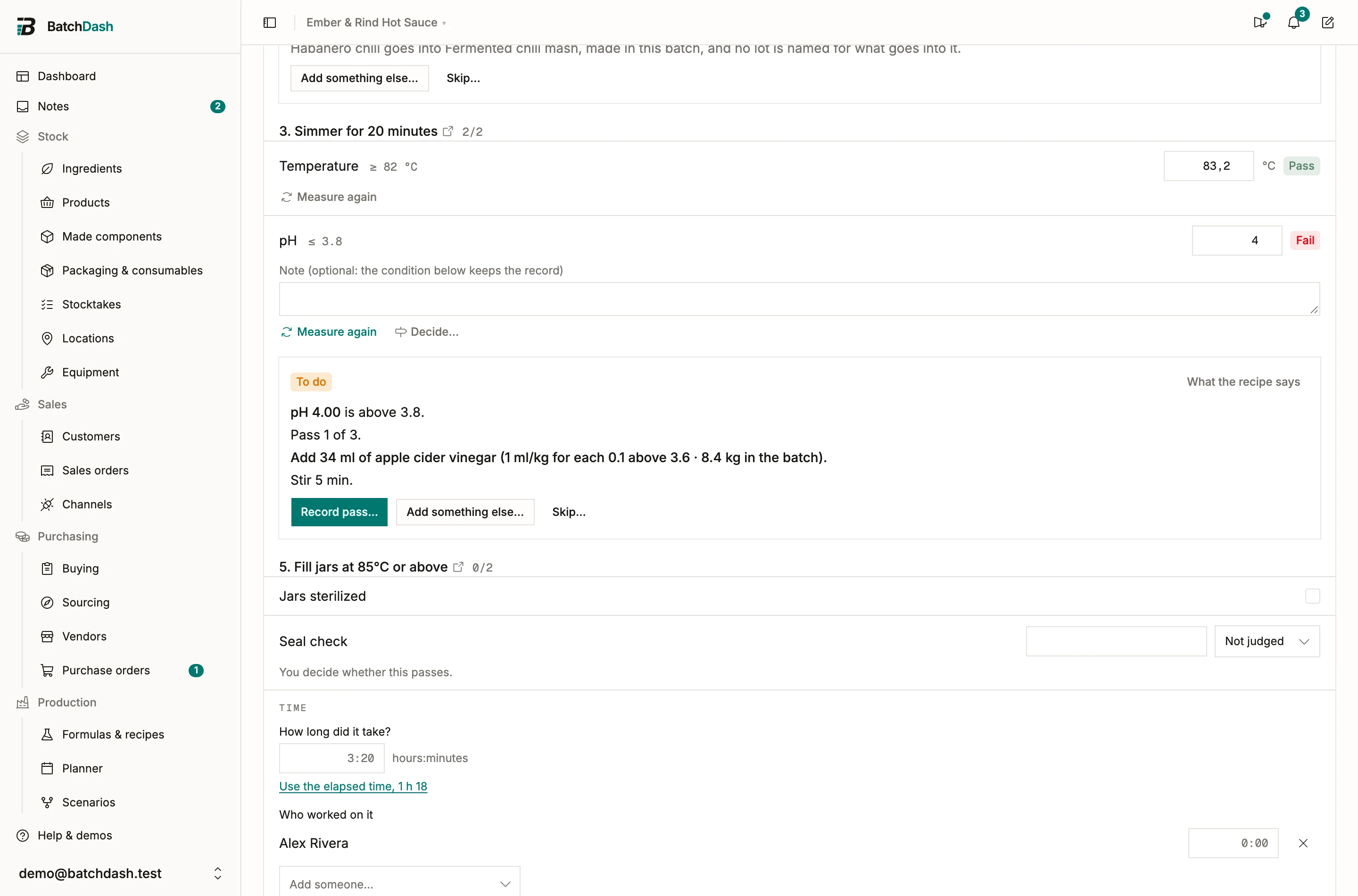
Section titled “Recording checks”Each check shows its target and the control it asks for: a number for a measurement, a checkbox for a yes or no, a short line plus your own pass or fail for something you observe. A critical control point is marked CCP.
“pH at most 3.8” says nothing about what you are doing when you take it, so the step heading above each group opens the recipe sheet at that step, highlighted: the method, the timings, the equipment, and any other target on it.
For a measurement, the result is not yours to type. You enter 86.2 against a target of at least 82 °C and the app decides it passed, from the target frozen into this batch at start. An observation works the other way: only you know whether “slightly cloudy” is acceptable today, so you set the result and the app records your call.
A checkbox nobody touched counts as to record, never as a failure. That distinction matters on a hygiene line, where every unticked box would otherwise read as something that went wrong.
When a check fails, a note field appears and it is required. The batch can still be completed with a failed check. It cannot be completed with a failed check nobody explained: write what happened and what you did about it. That note goes on the batch record in full, and the run header keeps a running summary (1 check failed, 6 checks to record, 6 of 6 checks passed) so you know where you stand without scrolling.
Type a passing value over a failed one and the note stays with the reading, still in view but no longer required. Keep it if it explains the fix. Clear it if it doesn’t.
A reading takes the time it was entered and the name of the person who entered it, and the server sets both. Type a corrected value over a reading and the check shows your name and the time of the correction, because the record credits each value to whoever took it.
With conditional steps switched on for your workspace, a recorded check keeps every reading. Measure again under it opens a field for the next one; the earlier readings stay in the check’s history, each with its time and person, and the latest decides whether the check passes. Typing in the latest field still fixes a mistyped digit. A failed check also offers Add something… beside its note, for what you put in to bring it back.
Conditions then sit among the checks as cards, each under the check it reads, saying what to add to this batch and when to measure again. A check a condition answers needs no note: its passes are the record. On a production batch, a failed critical control point needs a decision before the batch completes, from Decide… under the check: hold the batch or discard it. See additions and corrective actions and holding and releasing a batch.
Which lots went in
Section titled “Which lots went in”Click the Lot cell on any line and you get a search over what the app already knows is on hand.
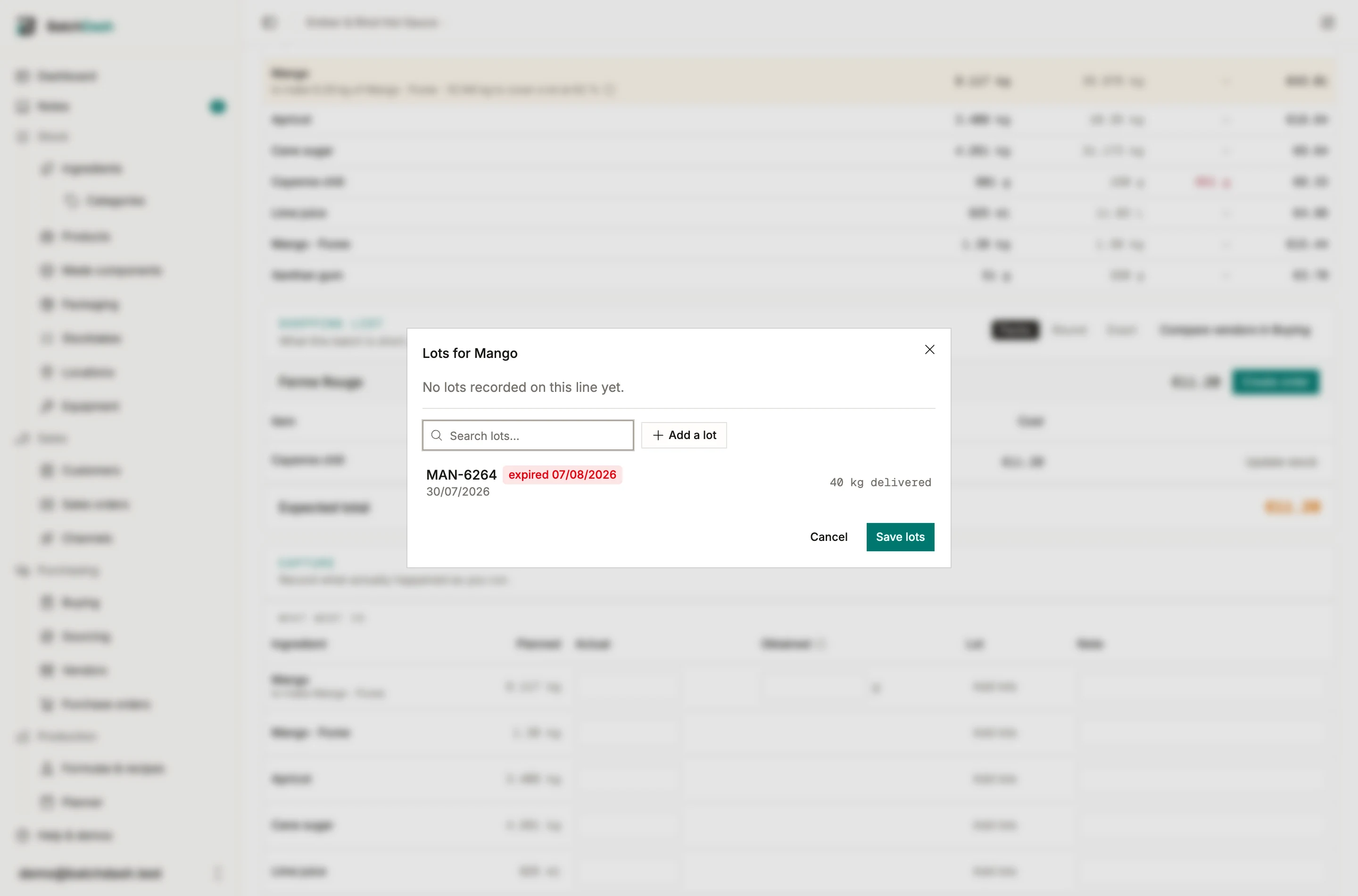
For an ingredient, that is its lot-marked deliveries, the ones still in stock first with the soonest expiry at the top. Each row shows what is left of it and its expiry, marked estimated when the shelf life worked the date out. A lot you name is the stock the batch takes: when the run completes, it comes out of that lot and not the one expiring first. For a component, it is the batches of it still in your walk-in, each row showing what is left, the batch that made it, and its expiry. A date already past reads expired in red, so a tub five weeks gone cannot look like one good until next year.
Each delivery gets its own row, with the vendor beside the date. Two suppliers can stamp the same code on the same ingredient, and then the code alone no longer says which pallet you opened. Pick the one you used and the record keeps that arrival. Type such a code instead of picking it and the dialog says how many deliveries carry it, leaving them all on the list: a guess there would come back out of the trace looking like something you read off a label. Pick one and the row you typed takes that delivery, keeping the amount you had already entered. Leave it unpicked and the code is still saved, with no delivery linked to it.
Picking a lot fills what the line still needs, capped at what that batch holds. Two kilos needed against a 100 g tub takes the 100 g and leaves the rest to come from elsewhere. Max fills a row to whatever is left in its batch, which is what you do with a tub you are emptying.
A running total sits under the rows: 1.2 kg of 2 kg accounted for. Under is fine and common. Over what you weighed, or over what a batch physically holds, is refused with the reason on screen.
None of it is required. If you do not track lots you never open the dialog and nothing nags you. What you do record turns possible rows into recorded ones in the trace.
A code nobody logged can still be typed. That is the sack whose delivery paperwork never reached the app, and refusing it would send you back to writing lots in a note.
Components
Section titled “Components”Where each component comes from (stock, a batch of it planned elsewhere, or this batch itself) is decided while the run is planned, on its Components card. See planning a run. Starting freezes that decision with the rest of the sheet.
When a batch the run takes from is not made yet, Start run asks first: “Start before RUN-000021 is made?” The question says what is at stake: “This batch takes 6 kg of Fermented chili mash from RUN-000021. Until RUN-000021 is completed, that 6 kg is not in stock.” To make the mash in this batch instead, cancel and use Change… under Components before you start.
Started anyway, the card keeps reminding you until that batch is completed: “RUN-000021 is not made yet. Complete it before this batch, which takes 6 kg from it.”
Packaging
Section titled “Packaging”For a batch that gets packaged, the Packaging card lists what the run will consume, in whole packages (48 jars, 48 lids, 48 labels), with on-hand levels. Manage the items under packaging.
If the recipe changes mid-run
Section titled “If the recipe changes mid-run”Edit the source recipe while a run is in progress and the run shows a banner: The recipe changed. Your sheet stays frozen. Two choices:
- Review & pull update rebuilds the sheet and the BOM from the current recipe. Use it when the edit matters for this batch. The readings you already took stay with their checks, even when a check moved to another step or its target changed: each keeps the verdict it was given. A check the recipe no longer has stays on the batch with what was recorded, marked Removed from the recipe, and stops counting in the checks summary. The confirmation names it.
- Dismiss keeps the frozen sheet. The run finishes against the snapshot it started with.
When the batch is done, complete the run.