
Additions and corrective actions
RUN-000025 reads pH 4.00 at the end of the simmer, against a target of at most 3.8. The sauce’s recipe already says what to do about it, in a condition. The batch page works out how much vinegar this batch takes, keeps each pass on the record, and lets you add anything else the batch needed along the way.
If a batch shows no Add to this batch under What went in, conditional steps are not switched on for your workspace.
A condition on the batch
Section titled “A condition on the batch”Each condition sits under Checks, right below the check it reads. Its card says where it stands:
| State | What it means |
|---|---|
| Waiting | Its check isn’t recorded yet. The card names the check and its step. |
| Not needed | The reading is within target: the reading, the bound, and “nothing to do.” |
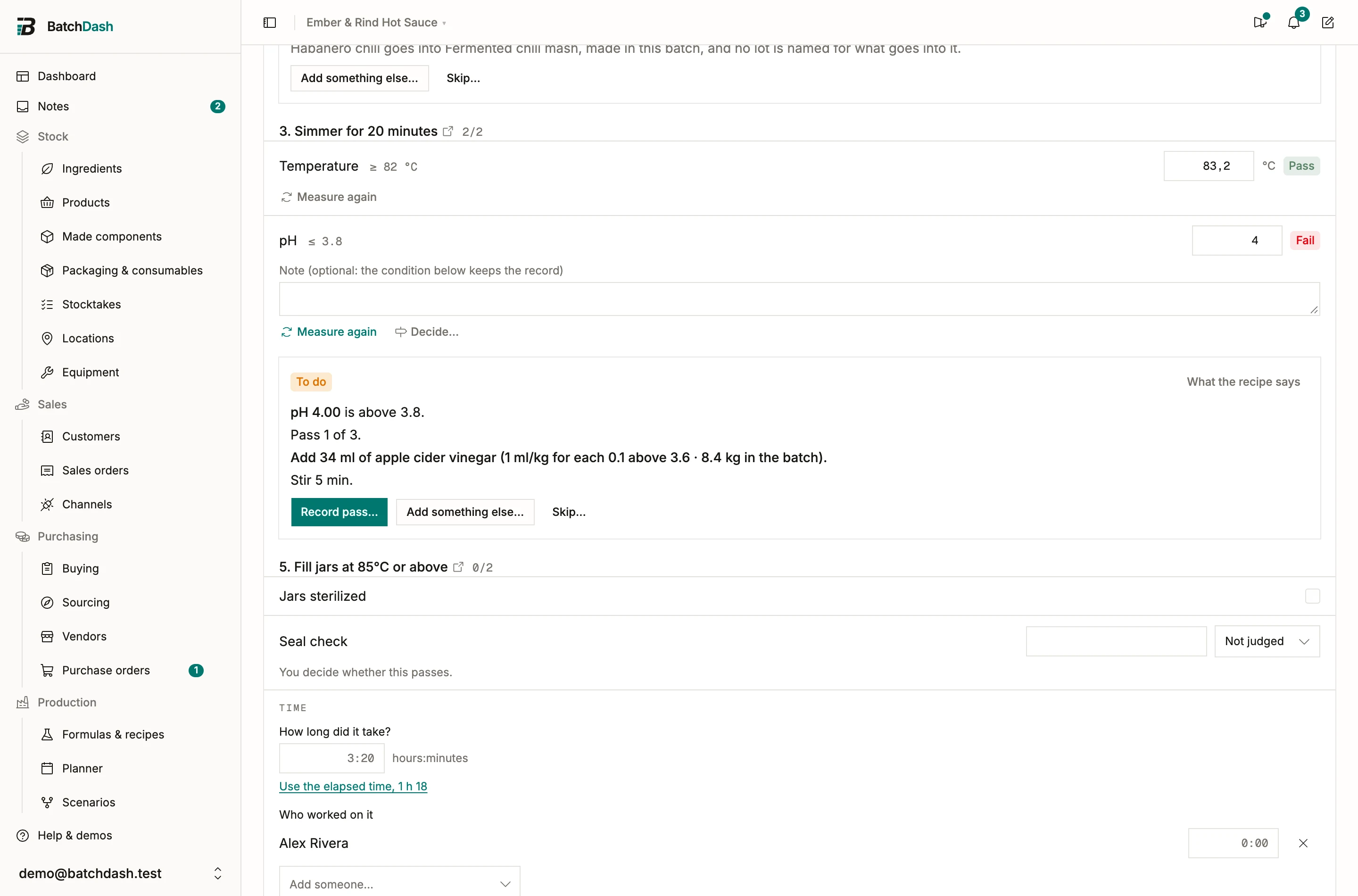
| To do | The reading missed. The card gives the pass, the amount to add and how it was worked out. |
| Later | A condition on the clock. The card says when it comes due. |
| Done | The check is back on target. The card keeps every pass. |
| Limit reached | The passes or the ingredient’s total ran out, and the card says what the recipe asks next. |
| Skipped | Someone skipped it. The card gives their reason. |
| Can’t be read here | A condition on a lot’s value whose ingredient goes into a component made in this batch. No lot of it is named here, so the card says why and the batch goes on. |
On RUN-000025 the card reads “Pass 1 of 3.” and asks for 34 ml of apple cider vinegar: 1 ml per kg for each 0.1 above 3.6, on the 8.4 kg in the batch. What the recipe says opens the condition’s own words under the card.
A condition that reads only the batch (its size, format, place, market or customer) was decided when the batch was planned. It has no card: its ingredients are ordinary lines in What went in.
The run header counts what is left, “1 condition to do”, or reads Needs a decision when a condition waits on one.
Record a pass
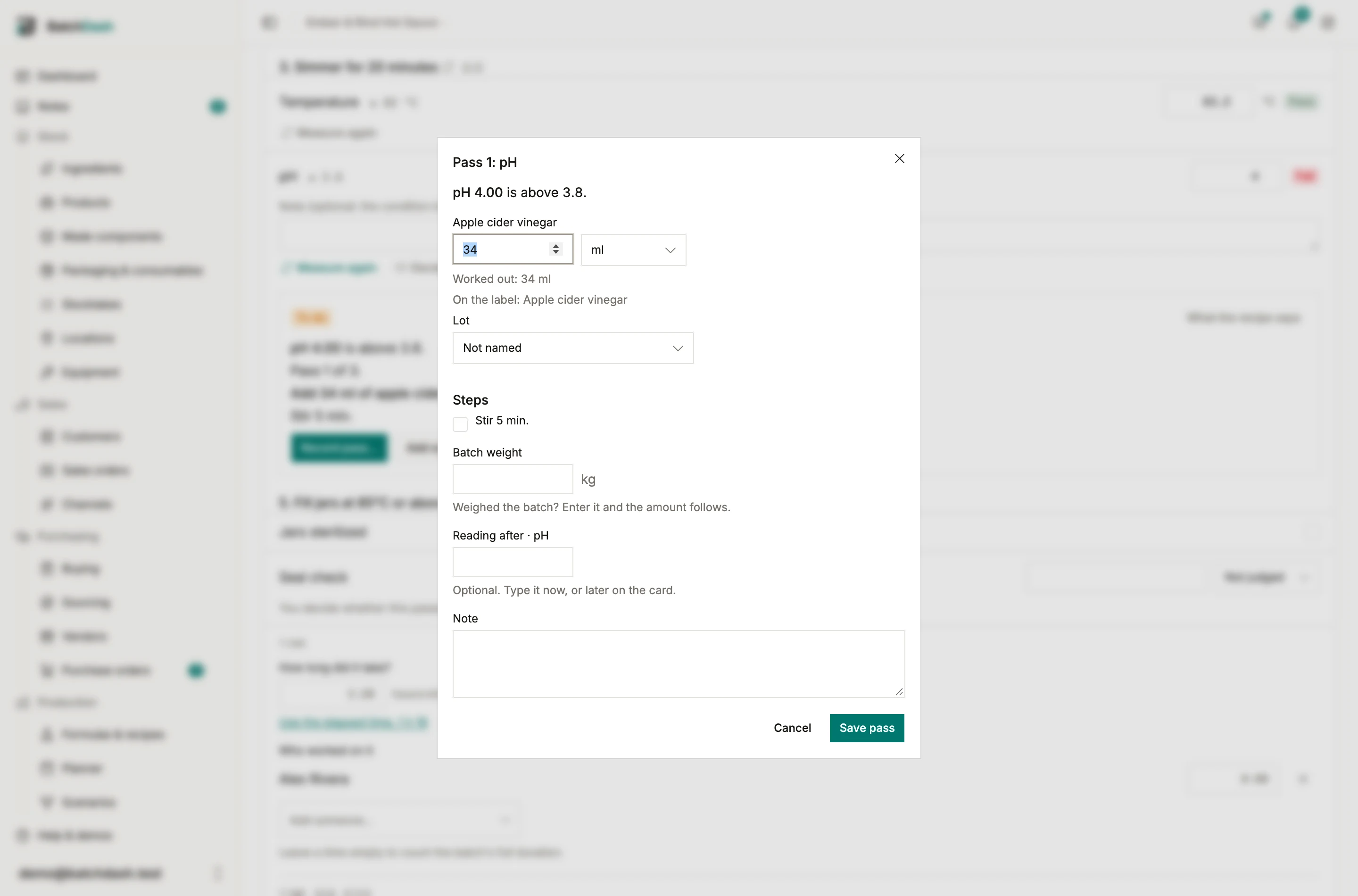
Section titled “Record a pass”Record pass… opens the pass with what the card worked out:
- each ingredient to add, with its amount (“Worked out: 34 ml”) yours to change, and the On the label: line it will add;
- Lot, with the same picker as the batch’s lines, or Not named to name it later from the card;
- Steps, what to do once it is in (stir 5 minutes, here), to read as you go;
- Batch weight: “Weighed the batch? Enter it and the amount follows.”;
- Reading after, the check once the pass is done, now or later on the card;
- Note.
Once the condition has run on three earlier batches, Past batches: shows what they would add at this reading, with Use beside it. Nothing changes unless you click it.
Save pass and the card moves on. A reading after that passes makes it Done. One that still misses gives the next pass, worked out again from the new reading: on RUN-000023, 3.86 asked for 22 ml after the first 34 ml. When the passes or the total run out, the card reads Limit reached.
A condition with a total per kg counts it down as it goes, “56 of 126 ml used.”, and the amount that reaches it says “This is the last of it.”
A batch can’t complete while a condition has a pass to record or a reading to take after one. The completion dialog names it: “pH: a pass to record, or skip it.”
The trail
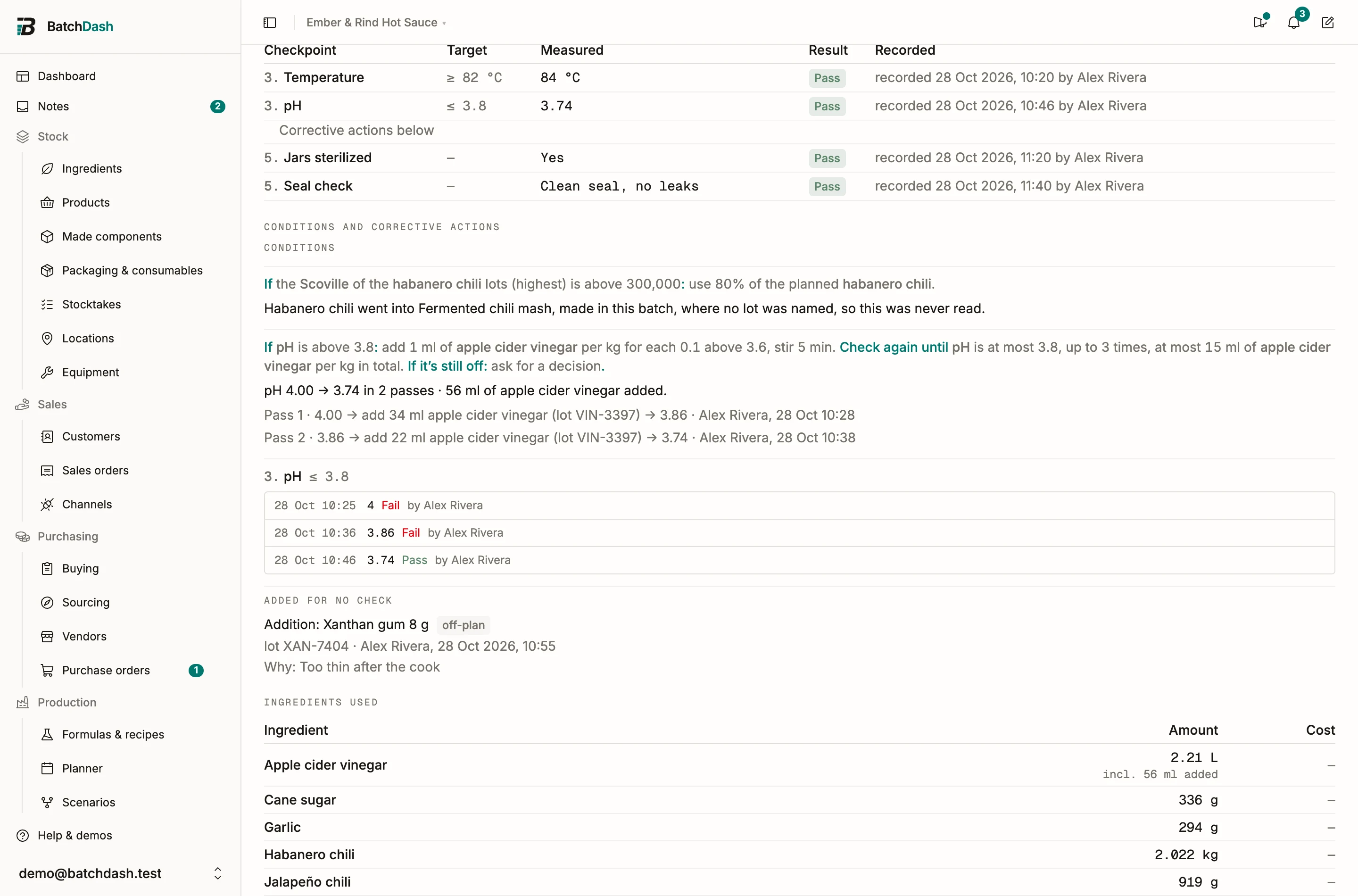
Section titled “The trail”A pass stays on the card with the reading before and after it, what went in, the lot, who recorded it and when. Once the batch completes, the trail moves to its batch record, under Conditions and corrective actions. RUN-000023’s reads “pH 4.00 → 3.74 in 2 passes · 56 ml of apple cider vinegar added.” Under it, pass 1 added 34 ml of vinegar from lot VIN-3397 and the pH read 3.86; pass 2 added 22 ml from the same lot, and the pH read 3.74.
A pass whose lot nobody named reads “lot not named”, with Name the lot beside it.
Measure again
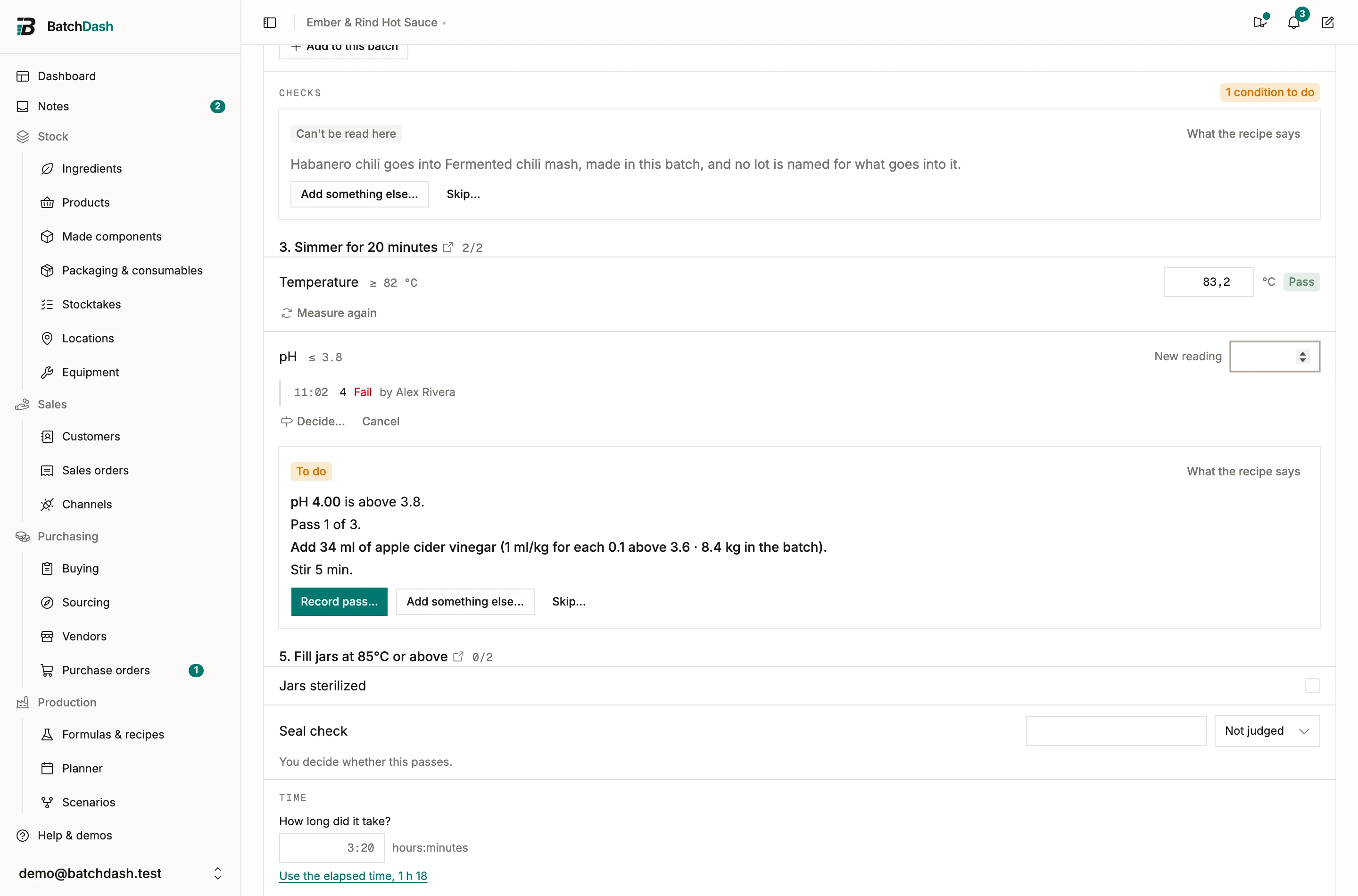
Section titled “Measure again”A recorded check keeps every reading. Measure again, under the check, opens an empty field for the next one, and the reading before it moves into the check’s history with its time and the person who took it. The latest reading decides whether the check passes.
The count under the check opens the history: on RUN-000023, “3 readings” lists the three pH readings, the last marked Current. While a condition works on a check, its card asks for the reading instead: “Measure pH again after pass 1.”
Typing over the latest reading still fixes a mistyped digit without adding one. A reading that fails again sends a second Check failed notification, which says the check is still failing.
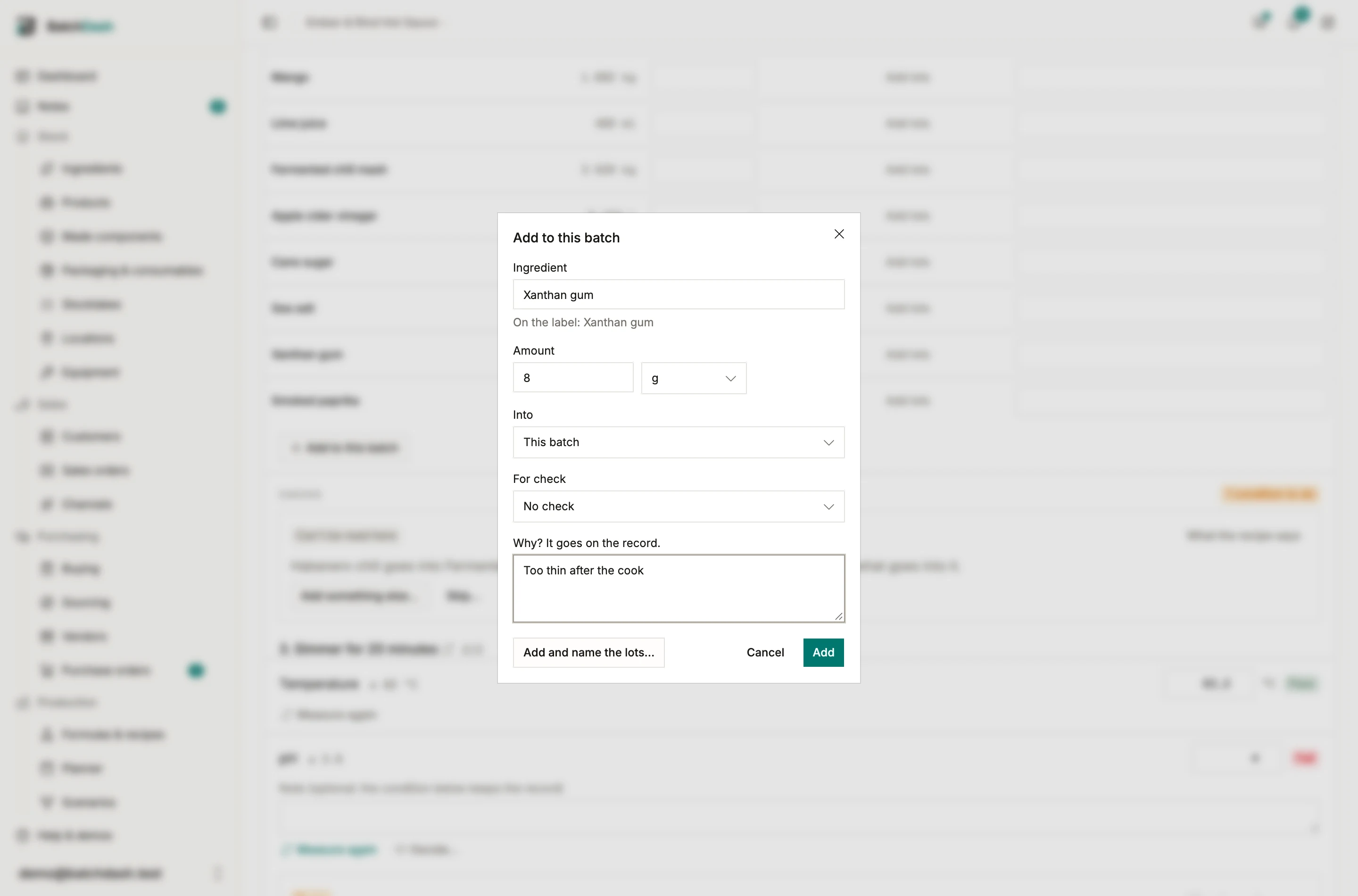
Add to this batch
Section titled “Add to this batch”Add to this batch, under What went in, records anything that went into the batch beyond its plan: an ingredient the recipe doesn’t use, or more of one it does. On a failed check, Add something… beside its note opens the same dialog with the check already picked, and Add something else… on a condition’s card does the same for the check it reads.
The dialog asks for:
- Ingredient, any of yours, with the On the label: line it will add;
- Amount, in any unit the ingredient is counted in;
- Into, when the batch makes a sub-batch: This batch, or the component made inside it;
- For check, the check it answers, or No check;
- Why? It goes on the record., which is required. Added from a check, the reason is saved as that check’s note too.
Before you save, the dialog warns you about three things. An ingredient bringing an allergen the recipe doesn’t declare says so, and Add waits for I’ve checked the label. Less on hand than the amount shows what is there, and you can still add it. A batch whose label is validated says “This batch’s label is validated. It will ask to be checked again.”
Add saves it. Add and name the lots… saves it and opens the lot picker. Once something was added for a failed check, the check’s field turns to a new, empty reading, because measuring again is what comes next.
Off-plan rows
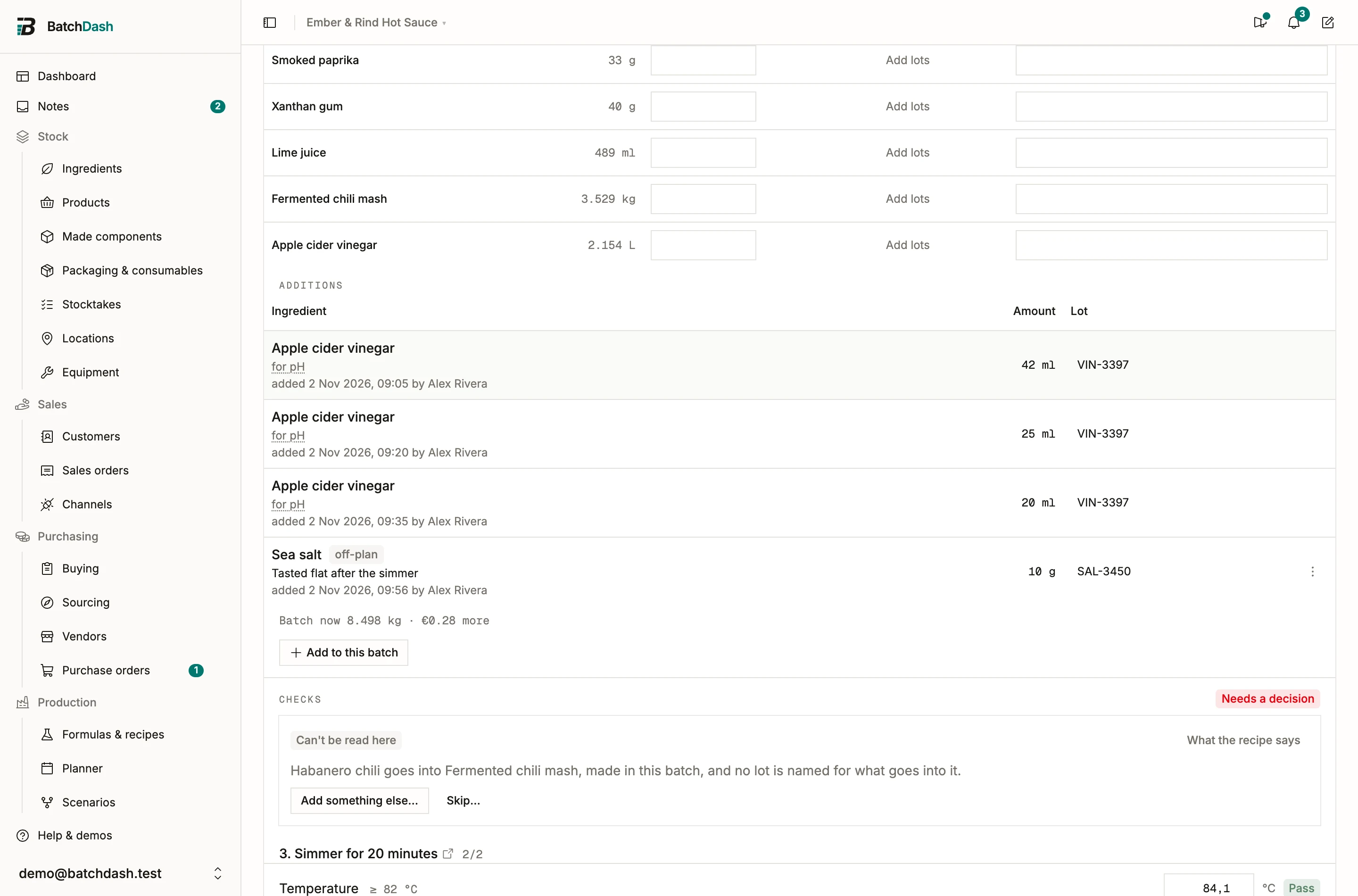
Section titled “Off-plan rows”Each addition has its own row under the planned lines, under Additions: what a condition’s passes added, and what you added by hand, marked off-plan. The row says what it was for (“for pH”, a link to the check), the reason, and when and by whom it was added. An off-plan row’s ⋮ menu offers Edit… and Remove until the batch completes. Removing one puts nothing back in stock, because nothing has left it yet.
Under the rows, “Batch now … · … more” gives the batch’s weight with its additions and what they add to its cost, the amount only for people allowed to see costs.
On RUN-000026, 10 g of sea salt went in off-plan while the batch waited on a decision: “Tasted flat after the simmer”.
Skip a condition
Section titled “Skip a condition”Skip… asks Why? (“pH meter broken, the lab took the reading”). The batch goes on without the condition, and the record shows who skipped it and why. Skipping a condition on a critical control point takes Decide on batches: without it, Skip… is unavailable and says so.
What the batch becomes
Section titled “What the batch becomes”An addition counts everywhere the planned lines count, even on a batch where nothing else was weighed:
- Stock. It leaves stock when the batch completes, in one movement with its ingredient’s line, from the lot you named or in the usual order. Revert completion returns it.
- Cost. It is priced at the ingredient’s weighted average cost on completion, like a line.
- Weight and yield. The batch weighs what went in, additions included, and its yield reads against that.
- The label. An addition is declared where it went, by its weight, and its allergens come with it. See label data.
- The trace. An addition’s named lot is an input of the batch, so a recall from that lot finds it. One with no lot named leaves the batch possible on that ingredient’s other deliveries. See trace.
- The record. The batch record keeps it all under Conditions and corrective actions: each check measured again or handled, its readings, what was added for it with the lots and the reason, the decisions, and the release.
- Test batches. A test batch that consumes no stock consumes none of its additions either, and still lists them on its page.
On a phone
Section titled “On a phone”The card’s next action is one full-width button. Record pass…, Add to this batch and Decide… open as sheets from the bottom of the screen, and they stay above the keyboard. A reading field opens the number keypad.
Who can do what
Section titled “Who can do what”Recording passes, additions and readings, and skipping a condition, take Edit on Runs. Skipping a condition on a critical control point, and a pass beyond the condition’s limits, also take Decide on batches.
When a check can’t be brought back, the batch needs a decision: see holding and releasing a batch. For what the record answers to, see corrective action.