
Planning a run
Planning a run answers two questions before you weigh anything: what exactly will this batch take, and do you have it in stock?
Create the run
Section titled “Create the run”- On the Runs page, click New run (or Run this recipe from the recipe itself).
- Pick the recipe and the version to run.
- Choose the kind: Test or Production. For a test run, tick Consume stock when completed if you want the trial to draw down inventory.
- Set the Target output and its unit. For a portion-based recipe, the field shows the equivalent mass. A recipe made in whole containers says so here too: ask for 10 portions of a quiche whose crust holds 8 and the field reads 10 portions is 1.25 batches, offering 8 portions and 16 portions. Click one, or plan the 10 anyway; see scaling rules.
- For a production run, choose the format under Produce as: a presentation such as a 250 ml jar, or Bulk component. Each presentation counts its own sellable units.
- Check the Reference. It is assigned from your organization’s pattern (RUN-000123 unless you changed the pattern); click Customize to type your own for this run. An organization that turned automatic references off types one here instead.
- Click Plan run.
With more than one location, the dialog asks where the batch is made, preset to your default: ingredients and components are drawn there and the output lot is booked there. You can change it while the run is planned.
A product’s replenishment rule can create the planned run for you; it lands in the list like any other, wearing a Planned by rule chip.
The bill of materials
Section titled “The bill of materials”The run page shows the Bill of materials: everything this batch needs. Each line shows Needed, On hand, Short, and Cost. Shortfalls are flagged as soon as the plan is computed, so you find out now rather than the morning you planned to produce.
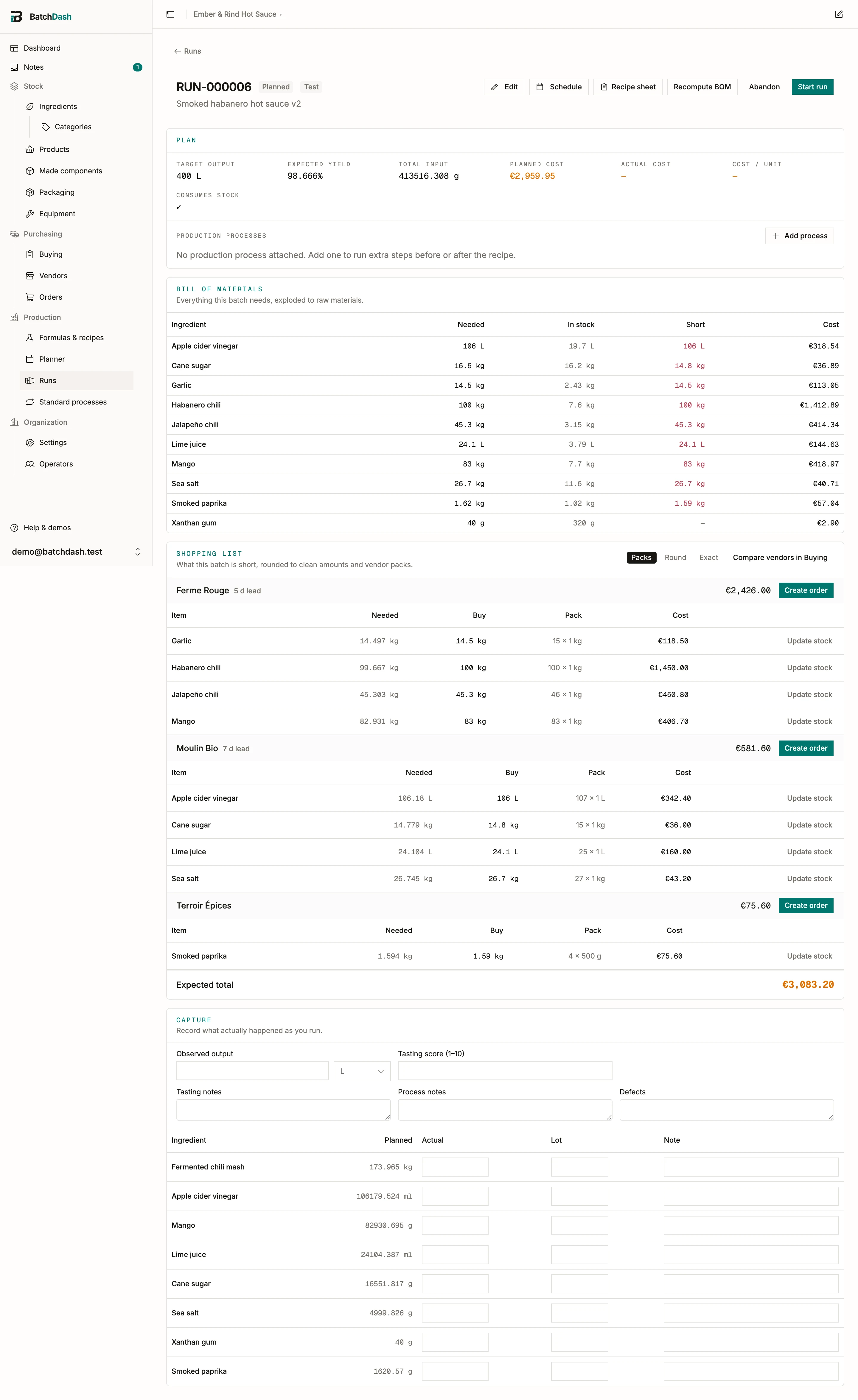
A component you already have is listed as itself, marked from stock, with the amount taken and what it cost. One that another batch is making for this one reads from RUN-000021, the batch’s reference, which opens it. Everything else is broken down to raw ingredients. So a batch that draws its fermented mash from the walk-in shows the mash, not the chilies and salt that went into it last month, and the shopping list stops asking you to buy them.
If your organization recorded what its scale reads (Weighing), every amount here is already rounded to that step, and the sheets ask for the same figures. A line too small to round safely is tagged Weigh precisely instead.
Variants made on the day
Section titled “Variants made on the day”A recipe that names pitted cherries, with not enough of them on the shelf, makes the rest from cherries when the pitted cherries are made from them. The Variants card says how: “500 g: 200 g from stock · make 300 g from Cherries”. In the bill of materials, the Cherries row comes first, tinted, with what it is for under its name: “to make 300 g of Cherries · Pitted”. When the yield has a range, the row adds what to have on hand for a poor lot, “353 g to cover a lot at 85 %”, and the Short column says so when the shelf holds enough for an average lot and not that one. Reservation, cost and the ledger read the expected figure. The final recipe sheet lists the operation: “Pitting: 341 g of Cherries → about 300 g of Cherries · Pitted”.
A variant that is usually bought, and has an offer to buy it from, is not made: its shortfall goes on the shopping list as it always did.
Another supplier’s variant standing in
Section titled “Another supplier’s variant standing in”Short of the shea butter a recipe names, the plan takes from another variant of the same ingredient when both are marked Interchangeable in recipes and the recipe line allows it. Each one is its own row: “Shea butter 300 g: 100 g from stock · take 200 g of Shea butter · Supplier B”, the notice above the table says “Shea butter took 200 g of Shea butter · Supplier B”, and the capture card asks what you weighed of each. The batch record and its label read what went in.
The Variants card is where you change that before the batch starts. Per line: let the plan decide, this variant only, take it all from one sibling, or make it all from the source. The recipe line’s own chip still rules what the plan may reach for: Any interchangeable variant (the default), This variant only, or Any variant, which widens to every variant of the ingredient, interchangeable or not.
A variant the named one is made from never stands in for it. The two are joined by a yield factor, so a gram of one is not a gram of the other, and the make step is what bridges them.
A variant whose allergens or INCI differ is never swapped in silently. The plan proposes it, marks the line Needs a decision, and says what differs: “Shea butter · Supplier B differs from Shea butter (allergens). Confirm on the Variants card.” The batch cannot be completed until you press Use Shea butter · Supplier B anyway or pick something else. Nutrition figures that differ are a note, not a decision.
With more than one location, a sibling whose stock sits in another room is still planned, and the card offers the move: “Move 200 g of Shea butter · Supplier B from Cold room to Kitchen for this batch.” Move it now books the transfer and plans again.
An ingredient that comes in fixed pieces rounds up to the next step whatever your scale says, because a whole egg is not divisible. A batch that works out at 0.6 of one asks for 1, the whole egg goes in, and the row is tagged whole pieces with the figure it came from. Nothing is written off; the batch is that much richer, and the run says how far whole pieces moved it off its target.
Components: from stock, from a planned batch, or made here
Section titled “Components: from stock, from a planned batch, or made here”When the recipe uses another of your recipes as an ingredient, a fermented mash or a base cream, the Components card says where this batch gets it. Each component reads as a short list: what the batch needs, then one line per source.
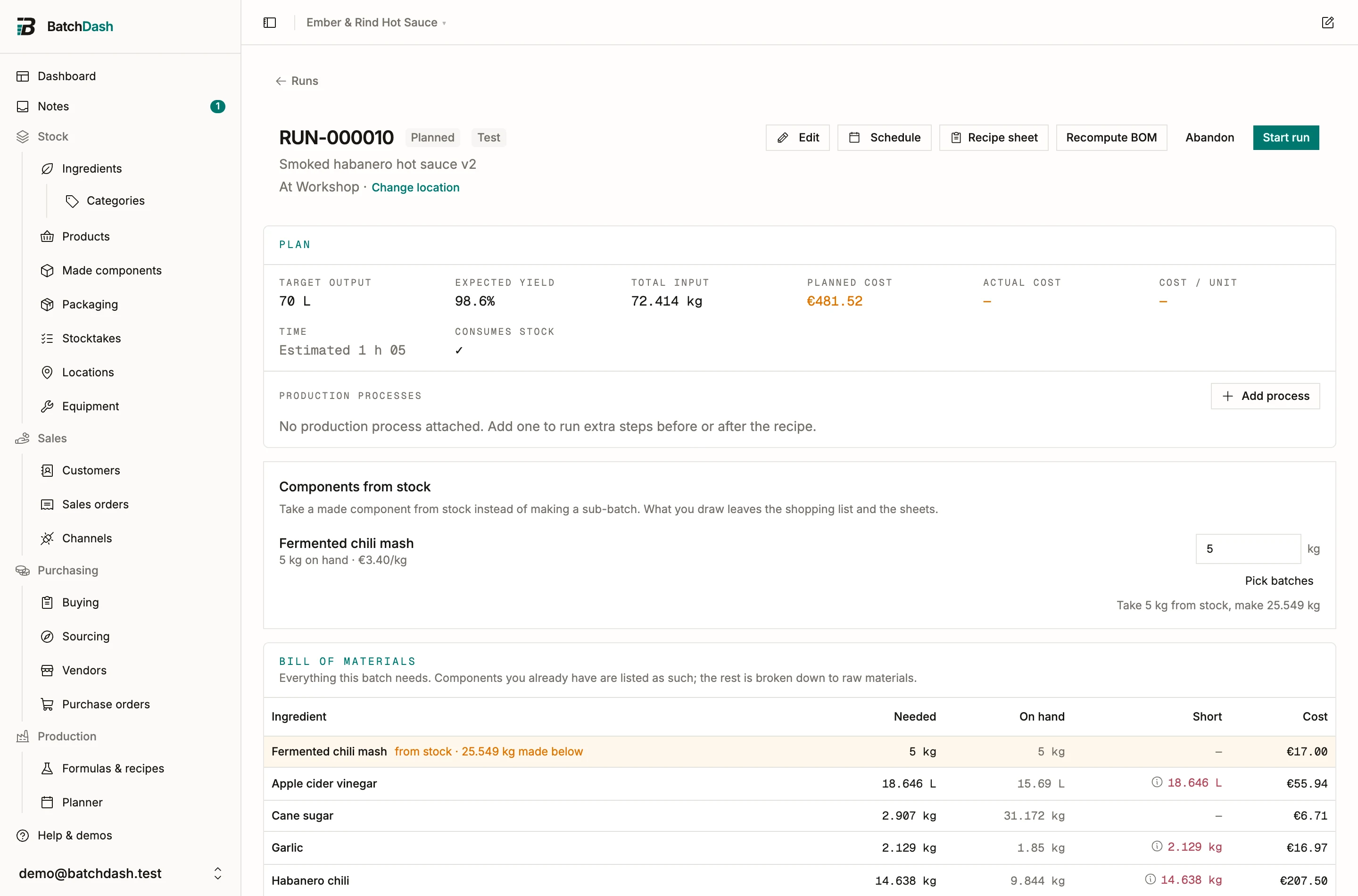
- From stock: “2 kg from stock: MASH-24-031”, the batches of it already on your shelves.
- From a planned batch: “6 kg from RUN-000021, ready Thu 8 Oct”, a batch of the mash that is planned or in progress and ready before this one starts. The reference opens it.
- Made here: “make 2 kg in this batch, which takes 10 d”. That is the Active time and the Wait time on the mash’s own steps, so you see at once when making it here would hold the batch up.
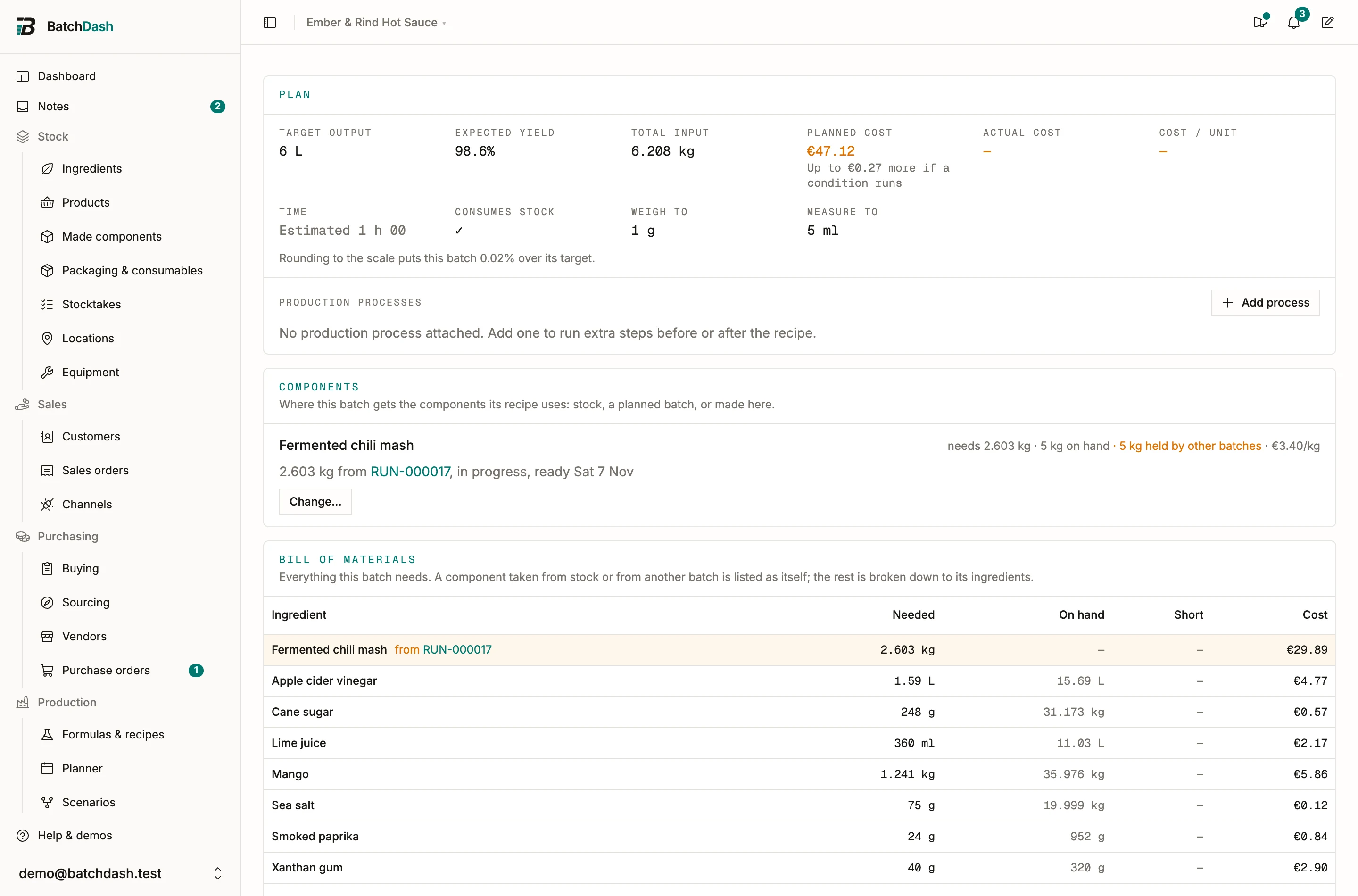
Whatever the batch takes, from the shelf or from another batch, drops out of its bill of materials, its shopping list and its sheets. The mash’s ingredients are counted on the batch that makes the mash, so the chilies are bought once. The shopping list says where they went: “Fermented chili mash comes from RUN-000021: its ingredients are on that batch’s list.” The sheet for the mash says Made elsewhere with what it still makes itself, and why it makes less than the recipe asks.
The plan chooses, and keeps choosing
Section titled “The plan chooses, and keeps choosing”Nobody has to pick. For each component the plan takes stock first, then batches of the component that will be ready in time (one already in progress before one only planned, the soonest ready first), and makes the rest here. A batch with no date yet counts as in time. While this run has a date, the planner marks it At risk until the batch gets one.
A batch ready only after this run is never taken by the plan. This batch makes the component instead, and the card tells you the later batch exists, with the moves that would let the run take from it (see below).
The choice keeps up with the plan. Plan a batch of the mash and the planned runs it is ready for, which were making their own, take from it, as far as it goes; move that batch past one of them and that run makes its own again. A line you chose yourself keeps your choice. Whenever a change plans other runs again (a choice saved here, a new day for a batch, a new size, an abandoned batch), a message names them: “RUN-000016 was planned again to match.”
A planned batch can supply a run when it is a production batch of the same recipe, made in bulk for the same location. A batch made at another location is listed greyed, like stock sitting elsewhere. A batch being made into jars, or a test batch, supplies nobody.
Change where it comes from
Section titled “Change where it comes from”Change… under a component opens Where Fermented chili mash comes from, with what the plan chose already ticked.
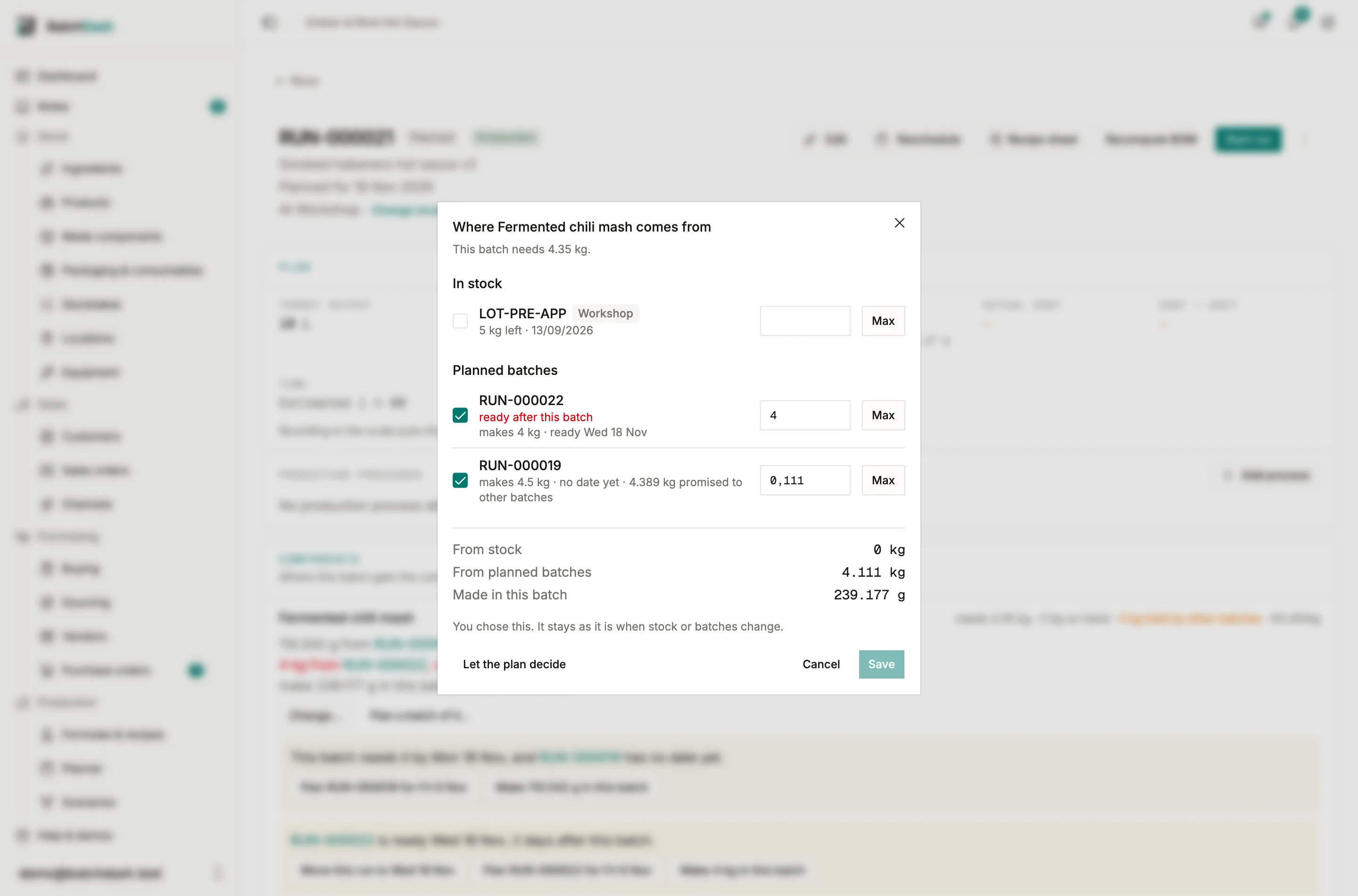
- In stock lists the batches on the shelf. Tick one and say how much of it; Max takes all of it, which is what you do with a nearly empty tub. Naming a tub is what lets the trace say which run used which one.
- Planned batches lists every batch of the component still being made, with what it makes and when it is ready (“in progress · makes 14 kg · ready Thu 8 Oct”) and what other runs already count on (“4 kg promised to other batches”). A batch that is “ready after this batch” or “expires before this batch” says so in red.
- Under them, the sums: From stock, From planned batches, Made in this batch, and Wasted when you take more than the batch needs. Made in this batch is worked out from the other two, since it is the figure the bill of materials is planned against.
Save stays off until you change something. Saved, the line says “You chose this. It stays as it is when stock or batches change.” A choice you made is never topped up behind your back: if a batch you picked ends up smaller, the line takes what it can and makes the rest. Let the plan decide hands the line back.
To make the whole component here although a batch of it exists, untick the batches and save. The plan leaves it that way.
On a planned run, Choose batches in a component line’s Lot cell opens the same dialog.
Plan a batch of it…
Section titled “Plan a batch of it…”While this run still makes some of a component, Plan a batch of it… plans a batch of that component for it, without leaving the page.
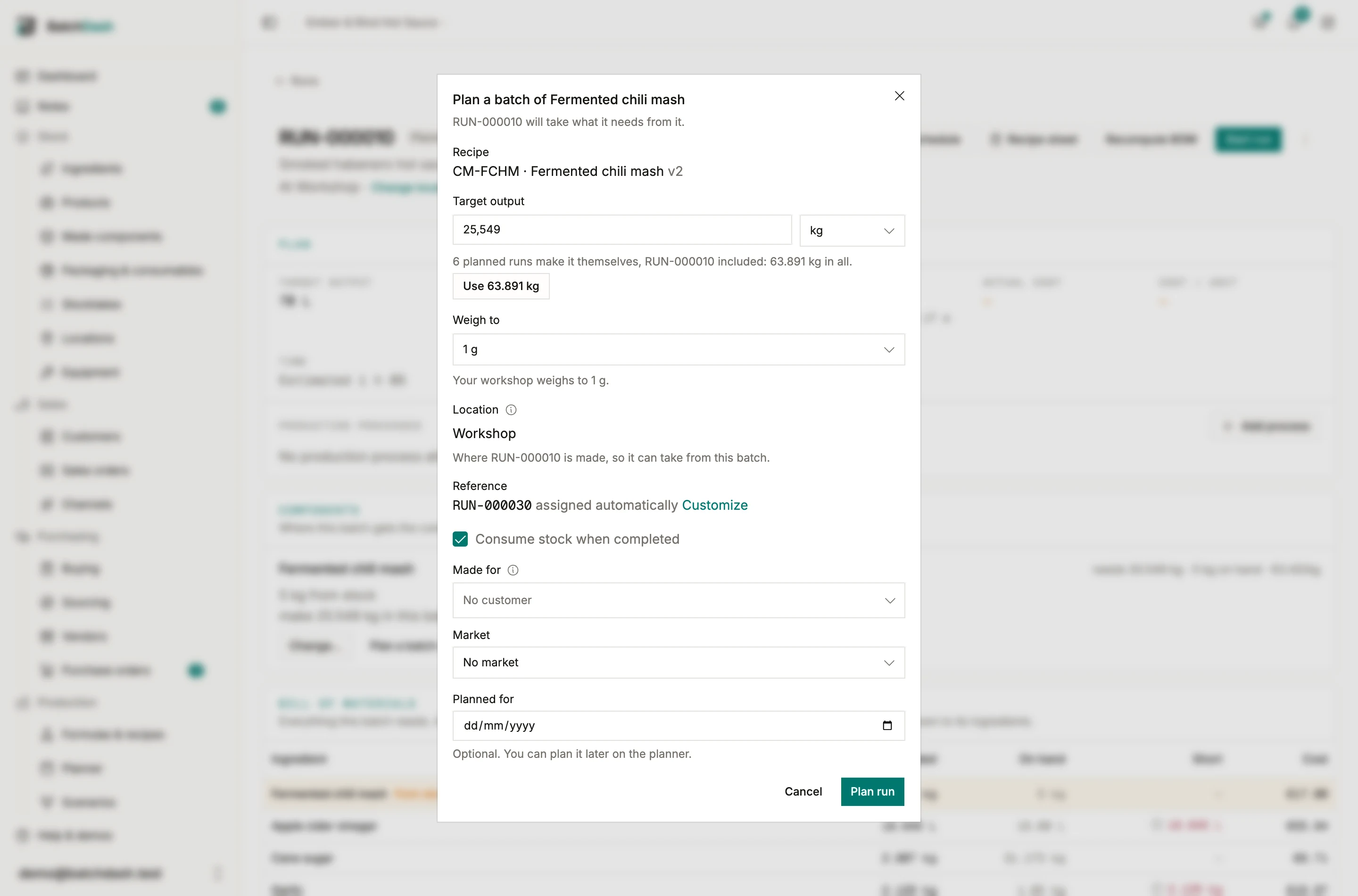
The dialog opens on the component’s recipe as a production batch in bulk, at this run’s location, sized to what this run still makes. When other planned runs make it themselves too, it offers their total: “3 planned runs make it themselves, RUN-000015 included: 14 kg in all.” Use 14 kg puts it in the size.
With the planner on, Planned for starts on the latest day the batch can start and still be ready, waits included, and says so under the date: “RUN-000015 needs it Mon 12 Oct: start by Fri 2 Oct at the latest.” A later day reads “Too late for RUN-000015”, with Use Fri 2 Oct to put the right one back. When no day is early enough any more, it says that too.
Plan run creates the batch, and this run takes from it, as does any other run it can supply. The message names them, “RUN-000040 planned. RUN-000015, RUN-000016 take from it.”, and Open goes to the new batch.
When the days do not line up
Section titled “When the days do not line up”The card checks every batch the run takes from against the run’s day. When something is off, a sentence says what, and the fixes sit right under it. Each fix is one click, and its message carries Undo.
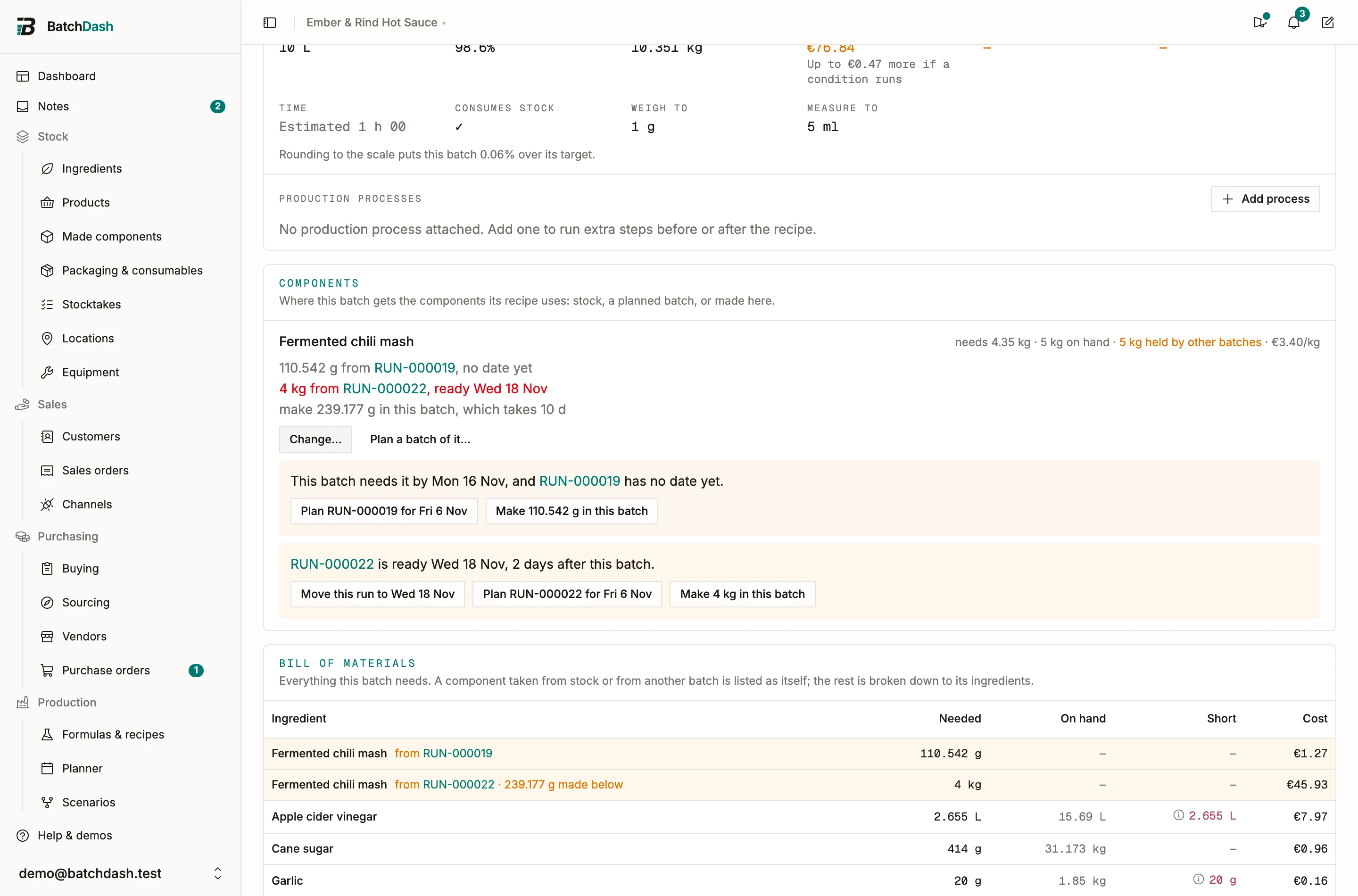
| What the card says | The fixes |
|---|---|
| “RUN-000021 is ready Wed 14 Oct, 2 days after this batch.” | Move this run to Wed 14 Oct, Plan RUN-000021 for Fri 2 Oct, Make 6 kg in this batch |
| “This batch needs it by Mon 12 Oct, and RUN-000021 has no date yet.” | Plan RUN-000021 for Fri 2 Oct, Make 6 kg in this batch |
| “What RUN-000021 makes expires Sun 11 Oct, before this batch.” | Make 6 kg in this batch |
| “RUN-000021 makes it too, but is ready only Tue 20 Oct, after this batch.” | Move this run to Tue 20 Oct, Plan RUN-000021 for Thu 8 Oct |
| “RUN-000021 is ready Thu 8 Oct, in time for this batch, with 4 kg still free.” | Take 4 kg from RUN-000021 |
The first one only happens on a choice you made, since the plan never takes a late batch itself. The last one is for a line you set to make the component here: a batch that is ready in time still has some to give, and taking it is one click. Taking one anyway is allowed: the run counts on it, and the planner marks it Short until the days line up. The moves are offered to people who can edit the planner, and a batch is only moved while it is still planned.
Once the run has started, the card says what is still to come: “RUN-000021 is not made yet. Complete it before this batch, which takes 6 kg from it.”
Stock and batches other runs have spoken for
Section titled “Stock and batches other runs have spoken for”Plan two runs against the same component and the first one holds what it took. The second reads needs 10 kg · 8.6 kg on hand · 1 kg held by other batches and will not plan against the kilo that is already promised. A planned batch works the same way: what one run counts on is promised to it, and the next run only sees what is still free.
The hold is a promise, not a movement: the tub is still physically on the shelf, and nothing leaves stock until a run completes. Abandon a run and its hold lifts on its own. Once a batch you count on is completed, what you counted on holds that batch’s lot, the way a tub you named does.
Drawing needs Consume stock when completed ticked. A run that consumes nothing makes everything, because nothing it does touches a shelf.
The shopping list
Section titled “The shopping list”Below the BOM, the Shopping list turns shortfalls into something you can buy. Pick a rounding policy: Exact (the raw shortfall), Round (clean amounts), or Packs (whole vendor packs, based on your vendor offers). Lines with an offer show the pack, the cost, and the lead time, and the list adds up to an expected total. From there:
- Create order builds a draft purchase order from the list.
- Update stock corrects an on-hand level when the shelf says otherwise. The list recalculates from it.
Items without a vendor offer still appear; buy those yourself, or add an offer to price them.
The list only shows while there is something left to buy. Once a shortfall is on an open order, its line leaves the list and the BOM row says so instead: 1 kg on order next to the Short column, in place of a red figure for stock that is already on its way. When everything is covered, the whole section disappears.
While the run is planned
Section titled “While the run is planned”Nothing is frozen yet. If you edit the recipe, receive a delivery, or change the target, click Recompute BOM to rebuild the plan from the current state of everything. The reference can still be corrected from Edit too. The snapshot and the reference only lock when you start the run.
A planned run is also where you attach a production process such as pasteurization, before or after the recipe.
Combining runs
Section titled “Combining runs”A replenishment rule plans one run per batch, so an order for 412 g of a 200 g quiche gives three runs. When you can make two in one go, combine them. From a planned run’s ⋮ menu, Combine with another run… opens one dialog: the run that gives, how much it moves, and the run that receives it. The planner’s Runs without a date tray offers Combine… beside a run that has a sibling, and dropping a run onto a day that already holds one of the same recipe offers it there.
Move All and the giving run closes as Combined, linked to the run that took it; its day, its orders and its notes follow. Move Half, or any amount you type, and both runs stay, the total unchanged. The dialog shows what each run becomes, how long each takes, and each person’s hours that day against their capacity, so you see the day fill before you commit. The button says what it will do: “Combine into RUN-000004”, “Move 100 g into RUN-000004”.
The other way round, Split into two runs… moves part of a run into a new one, with a day if you pick one. A run over the recipe’s most you can make in one go says so under its target, with Split it… right there.
Runs combine when they make the same recipe, into the same format, at the same place, and are still planned. A run with figures already recorded can give part of itself, never all of it.