
Currencies and exchange rates
Your books are in one currency. Your suppliers are not. BatchDash holds both facts at once: every average cost, batch cost, margin and report stays in your base currency, and an order printed in euros or dollars keeps the currency it was printed in, beside the rate it was converted at.
Nothing is ever converted twice, and nothing is revalued afterwards. What a crate cost the day it landed is what it cost.
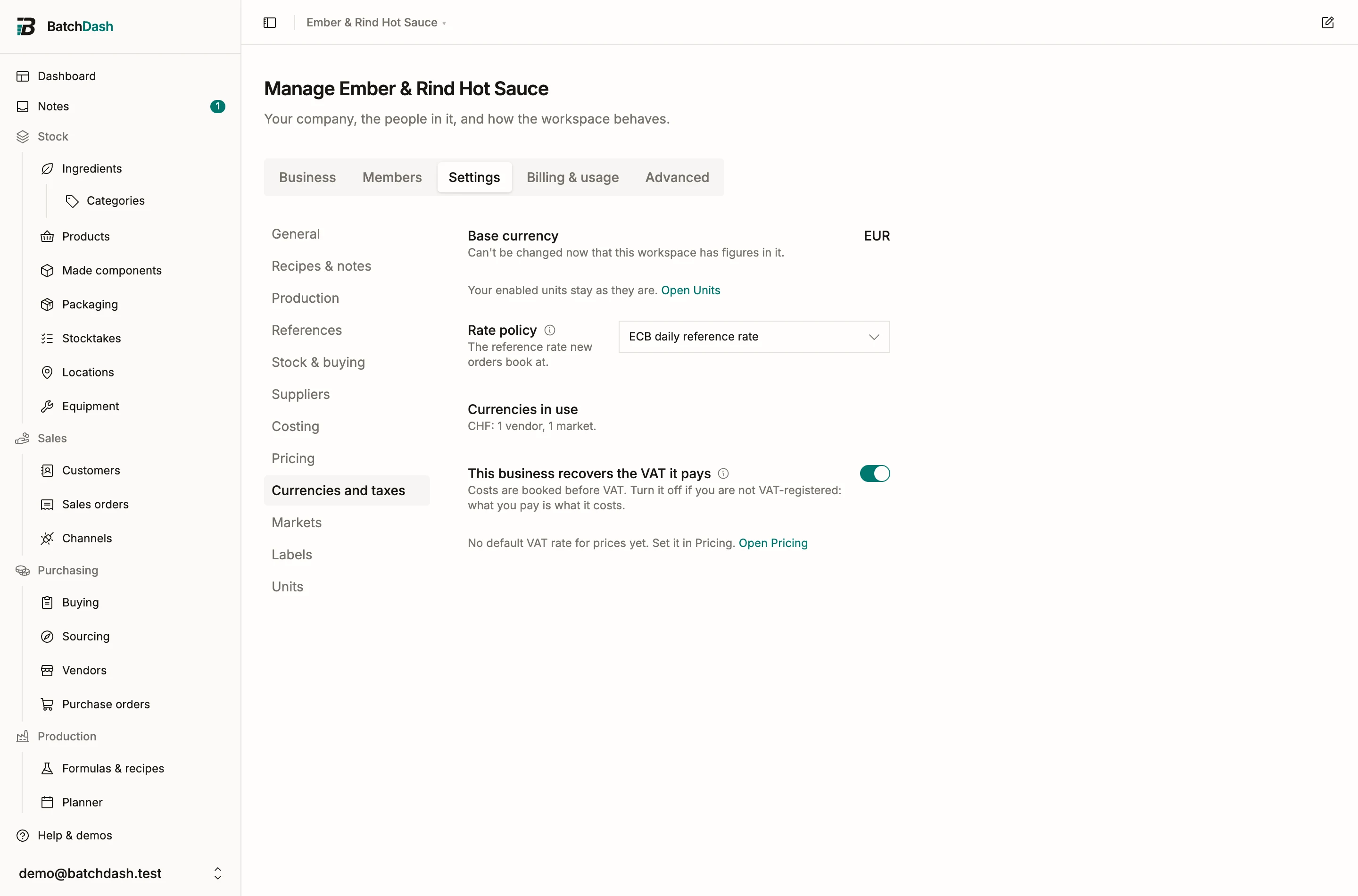
Your base currency
Section titled “Your base currency”Open Organization → Settings → Currencies and taxes. The first row is Base currency: the one currency every cost, margin and report is expressed in. You picked it when you created the workspace.
While the workspace holds no money, the row is a picker and you can still change it yourself. Saving asks you to confirm, naming both codes: “Every figure in this workspace will read CHF instead of EUR. Nothing is converted.” The vendors you already added invoice in the new currency from then on, and your enabled units stay as they are: the currency says nothing about whether you weigh in grams or in ounces.
Once the workspace holds money the row is plain text and says so: “Can’t be changed now that this workspace has figures in it.” Any one of these fixes it: a vendor offer, an equipment offer or a sourcing quote with a price, a purchase order, a sales order, a costed stock movement, an ingredient or product carrying an average cost, a stocktake line with a cost, a product price, an operator’s hourly rate, a piece of equipment’s purchase cost, a vendor’s delivery terms, your costing policy’s labor rate or overhead, a sourcing target, or a connected shop. Deleting those records later doesn’t undo it; disconnecting the shop does.
Changing the base currency converts nothing, so every figure already in the workspace would end up in the wrong currency. Support can relabel a workspace on a call, but only when the pick at signup was a slip.
The rate policy
Section titled “The rate policy”Rate policy says which published rate new orders book at by default.
- ECB daily reference rate, published by the European Central Bank on working days, for any base currency.
- Swiss FTA daily rate and Swiss FTA monthly average rate, published by the Swiss federal administration, offered when your base currency is the franc, because those feeds quote against it.
BatchDash fetches the table itself, every working day. You never type a reference rate and you cannot edit one: it is a published fact, and a fact you edited is not one.
Changing the policy is safe. Every order keeps the rate it was booked at, so nothing already recorded moves. What changes is the default the next order starts from. Tax authorities usually expect one method for a whole tax period, so pick one and leave it; check with your accountant which one your filings assume.
Currencies in use
Section titled “Currencies in use”Under the policy, one quiet line counts what your workspace actually buys and sells in: “CHF: 1 vendor, 1 market.” It says nothing when only your base currency is in use, which is the answer for most workspaces.
A vendor invoices in one currency
Section titled “A vendor invoices in one currency”Open a vendor and the Currency field sits right under its name, defaulting to your base currency, which also leads the list. The hint says what it decides: offers and orders from this vendor are typed in it. So are its delivery terms.
The field locks the moment the vendor has an offer or an order: “Fixed by 3 offers or orders”. A supplier who invoices you in two currencies is two suppliers in BatchDash, one per currency. Merging two vendors that invoice in different currencies is refused too.
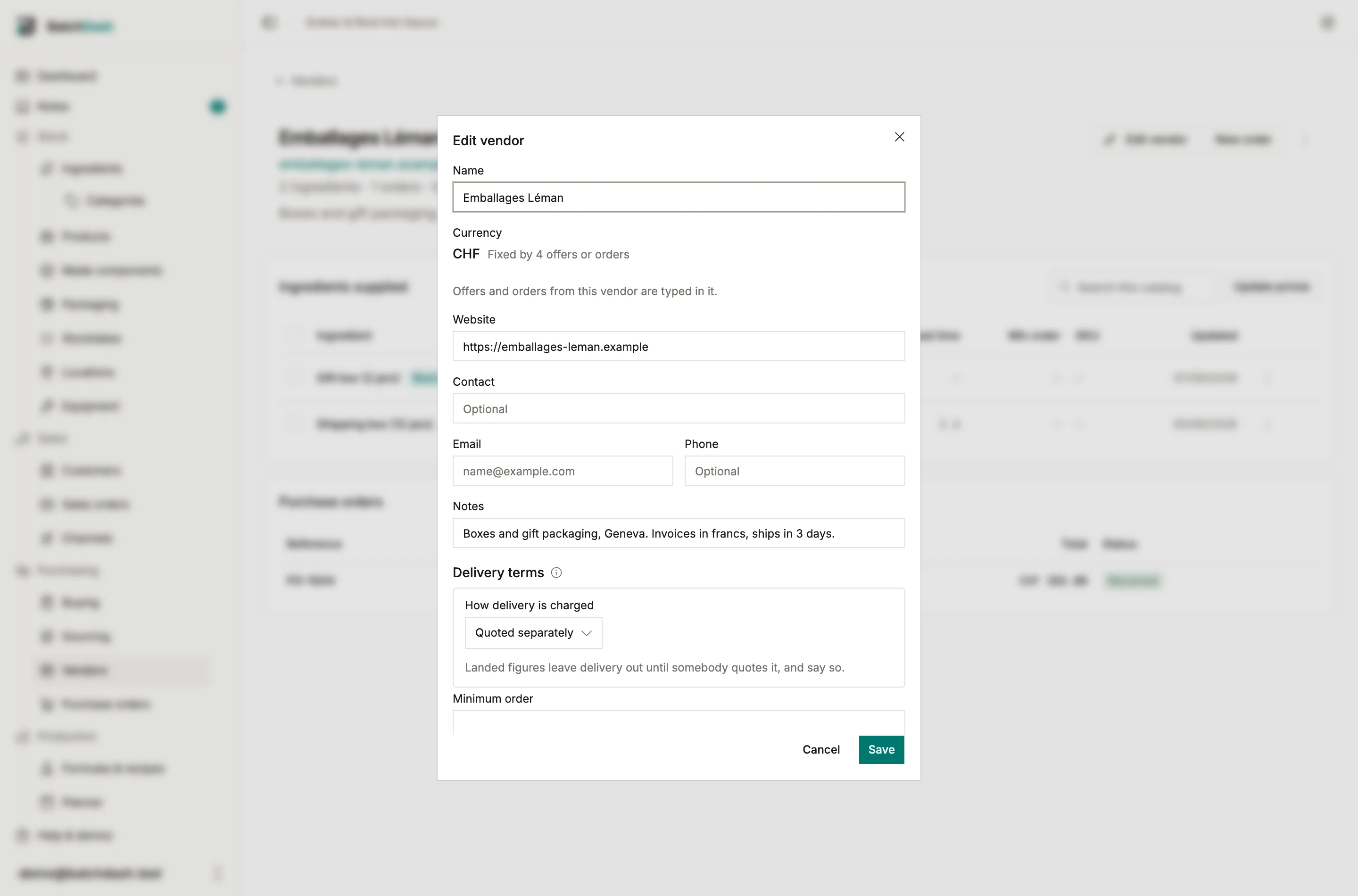
On the vendor’s page, the header says “Invoices in CHF” when it is not your base currency, and each offer shows the price the vendor quoted with your own reading under it: “CHF 1.10 / piece · ≈ €1.15 at today’s rate”.
At today’s rate
Section titled “At today’s rate”“At today’s rate” means the latest reference rate under your policy, used to put two offers in the same currency so you can compare them. It is never stored and never becomes a cost. You see it on the vendor page, on the ingredient’s offers card, in the Buying basket and on the planner’s shopping list.
The price history keeps what the vendor actually quoted, in the vendor’s own currency, because that is the record. Only the comparison is converted.
When no reference rate exists for a currency under your policy, the line says so instead of guessing: “No reference rate for USD under your rate policy.” A figure with no rate behind it reads as uncosted. Filing a dollar as a euro is exactly the mistake one currency per workspace existed to prevent.
An order carries its currency
Section titled “An order carries its currency”A new purchase order takes its vendor’s currency. You can change it while the draft has no lines, for the invoice that arrived in another currency; the moment a line exists the field reads “EUR · fixed by the lines” and stays there. Lines, fees and the VAT entry are all typed as the document prints them, and the order’s page and the orders list show the code beside the total when it is not your base currency. Purchase orders walks the same ground from the order’s side.
Booked at
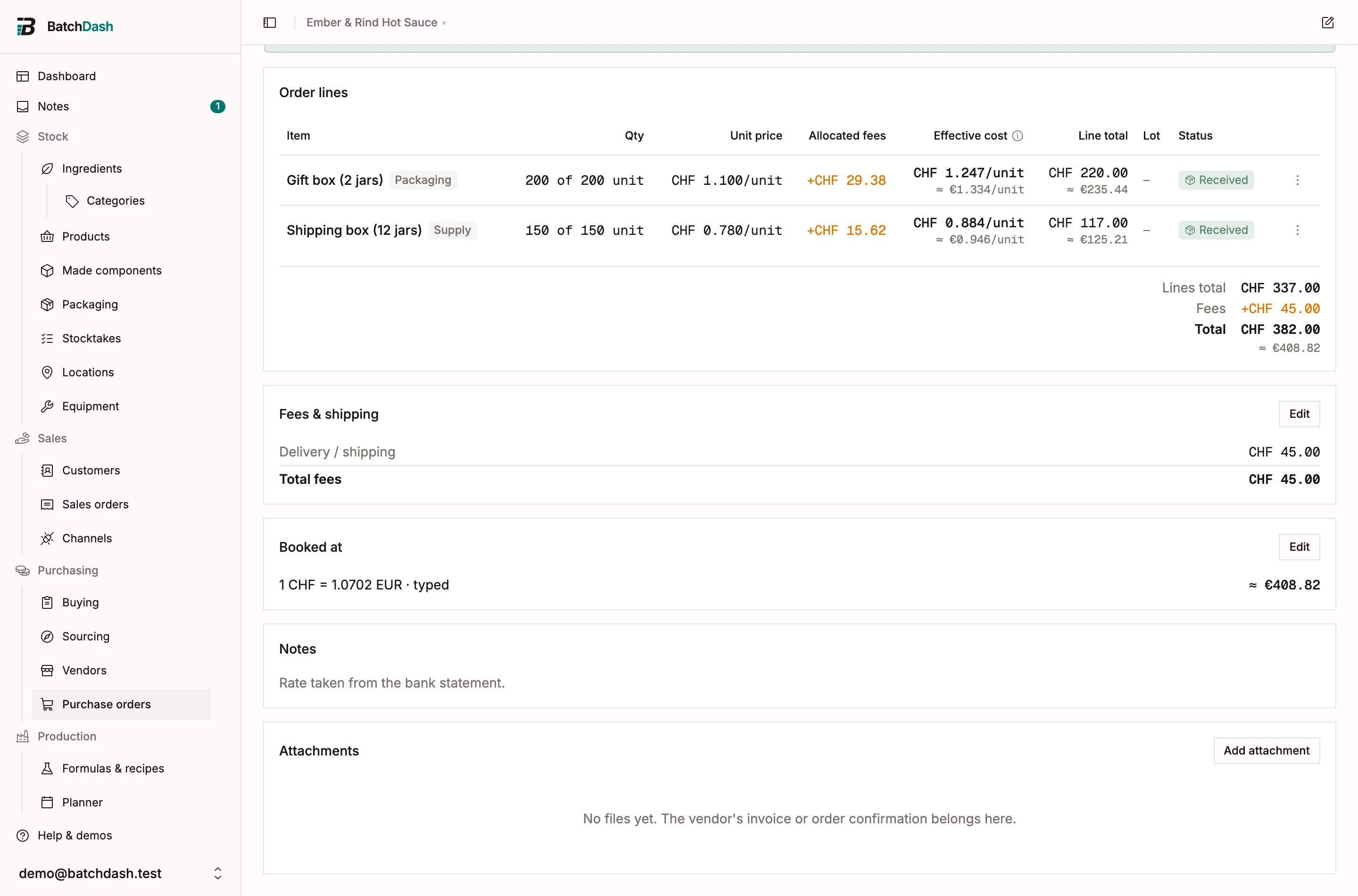
Section titled “Booked at”Under the totals of an order in another currency sits the Booked at card:
1 CHF = 1.049318 EUR · reference rate, ECB, 04/09/2026 ≈ €400.84
That is the whole conversion, visible and dated. A reference rate older than a week adds “(from 28/08/2026, stale)” and blocks nothing. No rate at all reads “No reference rate for CHF under your policy. Type one to receive this order.” and the Receive buttons are disabled with that reason until you set one.
The screenshot below is the same card on a workspace where the bank statement has already arrived and the rate was typed; a new order reads the reference line above.
The three ways to set a rate
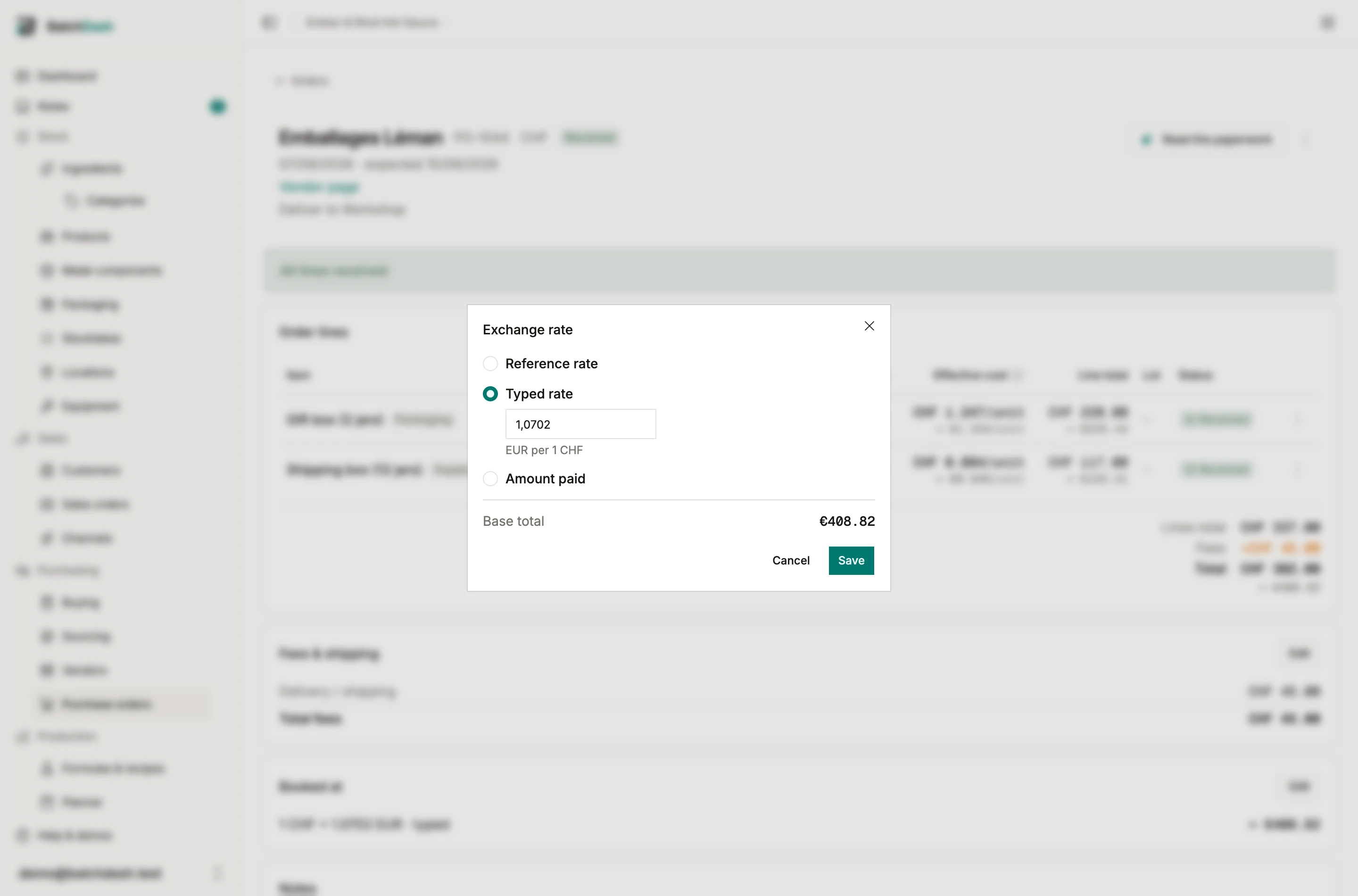
Section titled “The three ways to set a rate”Edit on the card opens Exchange rate, with three rows and the resulting base total under whichever you pick.
- Reference rate: the published figure for the order’s own date. This is what a new order starts with, and it is re-looked-up if you change the order date before anything has been received.
- Typed rate: a number you type, in base currency per one unit of the order currency. For the rate your bank quoted you, or the one your accountant told you to use.
- Amount paid: what the bank actually took, in your base currency, all its fees included. Type that and the rate is worked out from it, because what the bank took is the real figure. Each line’s share lands on your figure to the cent.
A worked example
Section titled “A worked example”A euro invoice reaching a Swiss maker’s workspace, whose books are in francs: lines 1,300.00 EUR, delivery 45.00 EUR, no VAT, since it is an export invoice. The reference rate is 1 EUR = 0.9412 CHF (ECB, 12 September 2026), so the order books at a base total of 1,265.91 CHF.
Three weeks later the bank statement says the transfer cost 1,271.30 CHF. Typed as the amount paid, the booked rate reads 1 EUR = 0.94520 CHF and every received line is restated, one correction row each.
Rates move, and the one in this example is the one published on that day. Which rate your own filings should use is a question for your accountant.
Changing the rate after a delivery
Section titled “Changing the rate after a delivery”Saving a new rate on an order whose lines have already arrived does what a corrected fee does: it re-costs every delivery booked against that order, replays each ingredient’s average cost, and leaves a line in the ledger under each delivery. The row reads “Cost restated €1.310/kg → €1.320/kg after the exchange rate changed.” It says who moved it and when.
Sealed batch records never recompute. A batch that was costed at what its ingredients cost that day keeps that figure, exactly as it does when a delivery fee is corrected. See fees and landed cost for the same mechanism on the fee side, and weighted average cost for what a restated delivery does to the average.
Logging a delivery from a foreign vendor
Section titled “Logging a delivery from a foreign vendor”Log delivery on an ingredient follows the vendor you pick: the price field wears that vendor’s symbol, and a line under it reads “Booked at today’s reference rate: 1 CHF = 1.049318 EUR. Change it on the order afterwards.” The one-line purchase order it writes carries the currency and the rate, so the conversion is on a document you can open and edit rather than buried in a stock movement.
A costed delivery straight off a foreign offer with no order behind it is not offered. Every conversion needs a document to live on.
What never happens
Section titled “What never happens”- Nothing is revalued. Stock is booked at the rate of the day it was bought and stays there. An unrealized gain or loss on a foreign invoice is your accountant’s entry to make.
- The app never assumes a rate of 1. A missing rate asks you for one.
- A rate is never money. Rates are shown to four to six figures; money is rounded once, to the cent, when it lands.
- VAT on what you buy: the printed VAT on an invoice, and what it does to your cost.
- Markets and VAT on sales orders: the countries you sell in.
- Organization settings: the rest of the Settings rail.