
Markets and VAT on sales orders
The same bottle carries 5.5% in France, 19% in Germany and 2.6% in Switzerland. The rate belongs to where the bottle is sold, so BatchDash puts it there: on the country.
A market is a country you sell in, with its currency and the VAT rate your products usually carry there. Customers belong to a market, orders open in one, and every line keeps the rate that applied the day it was added.
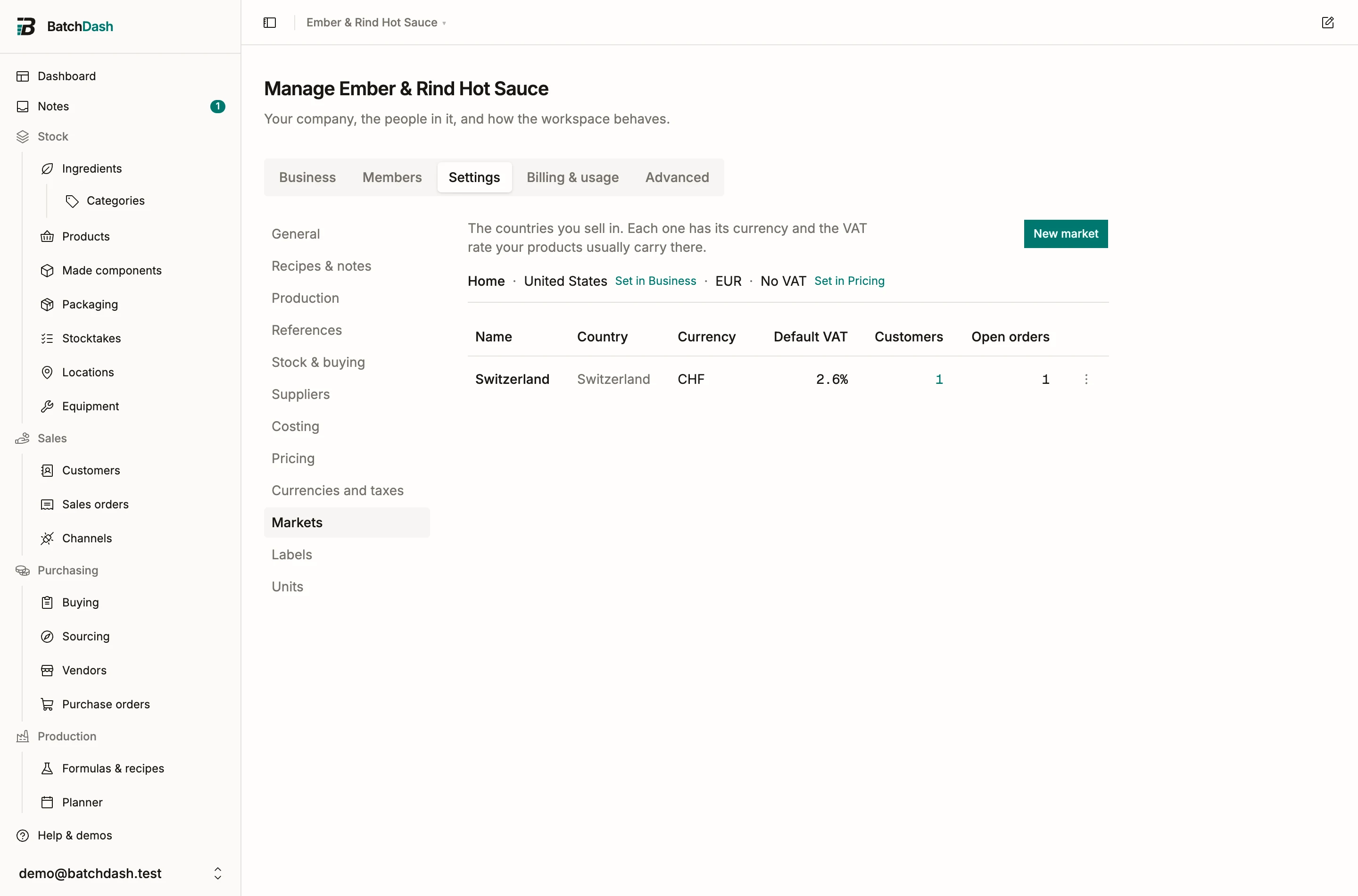
Home is already there
Section titled “Home is already there”Organization → Settings → Markets opens on a read-only Home row: your business country, your base currency, and the default VAT rate your prices assume. You do not create it and you cannot delete it. Each of its three figures links to where it is set: the country on the Business tab, the VAT rate under Pricing.
A workspace that sells in one country needs nothing else. Home is the answer.
Adding a country
Section titled “Adding a country”New market asks four things.
- Country, from the list. One market per country: a country that already has one is greyed out, and one you archived reads “(archived, use Restore)” instead of letting you make a second.
- Name, prefilled with the country’s name and editable, because “Germany” and “DE wholesale” are both reasonable labels.
- Currency, prefilled with the country’s usual one. It is locked to your base currency unless multiple currencies are on: “Your base currency. Turn on multiple currencies to sell in another.”
- Default VAT rate (%), or empty. Empty means “no VAT charged in this market”, which is the right answer for an exporter, and the table then reads No VAT on that row.
The table lists Name, Country, Currency, Default VAT, Customers and Open orders. Archive, in a market’s ⋮ menu, takes it out of the pickers and leaves it on every document that used it. While customers or open orders still point at it the item is greyed out, and the menu says why: “Still used by 3 customers and 1 open order.” The Customers count on the row opens the customers list filtered to that market, which is where you move them. An archived market comes back with Restore, in the same menu.
Rates change, and a rate that is right today may not be right next year. Set them from what your accountant tells you, and check with them before you change one.
A customer belongs to a market
Section titled “A customer belongs to a market”The Market select sits on the new-customer and edit-customer dialogs, under the wholesale switch, defaulting to Home. The customers list shows the market as a small badge when it is not home, and once you have two markets the filter pills gain one per market.
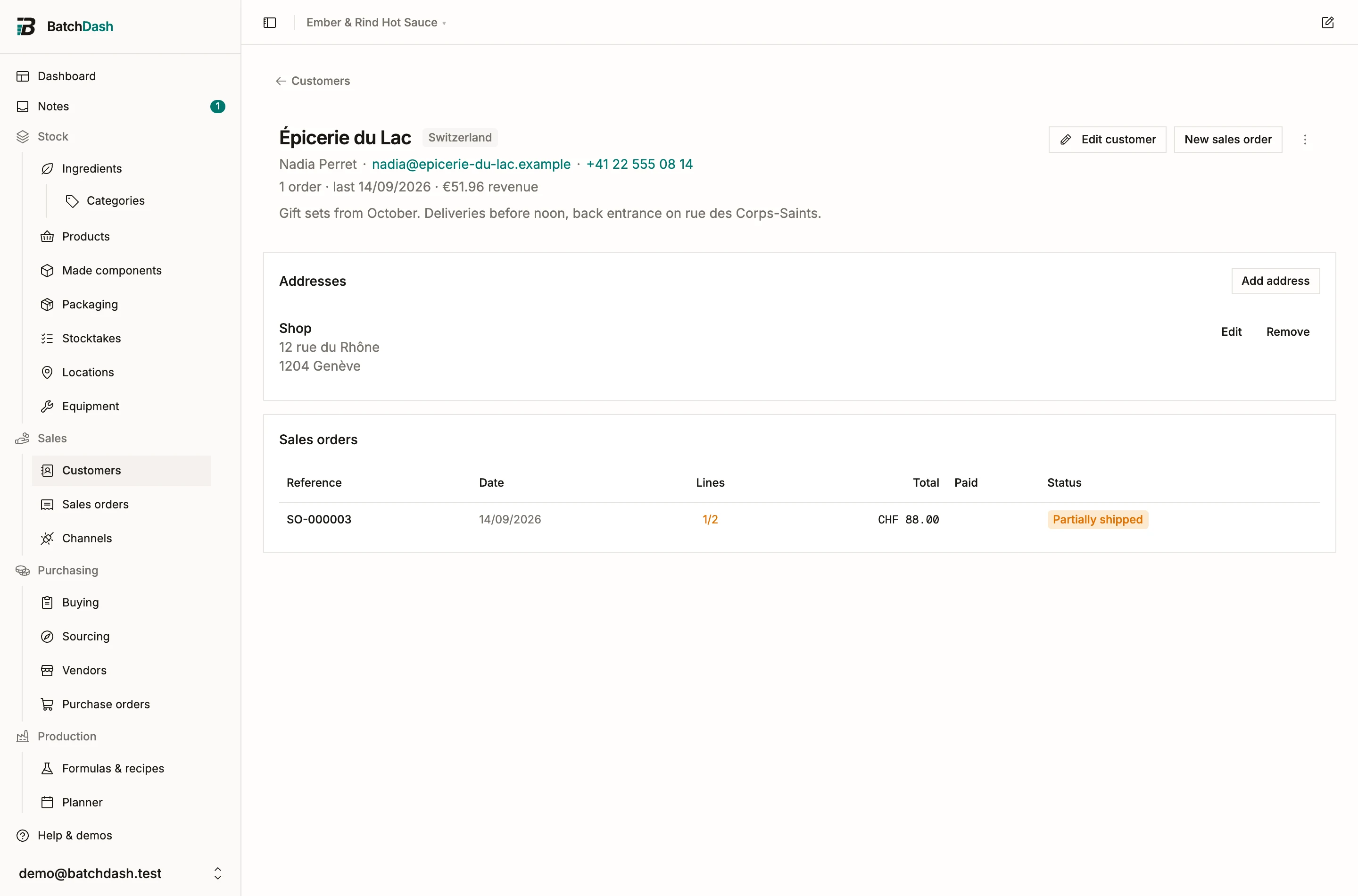
The customers CSV export carries a market column holding the country code, and the importer reads it back.
A sales order opens in a market
Section titled “A sales order opens in a market”New sales order shows a Market select under the customer, prefilled from the customer, Home for a walk-in with no customer. The market decides the order’s currency, and it locks once a priced line exists: “Switzerland · fixed by the lines”.
Under the two price boxes in the line dialog, one line says which rate that line will carry and where it came from:
- “VAT 2.6% (Switzerland market)” for the market’s own default;
- “VAT 20%, set on this product” when the product overrides it on your home shelf;
- “VAT 5.5% (your default)” from your pricing settings.
Change beside it reveals a rate field for this line alone, for the one product that is taxed differently.
Whatever the line ends up with is stamped on it. Raise a market’s default next spring and every order already written keeps its own figures, because a document you have sent is a fact, and it stays one.
The totals
Section titled “The totals”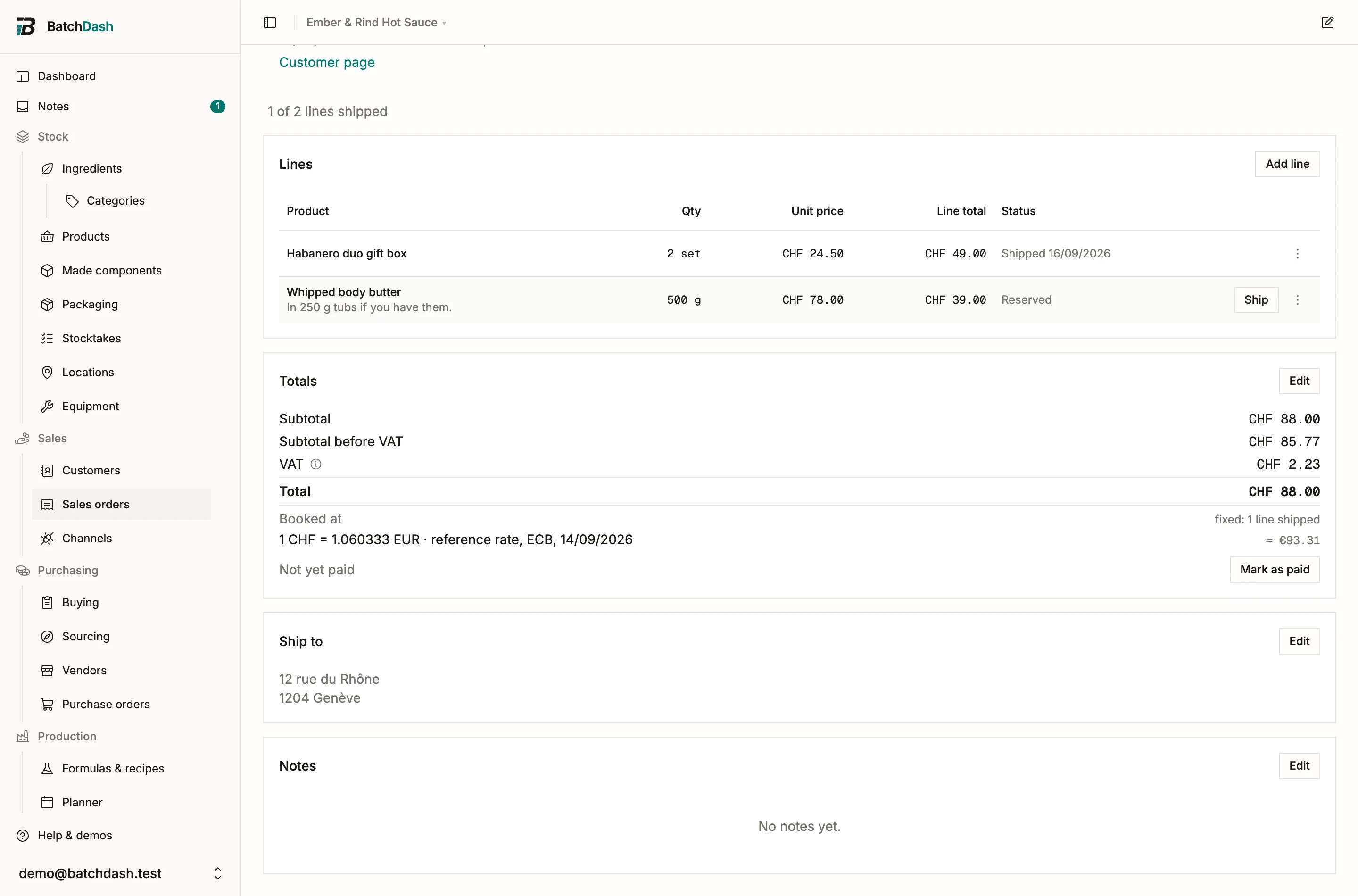
Once a line carries a rate, the totals card adds Subtotal before VAT and VAT above Discount, Shipping charged and Total. The two rows are absent when no line on the order carries a rate, and the total is then exactly the number it has always been.
How each line splits follows what you typed, which follows who is buying. The line dialog says which under its price boxes, incl. VAT or before VAT:
- A retail line is typed with VAT included, because that is the price on the shelf. Net is the typed price divided by one plus the rate.
- A wholesale line is typed before VAT, because that is what an invoice to a shop says. VAT is the rate applied on top.
A worked example. A French retail sale from a Swiss maker’s workspace: the France market is in euros at 5.5%, one line typed 4.64 EUR, the customer is not a wholesale customer. Net is 4.40, VAT is 0.24. The order books at 1 EUR = 0.9412 CHF, so 4.37 CHF of revenue lands on the ledger. Those are the rates that applied on that day; yours are a question for your accountant.
The order discount comes off the total after VAT. It is an amount off the whole order, so there is no single line to take it out of.
Booked at, on a sales order
Section titled “Booked at, on a sales order”When the market’s currency is not your base currency, a Booked at row sits under the total: the rate, where it came from, the day, and what the order comes to in your own currency. Edit offers the same three ways as a purchase order, with Amount received in place of Amount paid: what the bank actually credited you.
It stays editable until the first line ships. After that it reads “fixed: 1 line shipped”, because revenue already on the ledger is not re-booked. Ship with no rate on file and the button is disabled with the reason, exactly as Receive is on the buying side.
What this is not
Section titled “What this is not”Markets record where you sell and what rate you charged. They do not register you anywhere, do not decide whether you owe VAT in a country, and know nothing about OSS, IOSS or distance-selling thresholds. A market’s rate is a number you type after your accountant told you which one.
Per-market prices are not here yet: a product’s retail and wholesale prices are home-market figures, so a line in another currency is typed rather than prefilled. From the second order on, the last price you agreed with that customer in that currency is one tap away under the field.
- Sales orders: the document itself.
- Customers: who the orders are for.
- Currencies and exchange rates: the rate side of it.
- Pricing a product: where the home VAT rate comes from.