
Stock without a batch record
Not every lot on your shelf has a batch or a delivery behind it in BatchDash. Some were there before you started; some you made on a day nobody opened a run. Add stock puts them in, lot by lot, and every ledger says what stands behind them: nothing on file.
Where to find it
Section titled “Where to find it”- On a product: Add stock on the lots card, or in More actions on the page’s header.
- On a component: Add stock on its ledger card.
- On an ingredient: in the ⋮ menu on the ingredient’s page.
- On a packaging item: Add stock on its ledger card.
- For a component that has no stock line yet: Add stock… on the standard process that makes it.
For a whole shelf at once, the opening stock import takes a file, one row per lot.
Add stock never takes packaging from stock. A product whose recipe is not written yet records each new batch with Record a production instead, which does (a product before its recipe).
What you type
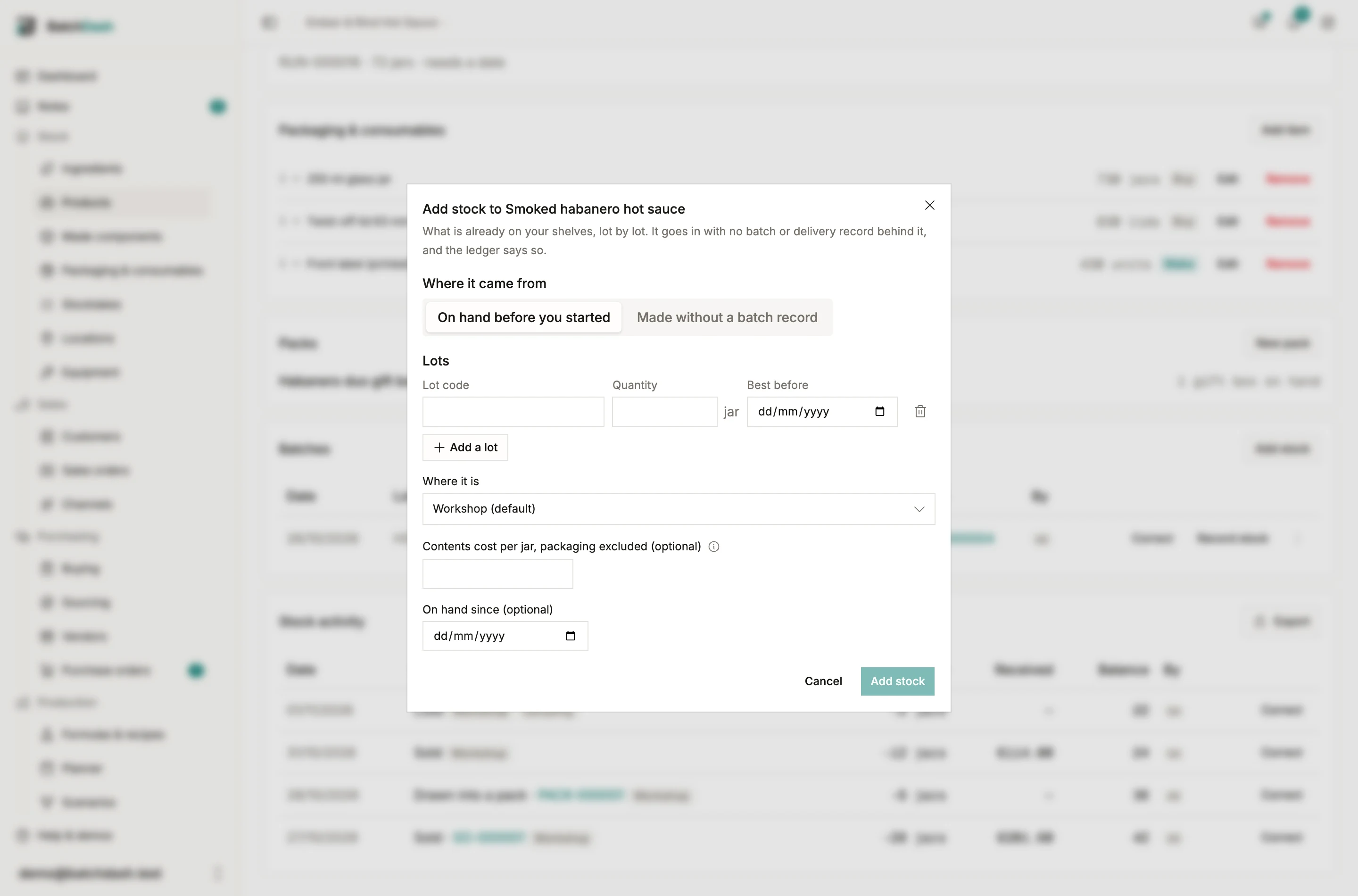
Section titled “What you type”- Where it came from, on a product or a component: On hand before you started, or Made without a batch record. An ingredient and a packaging item are always the first.
- Lots: one row each, with its lot code, its best-before and its quantity, up to twenty at a time. The total reads under them.
- Where it is, when your stock sits in more than one place.
- The cost, optional: per unit, or per kilo or liter for an item counted in grams or milliliters.
- On hand since, optional: the day it was already there. It can go back in time, never forward.
A lot code already open on the same item asks before it goes in: two lots can share a code, one lot split across two places or a supplier who used the code twice. Keep both under this code books it; each lot keeps its own quantity.
How it reads afterwards
Section titled “How it reads afterwards”| Where it came from | Label on the lot and in the movements | What the trace says |
|---|---|---|
| On hand before you started | Opening stock | On hand since that day. No batch or delivery record sits behind it |
| Made without a batch record | No batch record | Made on that day, its inputs not recorded |
Such a lot sells, moves, gets counted and gets recalled like any other. The trace starts at the lot: there is nothing further back to show.
What a blank cost means
Section titled “What a blank cost means”Leave the cost blank if you do not know it. The stock goes in uncosted and stays flagged until something gives it a cost, and it is never counted as zero in an average. Type 0 only if it cost nothing. A backdated entry replays the average cost from that day, the way a backdated delivery does.
What it never does
Section titled “What it never does”It records no batch, consumes no ingredient and draws on no stock. Stock you buy ready-made comes in with a delivery instead, so its lot knows its vendor and its order.