
Custom units
You buy habaneros by the crate and count jars by the case, but the built-in unit list stops at grams, liters and pieces. Custom units let you measure in the words your workshop actually uses. Both unit sections live under Manage organization → Settings → Units. Custom units are part of the larger plans.
Choosing the built-in units
Section titled “Choosing the built-in units”The Units section lists every built-in unit: metric and imperial mass, volumes, kitchen measures, count. Tick the ones your team measures in; exactly those appear in every unit dropdown across the app. Keep at least one mass unit and one volume unit enabled. Turning a unit off only hides it from pickers: amounts already recorded in it keep working.
Defining a custom unit
Section titled “Defining a custom unit”Under Custom units, press Add unit and fill four things, two of them optional:
- Name: what pickers show, e.g. “Case”.
- Short name (optional): the compact form shown next to numbers, e.g. “cs”.
- Plural (optional): how it reads after any number but one, e.g. “loaves” or “cases of 12”. Left empty, a one-word name takes the regular plural (“jar” reads “jars”) and a short name stays as written, like “kg”. See plurals below.
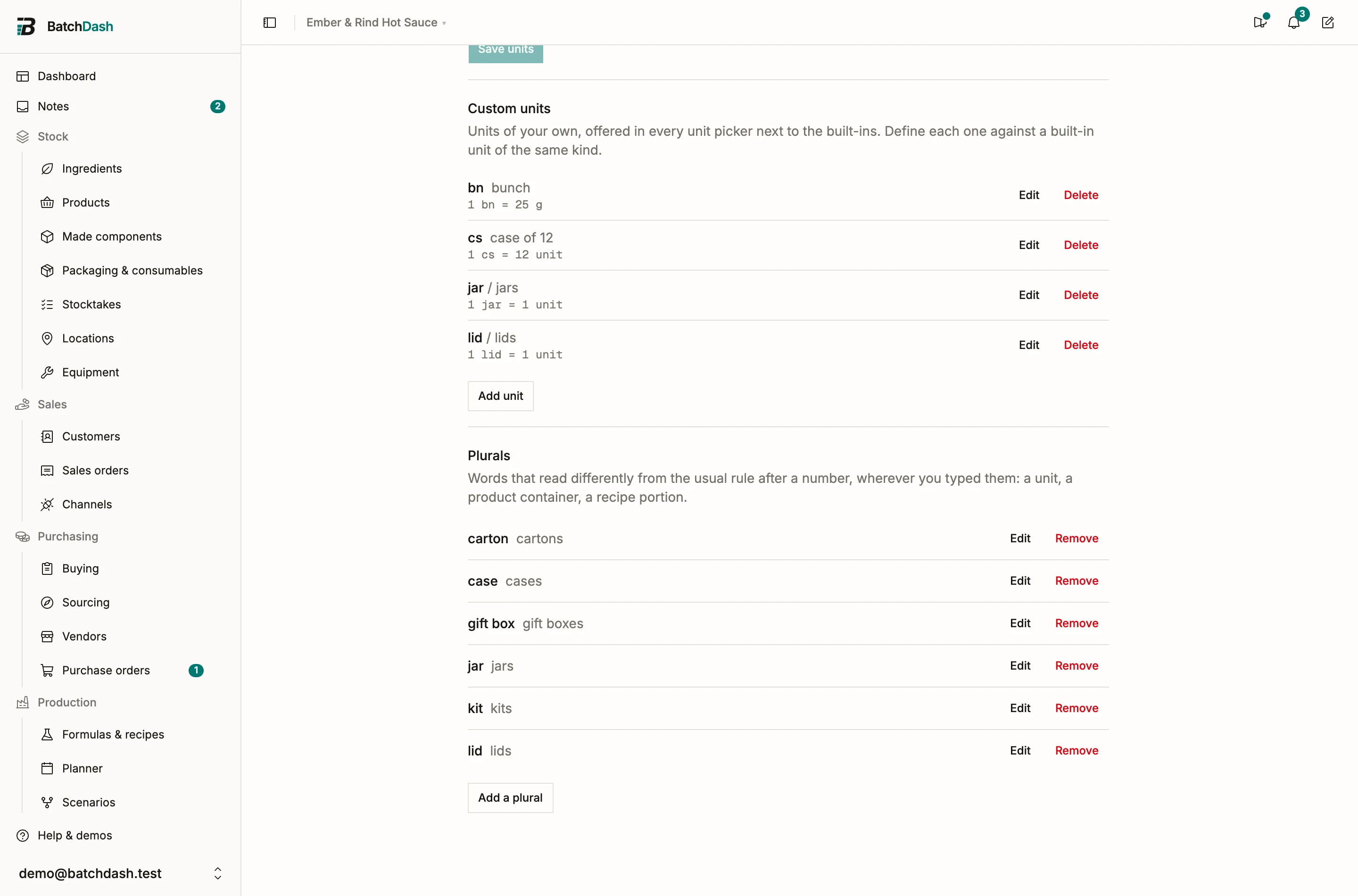
- Equivalency: what one of it equals, expressed in a built-in unit or in another custom unit. 1 Case = 12 units. 1 Bunch = 25 g.
The equivalency is the whole definition. Amounts entered in the unit convert through it: order 3 cases and BatchDash counts 36 units; weigh out 2 bunches of coriander and the recipe math sees 50 g. Since formulas compute in grams under the hood, a mass equivalency plugs your unit straight into costing; see mass-based formulas.
Where custom units appear
Section titled “Where custom units appear”Everywhere units are picked: an ingredient’s unit, order lines, vendor offers, recipe lines. They sit in the picker next to the built-ins, grouped under “Custom units”.
A unit worth exactly one piece (1 jar = 1 unit) is another name for a piece, so an item stocked in it is counted like one in Units / Pieces: whole pieces, a piece weight, and amounts that read “800 jars”. See ingredients you count.
Plurals
Section titled “Plurals”A word that follows a number takes the plural of its language: “3 jars”, “3 bocaux”. When the rule gets a word wrong, say how it reads. Every field where such a word is typed has a Plural box beside it: a custom unit, a product’s format (“bottle”), a recipe’s portion (“loaf”). Left empty, the box shows what the rule would give, and a preview reads “1 loaf · 2 loaves”.
A plural belongs to the word itself, wherever you typed it: “loaf → loaves” set on a recipe also reads on a product sold by the loaf. Plurals, at the end of the Units section, lists every word you gave one. Correct one there, add one for a word typed somewhere without a box, or remove one you no longer use; removing it only changes how the word reads.
In English a word takes the plural after any number but one (“0 loaves”, “1.5 loaves”). In French it takes it from two up (“1,5 bocal”).
Editing and deleting
Section titled “Editing and deleting”Edit a unit to change its name or equivalency. The plural can change at any time, even while the unit is in use, because it only changes how amounts read. Stored amounts always convert through the current equivalency, so adjusting it re-reads history too; correct a wrong definition early. Deleting is refused while ingredients or recipes still measure in the unit: change their unit first, then delete.
Custom units are workspace-wide. For a conversion that only makes sense on one ingredient (“1 clove = 5 g”, true of garlic only), use an ingredient equivalency instead.