
Conditional steps
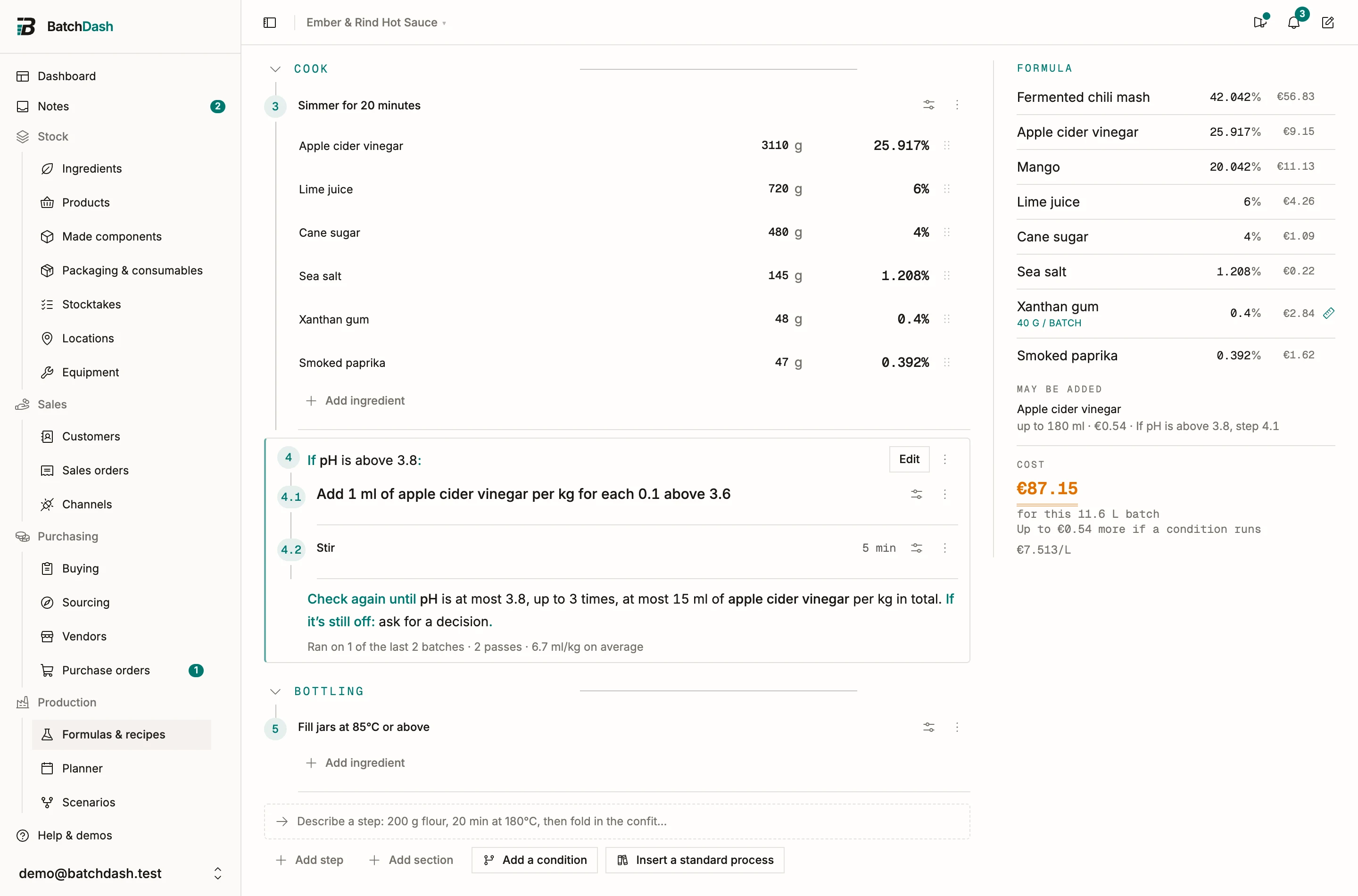
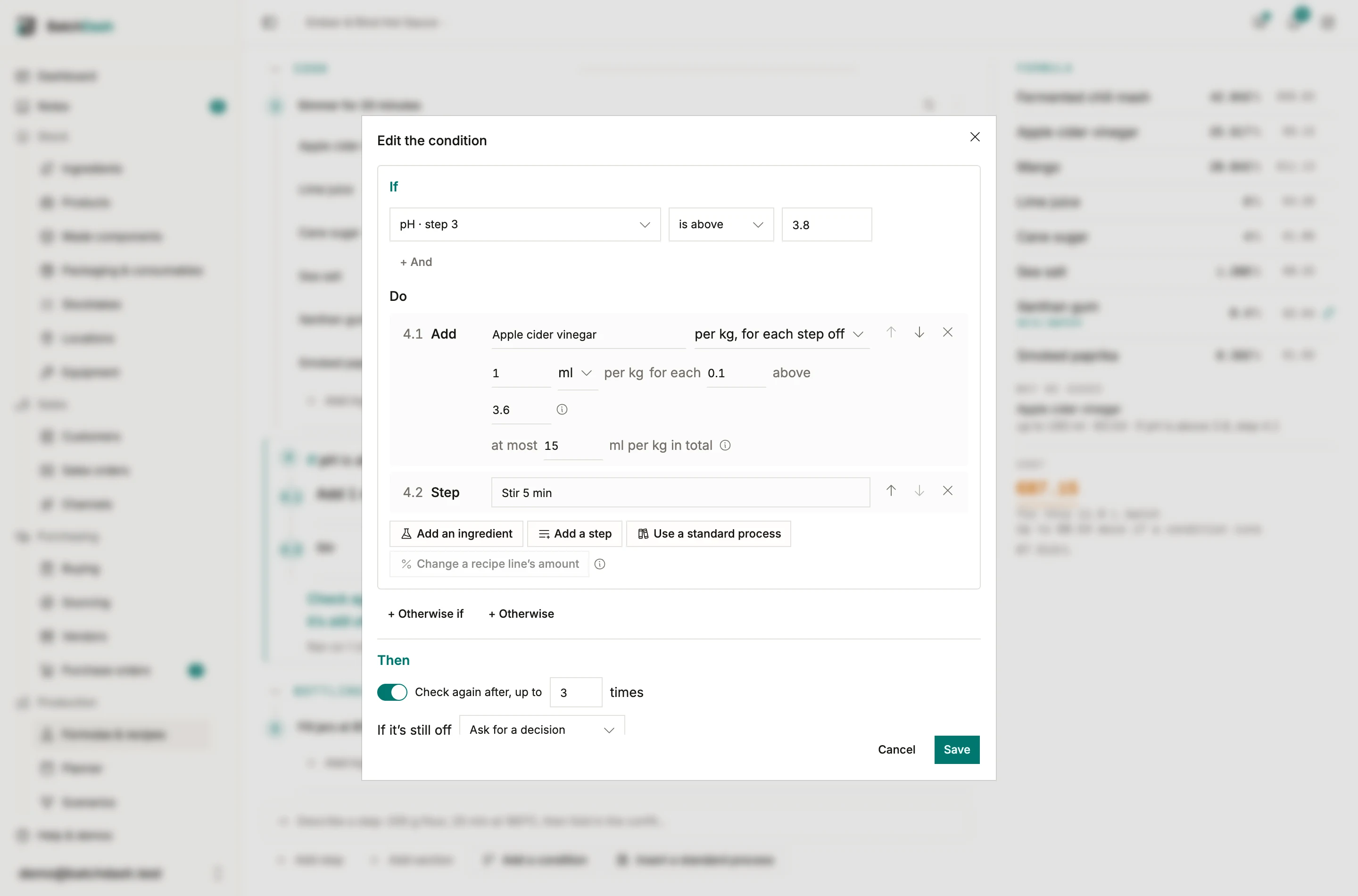
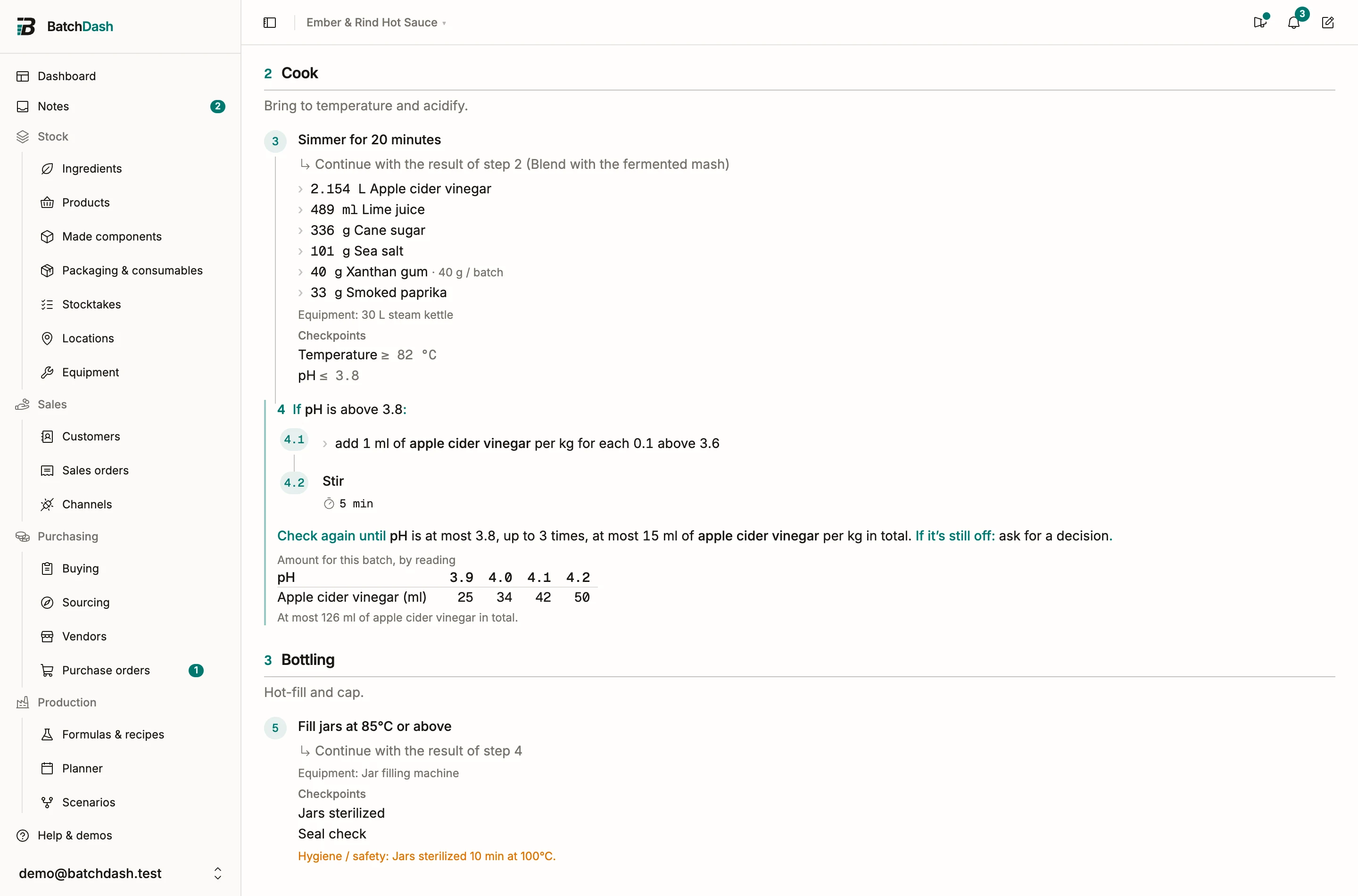
The pH reads 4.0 at the end of the simmer, and someone pours in vinegar by eye. A condition puts what to do into the recipe instead: if pH is above 3.8, add 1 ml of apple cider vinegar per kg for each 0.1 above 3.6, stir 5 minutes, and check again. Each batch then works the amount out for its own pot, and the record keeps what was done.
If a checkpoint shows no If it fails…, conditional steps are not switched on for your workspace.
How a condition reads
Section titled “How a condition reads”A condition is one numbered step of the method, 4, and its steps are 4.1, 4.2. Its first line says when it applies (“If pH is above 3.8:”), its steps say what to do, and its last line says what happens next: check again, up to how many times, and what to do if the check is still off. Give its steps a time, equipment or a check like any other step.
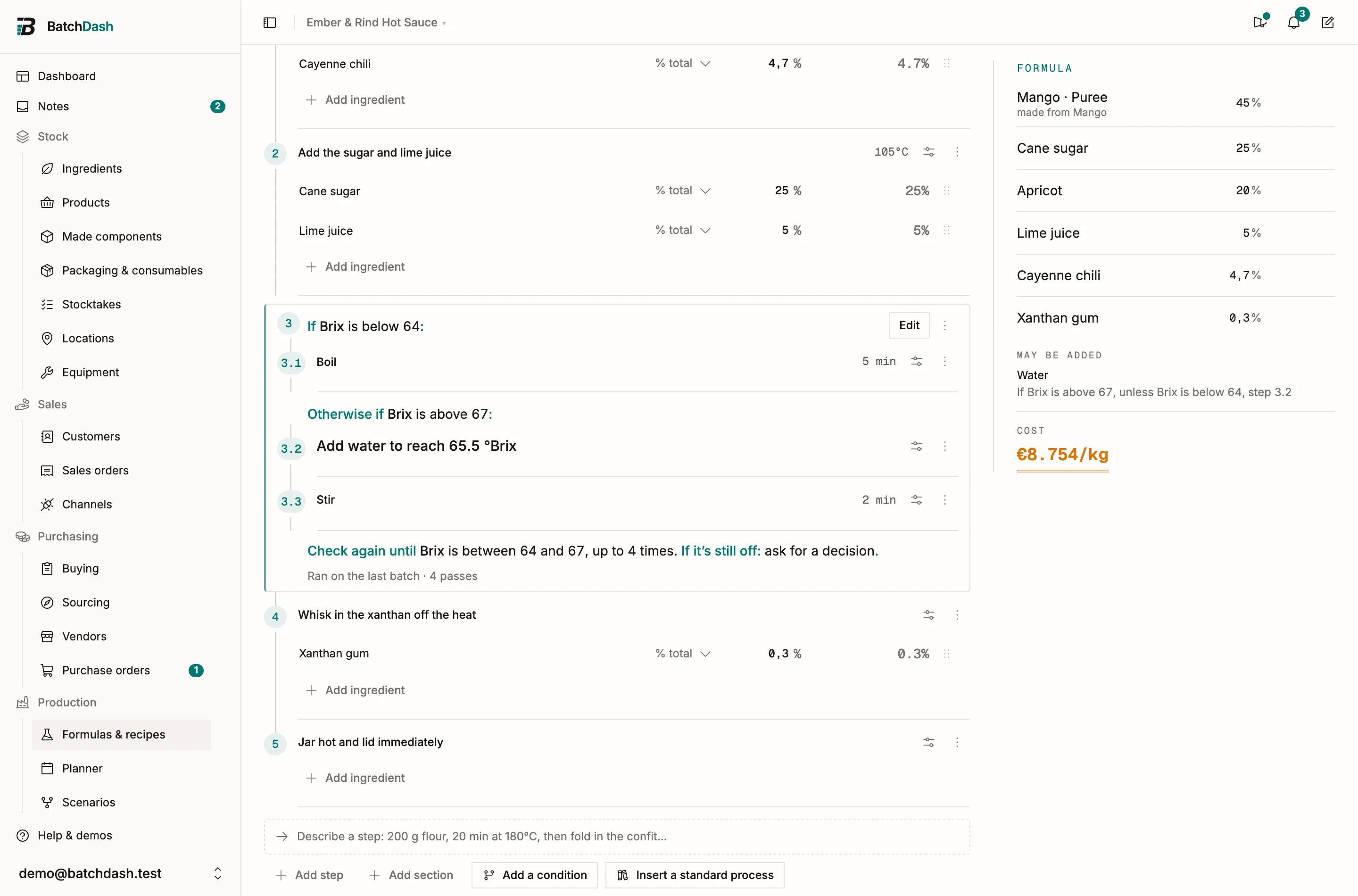
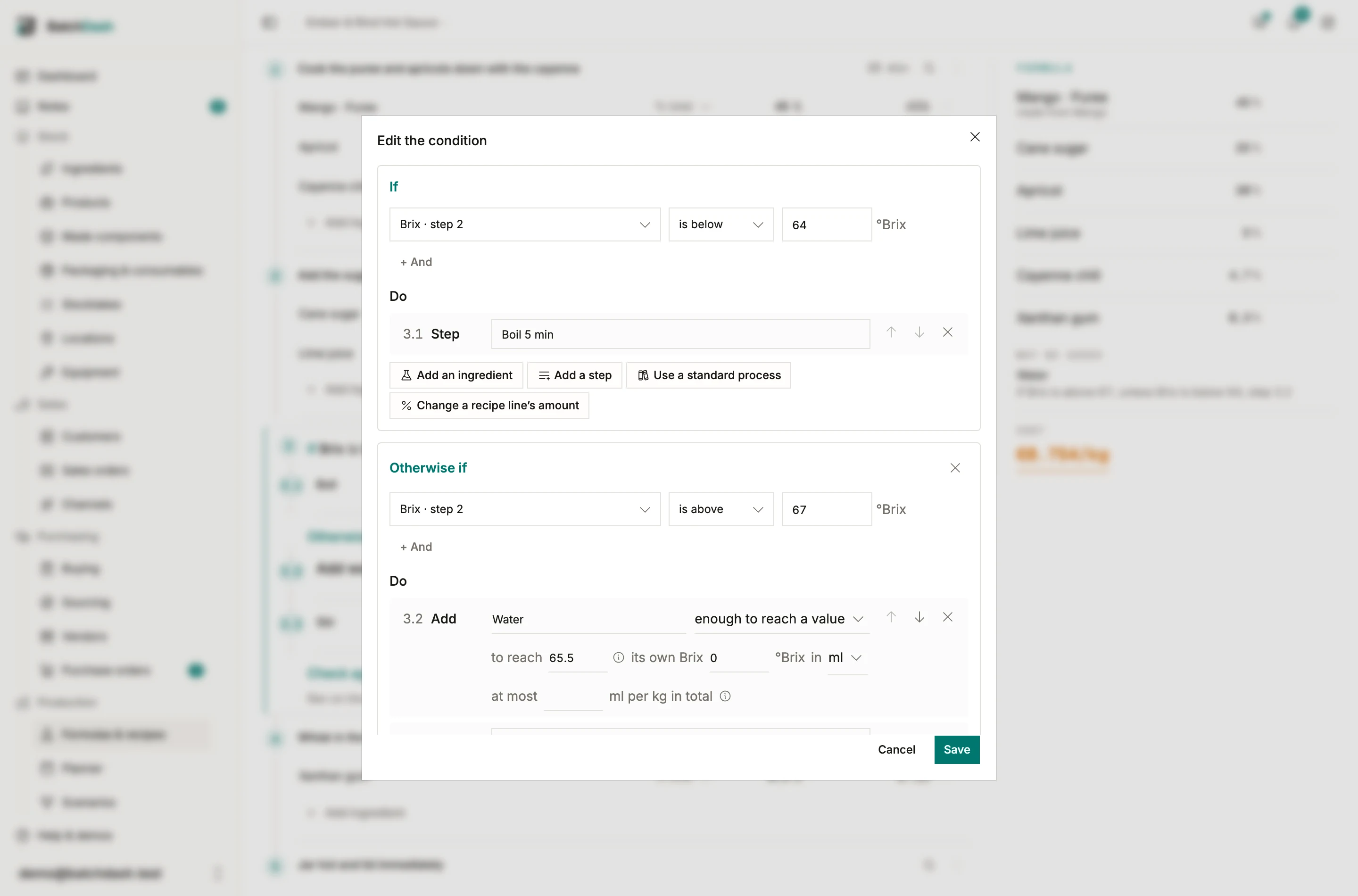
A condition can have more than one part. Otherwise if covers another case, and Otherwise covers everything else. The jam’s Brix condition boils it 5 more minutes when it is below 64, and adds water when it is above 67.
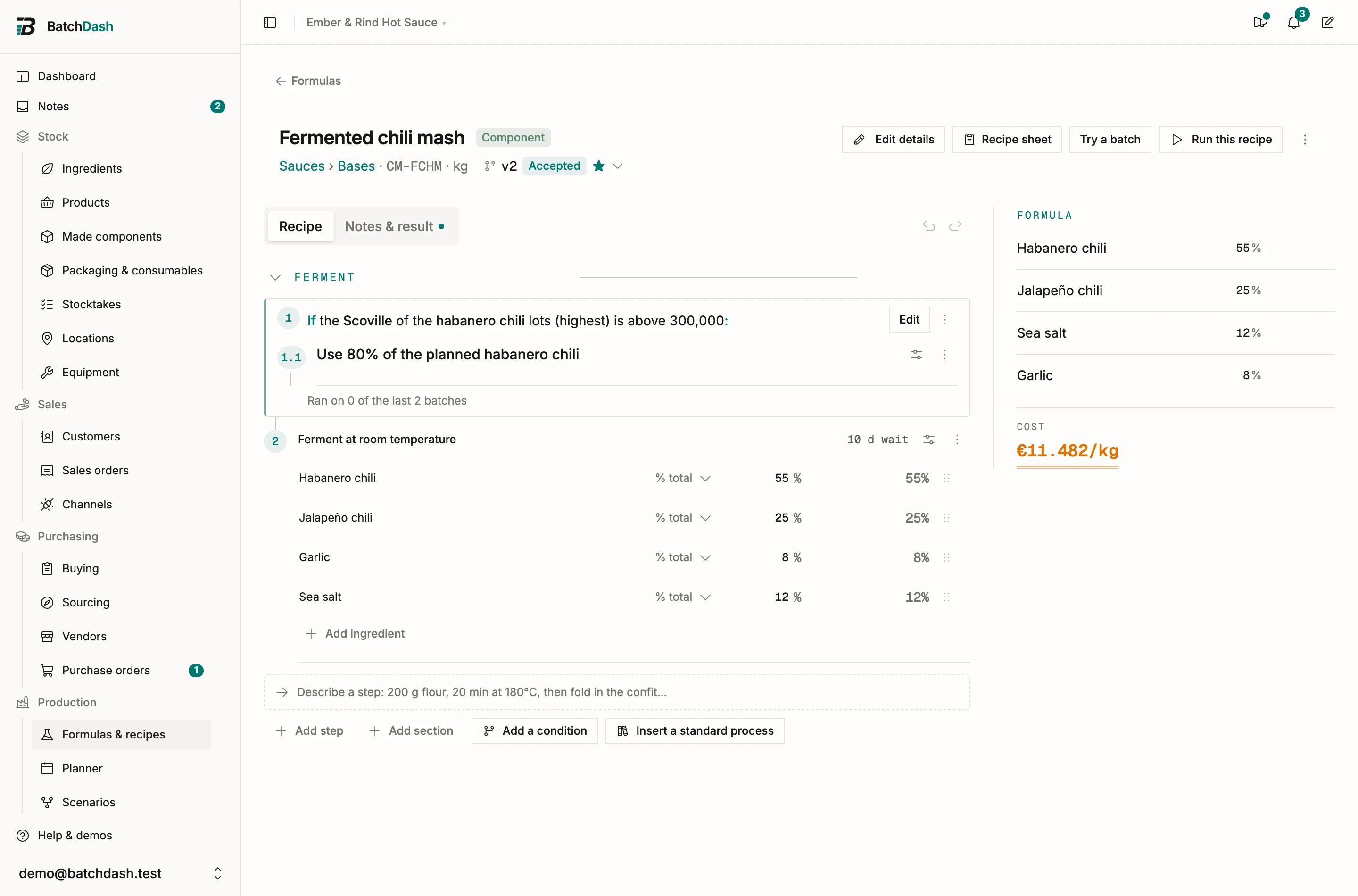
A condition can read a check, the batch itself (its size, format, place, market or customer), a value of an ingredient’s lot, or the time since something. One that reads only the batch is decided when the batch is planned: its ingredients are ordinary recipe lines on the batches that take it, and the others never see its steps. Every other condition is decided at the bench, as the batch is made. A condition holds steps. It can’t hold another condition, and the method still runs top to bottom.
Start from a check
Section titled “Start from a check”On a checkpoint’s row in a step’s details, If it fails… opens a new condition with that check already picked (If too low… and If too high… on a range). It lands right after the check’s step. What is left to say is what to do.
The other ways in: Add a condition after this step in a step’s ⋮, Condition on the line between two steps, and Add a condition at the foot of the method.
Type it
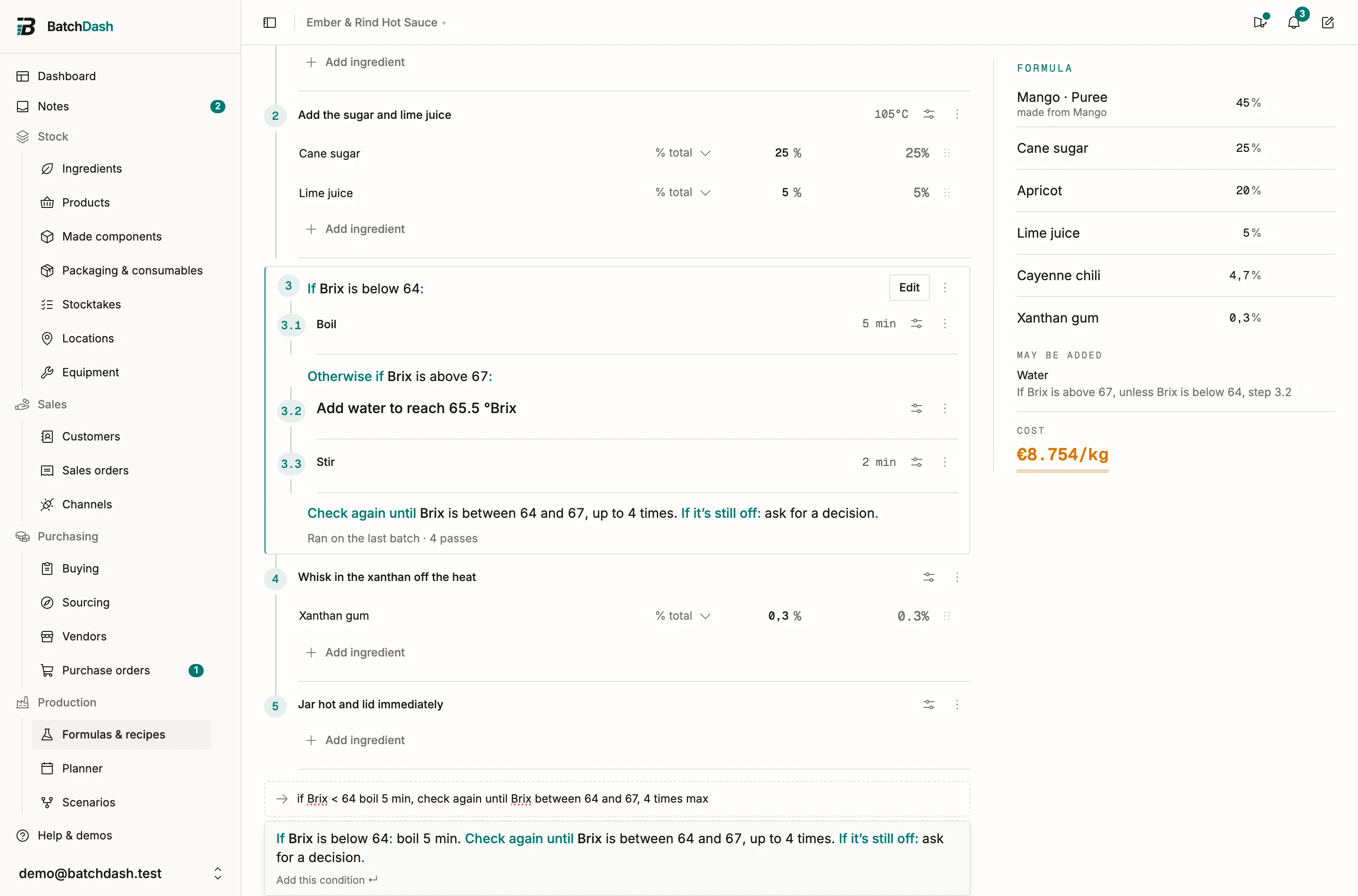
Section titled “Type it”The capture line at the foot of the method reads a whole condition: “if pH > 3.8 add 1 ml/kg vinegar per 0.1 above 3.6, stir 5 min, check again until pH ≤ 3.8, 3 times max”. It reads “otherwise if”, “otherwise”, “check again until”, “times max”, “at most”, and the recipe’s own checks and ingredients by name. The preview shows the condition before Enter adds it, and names anything it could not place instead of guessing.
The dialog
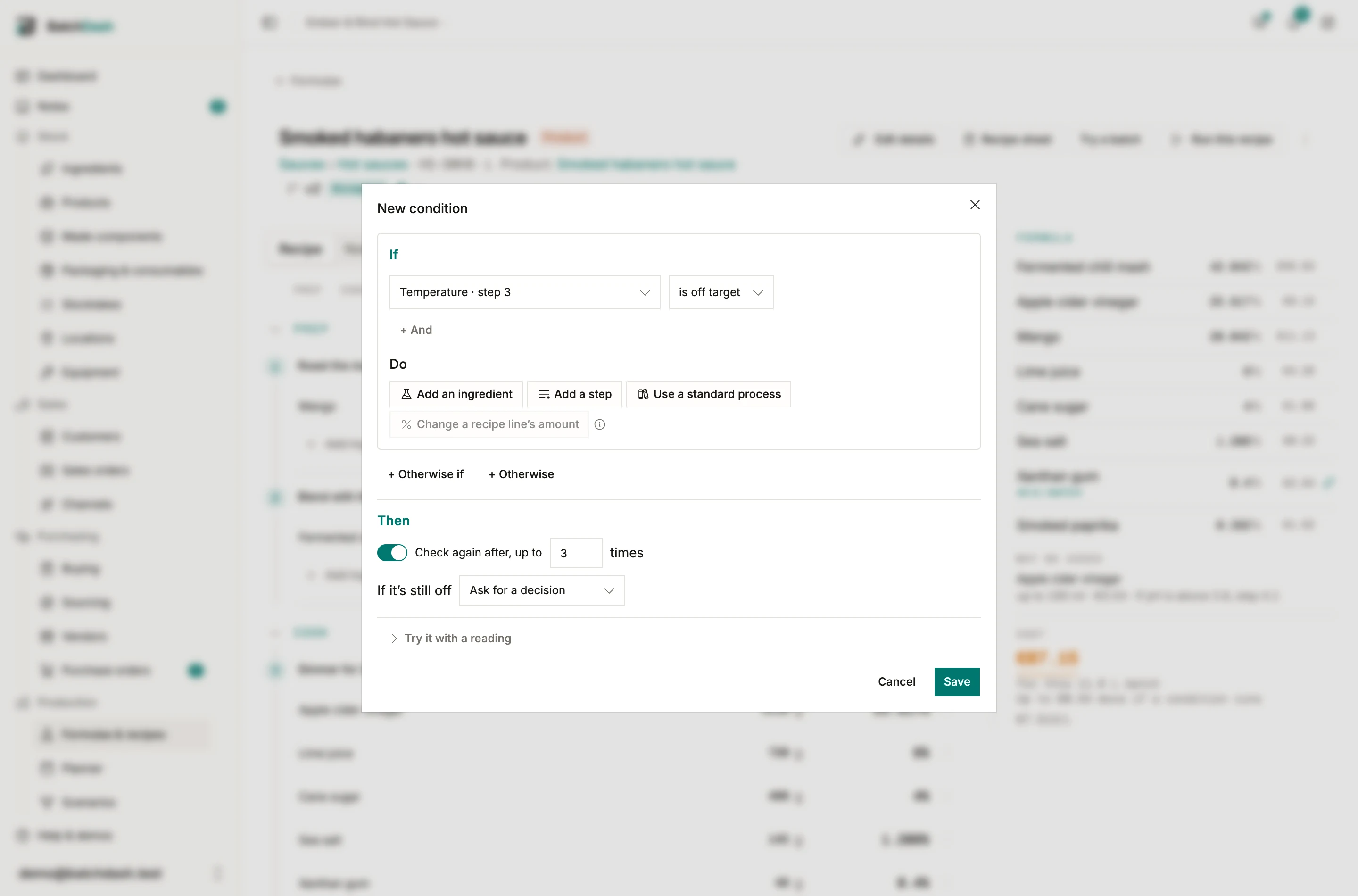
Section titled “The dialog”Edit on a condition opens one screen with three parts:
- If: up to 3 lines, with All of these or Any of these. What to check offers only the checks of earlier steps.
- Do: Add an ingredient, Add a step, Use a standard process, or Change a recipe line’s amount. Otherwise if and Otherwise add a part with its own Do.
- Then: Check again after, up to a number of times, and If it’s still off: ask for a decision, hold the batch, or carry on. A critical control point can’t carry on.
How much to add
Section titled “How much to add”| How much | What it means | Example |
|---|---|---|
| per kg of batch | a rate on what is in the pot | 2 g of salt per kg |
| per kg, for each step off | a rate for each step the reading sits past a value | 1 ml of apple cider vinegar per kg for each 0.1 above 3.6 |
| enough to reach a value | the amount that brings a share to a value, from the ingredient’s own value | water to bring a jam to 65.5 °Brix |
| as needed | no amount: the maker weighs what it takes |
The pot is the batch at that step, earlier additions included, and a pot weight typed on the batch replaces the estimate. Enough to reach a value works for a share (°Brix, salt %, dry matter), never for pH or a temperature, and it needs the ingredient’s own value: water is 0 °Brix. Amounts go through the ingredient’s density and are rounded to the batch’s Weigh to and Measure to without moving more than 5%. With Check again on, a total per kg can cap the ingredient over every pass, measured against the pot when the condition started. Each pass is worked out again from the latest reading.
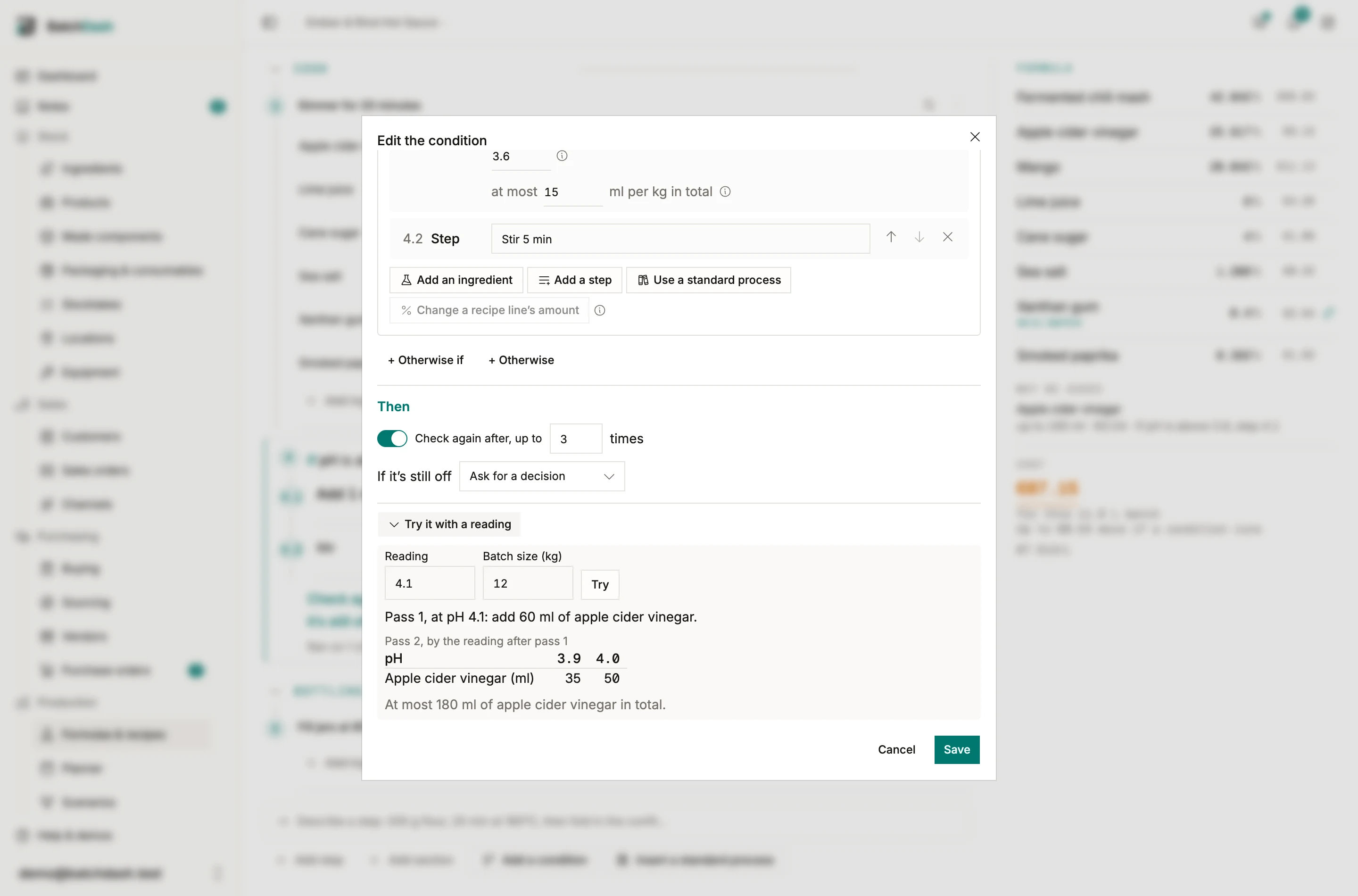
Try it with a reading
Section titled “Try it with a reading”Try it with a reading in the dialog takes a reading and a batch size, starting at the recipe’s own batch. It answers with the first pass and the next one, using the same arithmetic as the batch page and your Weigh to and Measure to.
What the recipe and a plan say
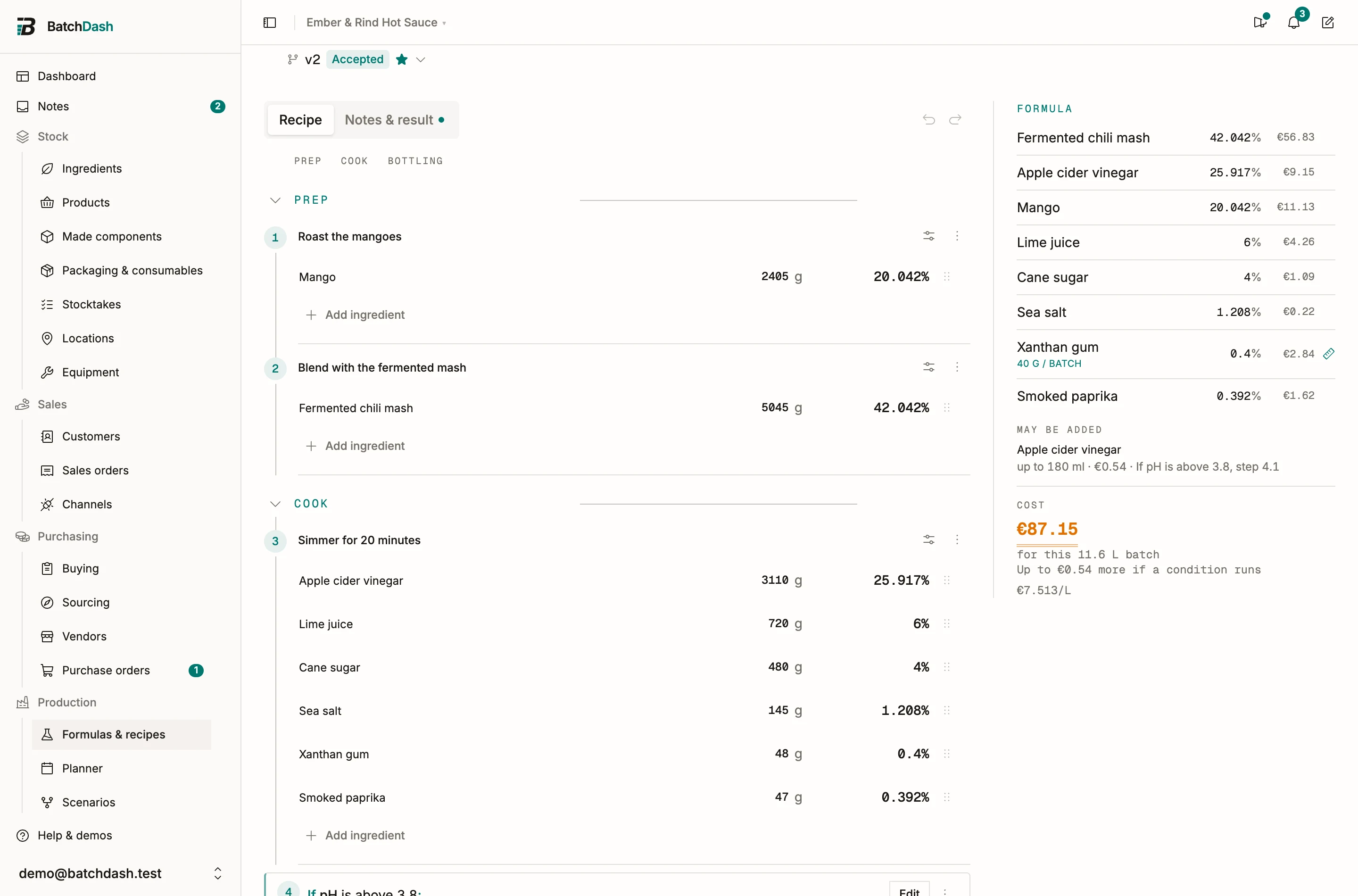
Section titled “What the recipe and a plan say”The recipe’s ingredients, shares and cost describe a batch where no condition runs. May be added lists apart what a condition can add, with the most for the recipe’s batch and what that would cost, and flags an allergen the recipe does not otherwise declare. A condition decided when planned is listed under Depends on the batch. A planned batch reads “May need up to…” under its lines and in its shortage warning: never reserved, never bought.
On the printed sheet
Section titled “On the printed sheet”The sheet prints each condition where it sits: its words, the amount for this batch, a table of amounts for the likeliest readings with the cap, and a grid to write each pass by hand (reading, added, lot, reading after, initials). A critical control point keeps its mark. A sheet printed for a given size decides the conditions that read the batch for that size, and says so.
Lots, the batch and the clock
Section titled “Lots, the batch and the clock”- A lot’s value. Tick Varies by lot on a category field, like Heat (SHU) on Chilis, and receiving asks for each lot’s value. A condition reads the highest, or the weighted average, of the lots named on the batch, and its card asks for a missing value, with Save on the lot. When the recipe is a component made inside another batch, the lots of its ingredients aren’t named there, so the card reads Can’t be read here.
- The batch. Its size, format, place, market or customer. A condition that reads only these is decided when the batch is planned. A component made inside a batch reads that batch’s facts, its size included: the chili mash made in a sauce batch reads the sauce’s size. A production process added to the batch reads them too. Made in its own batch, the mash reads its own.
- The clock. The time since the batch started, since a check, or since the condition’s last pass. Its card says when it comes due: “Ready at 06:40”.
What the recipe learns
Section titled “What the recipe learns”Under a condition that has run, one line says what its batches did, counted across every version that kept the condition. After 3 batches, a batch’s pass shows what past batches would add, and the dialog offers Use the learned rate, saved like any other edit. When it has run on 7 of the last 10 batches, and your workspace has recipe versions, its ⋮ offers Fold into the recipe…: a new draft weighs the usual amount at the step before the condition, and the condition stays.
Standard processes inside a condition
Section titled “Standard processes inside a condition”What a condition does can be a production process from the library: pick it under Do with Use a standard process. Its steps stay linked to the process, with Template changed and Update. See standard processes.
What the bench refuses
Section titled “What the bench refuses”A recipe holds up to 40 conditions; a condition has up to 4 parts, up to 3 lines per If, and up to 6 steps and 4 ingredients under each If or Otherwise; Check again goes up to 10 times. The bench also says, in its own words:
| You did | It says |
|---|---|
| picked a check from a later step | A condition can only read a check that comes before it. |
| picked a check with no target | This check has no target, so it can’t fail. |
| set a critical control point to carry on | A critical control point can’t carry on. Ask for a decision or hold the batch. |
| deleted a check a condition reads | A condition reads this check. Change that condition first. |
Who can do what
Section titled “Who can do what”- Writing conditions takes Edit on Formulas & recipes; trying a reading only needs View.
- The library takes Edit on Standard processes.
- Carrying a condition out on a batch takes Edit on Runs.
- Deciding on a batch takes Decide on batches. See holding and releasing a batch.
The batch side is in additions and corrective actions.