
Buying
Buying is where you decide what to buy. It reads your planned batches and your restock levels, subtracts what is already on the shelf and what is already on order, and groups what is left by vendor. From there it tells you how much to buy, from whom, at what price, by when, and why each line is on the list at all.
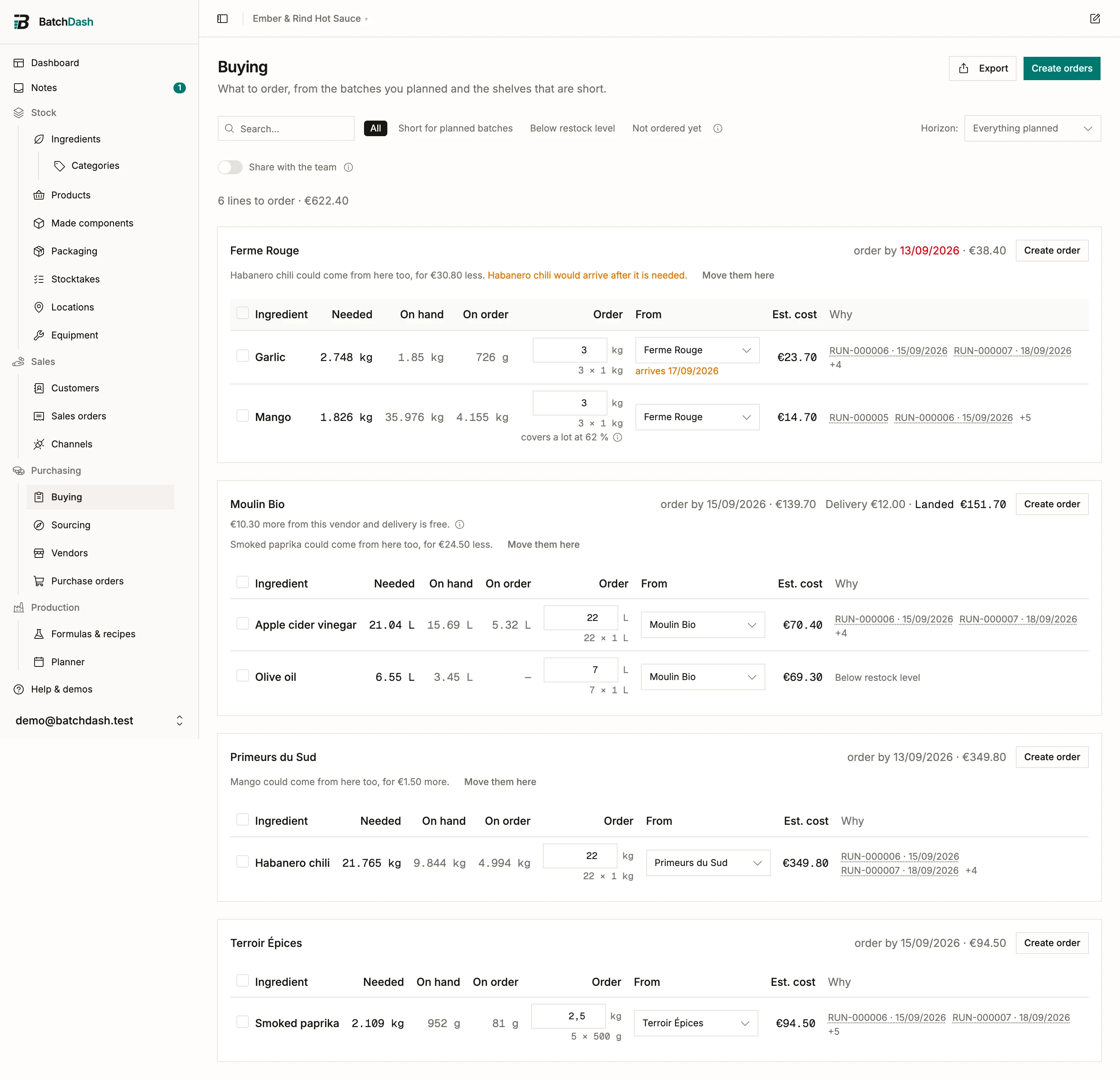
An order you have not accepted yet does not belong here. Check it in a scenario first: it shows what it would add to this list, and drafts the purchase orders only when you apply it.
What lands on the page
Section titled “What lands on the page”Two things put a line here.
A planned batch is short. Every run in the horizon you pick is summed per ingredient, so three batches needing the same chili produce one line, not three. The Why column names the batches driving it.
A shelf is below its restock level. Set a restock level on an ingredient (or a packaging item) and it starts appearing here on its own, with no batch involved. See ingredients.
The two add up rather than competing. A restock level is stock you want left on the shelf after the planned batches have taken theirs, so an ingredient that is both needed by a run and below its level asks for both: 100 on the shelf, 500 wanted, a batch needing 5, and Buying asks for 405. Buying only the batch’s share would end it right back under your own level.
The horizon is yours to choose: the next 7, 14 or 30 days, or everything planned. A batch with no date on the planner only counts under Everything planned, because a run with no date cannot be “needed this week”.
Components made in another batch
Section titled “Components made in another batch”A run that takes a component from a batch of it planned on its own does not buy that component’s ingredients. The batch that makes the component does, so the line is there once, and the Why column says who it is for: “RUN-000021 for RUN-000015”. Such a batch counts under a dated horizon as soon as a run inside the horizon takes from it, even while the batch itself has no date: the chilies for next week’s sauce never drop off the list because the mash is still undated.
When a planned run makes a component itself because the only batch of it comes too late, the ingredients are bought for both. The page says so above the list, before you order:
Fermented chili mash is made twice: RUN-000010 makes 3 kg itself, because RUN-000021 has it only from Tue 20 Oct.
Under it: “Move one of them to buy for one batch.” Each reference opens its run, where the fixes are. Nothing shows when nothing is made twice.
Products you buy
Section titled “Products you buy”When your plan includes products you buy ready-made, a product can land here too: one you buy ready-made, or one of your own recipes that a co-packer delivers. It wears a Product badge and reads in its own unit, jars or bags. Two things put it here:
- Below restock level. Set the level with Set restock level in the product’s ⋮ menu. It is read against what a new sale could still be promised, the Available figure the product shows: stock held for its finished-product check does not count, and neither does stock already promised to a sales order.
- Sales orders need more. Confirmed sales orders promise more than the shelf holds.
The two add up the way an ingredient’s do. Buying asks for the level plus what is promised, less what the shelf holds and what open orders already bring. For a co-packed product, the batches planned into its format count as coming in too, and the line says so: “Planned batches will make 18 jars, counted as coming in.” When a replenishment rule plans that product as well, the line adds “A replenishment rule plans it too.” A product whose rule prepares its draft orders says what that rule is doing: about to prepare the draft, already prepared one (named, with a link), or not preparing this one. See automatic draft orders.
Its vendors are the ones with a price for the product, and the rest works as it does for an ingredient: the pack math, the vendor pick, Add an offer (for someone who may manage products), the saved list, and Create orders, which puts the line on that vendor’s draft. See products you buy ready-made and co-packed products.
What the columns mean
Section titled “What the columns mean”| Column | What it is |
|---|---|
| Needed | The shortfall after your stock: what the batches ask for, minus what you hold. |
| On hand | Current stock. |
| On order | Un-received quantity on open purchase orders. Already-ordered stock is never asked for twice. |
| Order | The quantity to buy, rounded up to whole packs with the vendor minimum respected. Editable. |
| Est. cost | The rounded quantity at the vendor’s price. It follows the quantity if you change it. |
These are the same words every stock page now uses; Availability defines all six in one place.
Quantities read at the scale you would say them out loud. An ingredient stored in grams shows as 24.5 kg when there are 24500 of them, 164 cl reads as 1.64 L, and you type into the Order box in the same unit you read. What gets stored and ordered is unchanged; only the reading is. This holds across the app, recipe sheets included. Spoons, cups and counts are left as they are, because “3 tbsp” is the instruction.
The Order figure is a suggestion, not a rule. It starts from the cheapest live offer for that ingredient, rounds the shortfall up to a whole number of packs and honors the minimum order quantity, so what you order clears the shortfall rather than landing exactly on it. Type over it whenever the real world disagrees.
A vendor you have received the ingredient from but never entered an offer for is still somewhere to buy it. Buying uses the last price you paid them, from the delivery or received order that recorded it, and says so under the vendor: “Price paid 12/09/2026”. A delivery is not a pack, so that line is bought loose: the shortfall rounded to a clean figure (704.5 g becomes 710 g), with no pack note and no minimum. The draft order it creates says “price paid last time” on the line, so the price gets checked before it goes out. A vendor with an offer on file is always quoted from that offer, even when a newer delivery paid them something else.
Under each quantity you get the arithmetic behind it: 5 × 5 kg is five packs of five kilos. It follows what you type, so changing the box changes the note; type a figure that is not a whole number of packs and it says so rather than pretending. The arrows step by one pack, because that is the only increment the vendor actually sells. When the vendor’s minimum is what pushed the number up rather than your shortfall, it says that too (min 25 kg).
All of it comes from the offer, so if a quantity looks wrong the fix is on the vendor’s offer: see vendor offers and price history for pack size, minimum order quantity and lead time. Lead time is worth filling in: it is what lets this page tell you an order placed today will not make the batch it is for.
When an ingredient has variants
Section titled “When an ingredient has variants”An ingredient you hold in several forms, or from several suppliers, lands its shortage on the variant your plan chose. Where there is a second way to get it, the line says so under the name, with both prices and a switch.
Bought, and it could be made. The line is a variant you usually buy that can also be made from another one: Can be made from Cherries: 568.182 g, 3 kg in stock. The quantity is what pitting them would take at the yield you recorded, and the stock figure is what that shelf holds today. The sentence turns amber when the shelf holds less. Under it come both prices, the line’s own way first: €9.500/kg bought from Frosty · €6.818/kg made · €2.682/kg less. The saving only shows when the other way really is cheaper.
Made, and it could be bought. The mirror. The line is the cherries your batches are going to pit, and somebody sells them already pitted: To make 600 g of Cherries · Pitted., then €6.818/kg made · €9.500/kg bought from Frosty.
When the made price cannot be worked out, the line says what it is waiting for: made: no price until Cherries has a cost. Prices only show to people who can see costs.
Make it instead and Buy it instead take the other way. They change the variant’s own setting (Usually bought or Usually made, the one on its ingredient page) and plan again every planned batch that follows it, so the line reads the other way round as soon as the page reloads. Before anything moves, the confirmation names the batches: the ones planned again, the ones whose Variants card already decided that line (they keep that choice), and the ones already started (their plan stays as it was when they began). Each reference opens its batch. Planning again still takes a batch’s own shelf first, and only the rest is bought or made.
The switch is on the Buying table, on the line’s own screen and on a planned batch’s shopping list, for anyone who can manage both ingredients and batches.
A batch making a variant whose yield you recorded as a range buys enough for a poor lot. The quantity to order then carries covers a lot at 85 %, and its ⓘ says why. The need beside it is still what the batch expects to use, and it stays the figure the cost and the stock reservation read. Type a smaller quantity and the note goes, since it would no longer be true.
Choose who you buy from
Section titled “Choose who you buy from”Each line starts at a vendor the page picked for you, and it does not simply pick the cheapest. A chili needed Friday does not care that a ten-day supplier is two euros cheaper, so among the vendors that can arrive by the day the batch needs it, the cheapest wins. When none of them can make the date, the fastest wins, because you are late either way and the only thing left to buy is time. A line with no deadline, like one that came from a restock level, keeps the plain cheapest. The line sheet says which of those happened, in words.
That is your rule, not ours. The criteria and the order they bind in live in Organization → Settings → Suppliers, and the same rule decides which supplier leads a sourcing search. Two screens naming two different suppliers for the same shortfall helps nobody, so there is one setting behind both.
One ingredient can sit above that rule. On the ingredient page, a vendor’s row menu offers Set as preferred vendor, and from then on Buying and a batch’s shopping list start that ingredient there whenever the vendor has a live offer. The rule still orders every other vendor and still decides every other line. It is for the relationship the math cannot see: the farm that saves your allocation in a bad harvest.
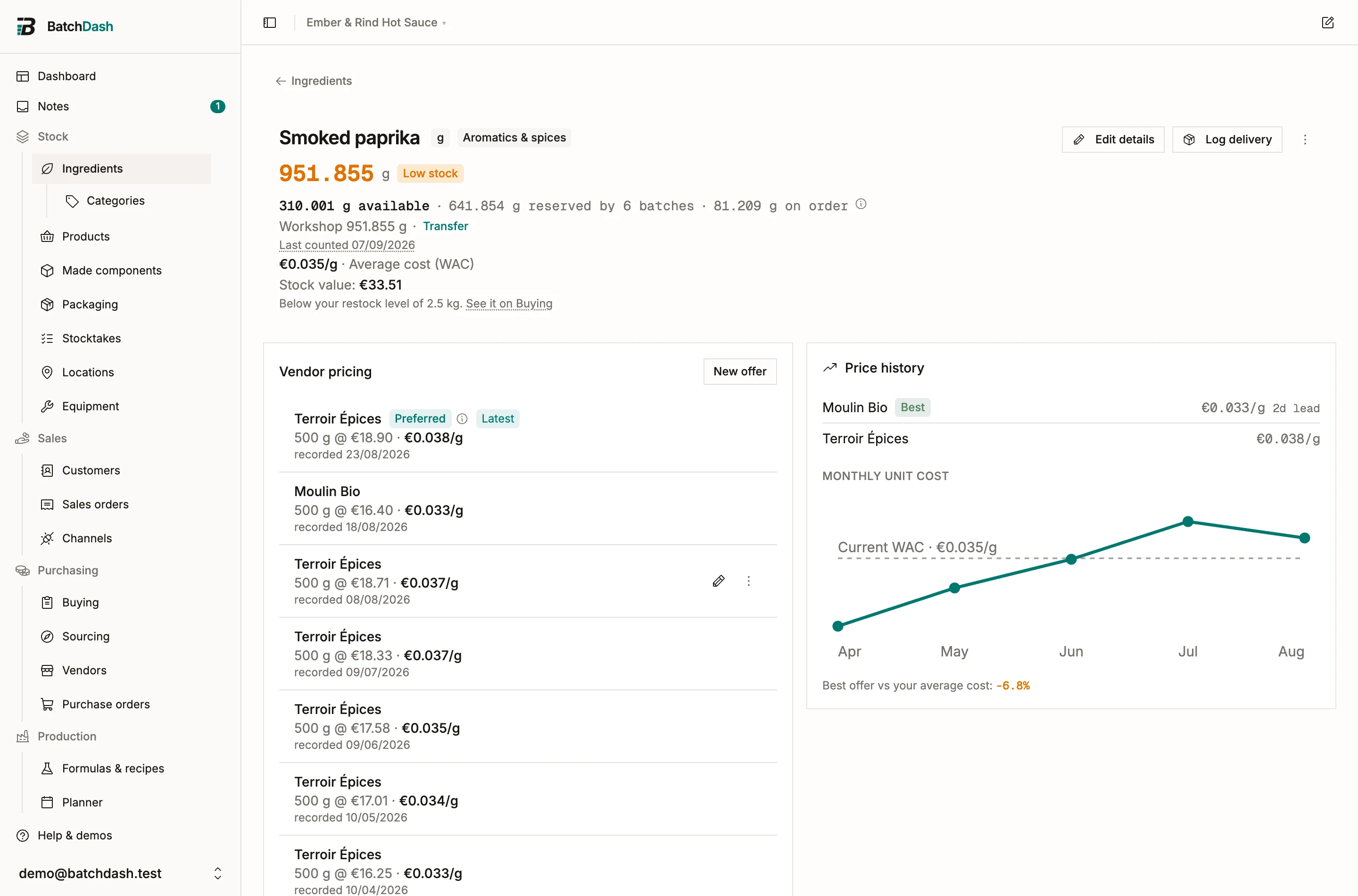
The pin never hides what it cost you. Whenever it picked someone the rule would not have, the line’s reason carries a ⓘ:
Pinned as your preferred vendor. Your rule would have picked Ferme Verte at €18.40 (cheapest).
When the two agree, nothing is said, because there is nothing to disclose. A pinned vendor who cannot arrive in time still gets the late warning, and an old price still gets its old price mark. The pin overrules the choice, never a warning. If the pinned vendor has no current offer, or the offer is marked no longer supplied, the rule answers as if there were no pin and the ingredient page says Preferred · no current offer. Deleting the vendor drops the pin; merging carries it to the vendor you kept.
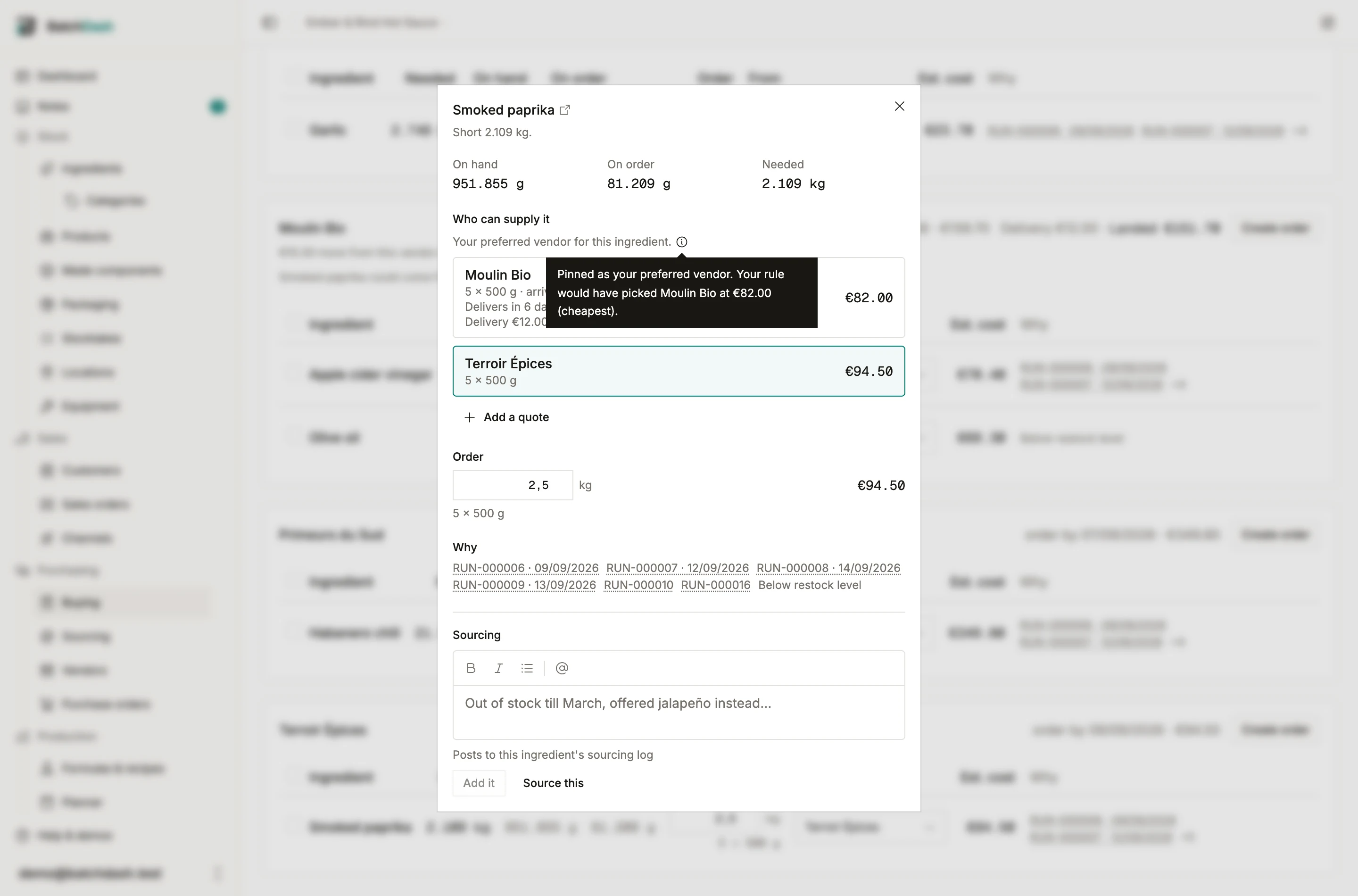
That is a default, not a decision. The From column lists every vendor with a live offer or a price you paid them, each with what this line would cost there, and the cheapest marked. Pick another and the cards regroup on the spot.
What delivery costs
Section titled “What delivery costs”Fill a vendor’s delivery terms in and their card starts counting carriage. Under the goods total: “Delivery €12.00 · Landed €52.00”. That is what they charge for what the card holds now, and what the order really comes to. A vendor whose terms are Not known shows neither. Nobody has said, so the page does not guess.
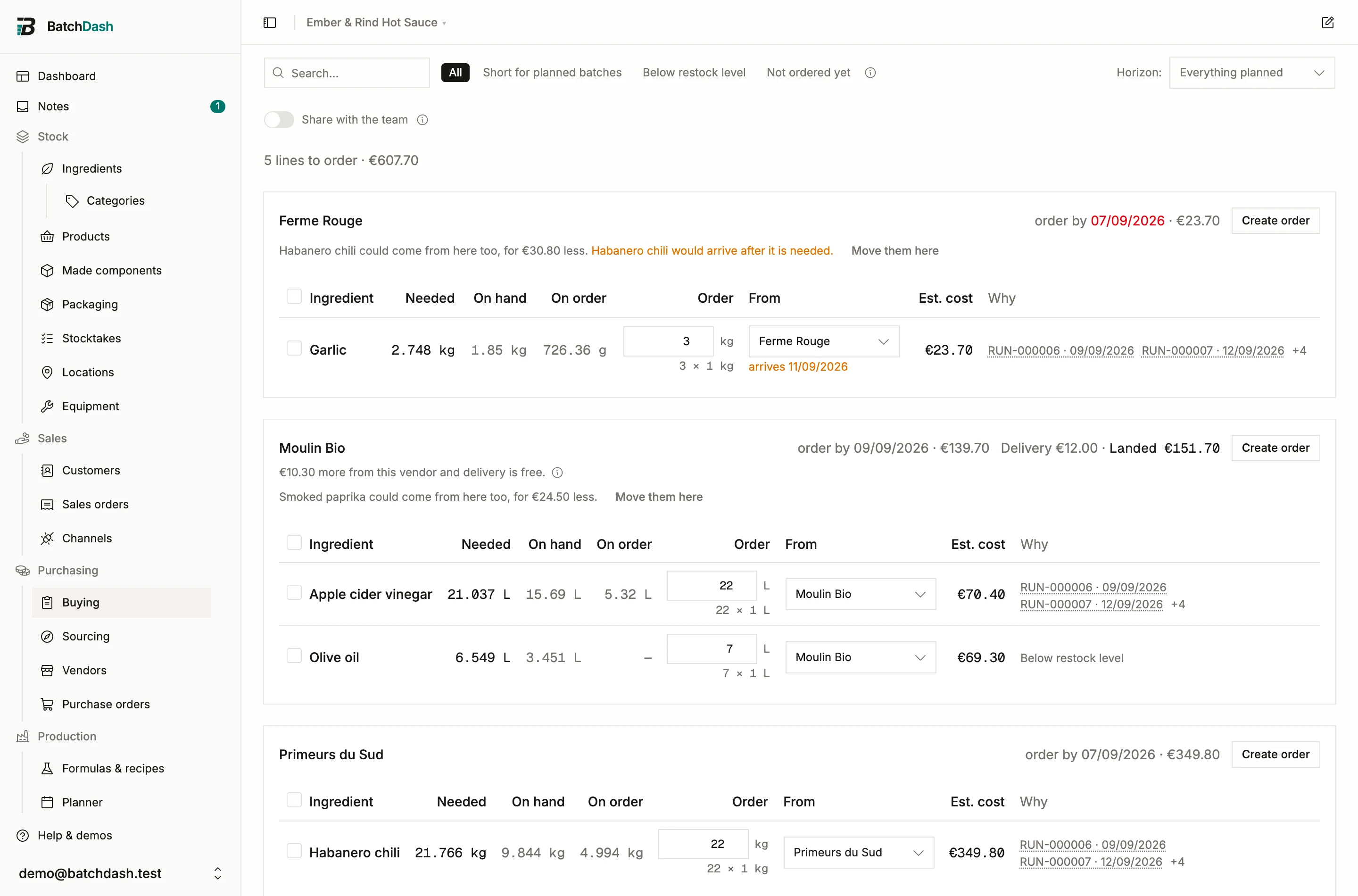
Three sentences follow from it, each only when it is true:
€38.00 more from this vendor and delivery is free.
Shown when a Free from threshold is within reach, and only when something already on the page would close the gap on its own. Hover the ⓘ for which lines those are. A threshold €400 away with nothing that could reach it is a fact about the vendor, not a suggestion, so it stays quiet.
Below this vendor’s minimum order of €150.00 by €22.00.
A warning, not a block. The vendor may well accept it, and it is your relationship.
And the consolidation sentence now compares landed totals, so moving a line to a vendor whose threshold it crosses can read “for €6.20 less” where the goods alone said “for €20.00 more”. Both cards are priced with and without the move, because taking a line off one card can drop it back under its own threshold too.
The per-line vendor pick is untouched: it still follows your workshop rule, on the goods rate. A line cannot know the basket it will end up in, and a rule that changed its answer as lines were ticked would be unreadable.
That matters because the cheapest line-by-line answer is often the worst basket. Three ingredients at three different shops is three orders, three deliveries and three minimum charges. So when one vendor can also cover lines sitting on another card, their card says so:
Lime juice, Cane sugar could come from here too, for €4.20 more.
Move them here does exactly that. The sentence says which way the money goes, whether the move saves or costs, and it warns you when a line that is currently on time would arrive after it is needed.
Where a vendor’s lead time cannot make the date, the line says so next to the vendor: “arrives 09/08/2026”. Open the line and it spells out the trade, so nobody finds out on the morning of the batch.
A line with no vendor at all shows Add an offer instead. Fill in who sells it, at what price, in what pack size, and it joins that vendor’s card without you leaving the page. The price box wears the currency that vendor invoices in; a name that is new to you gets a Currency field first, since the price you are about to type is in it.
One line, one screen
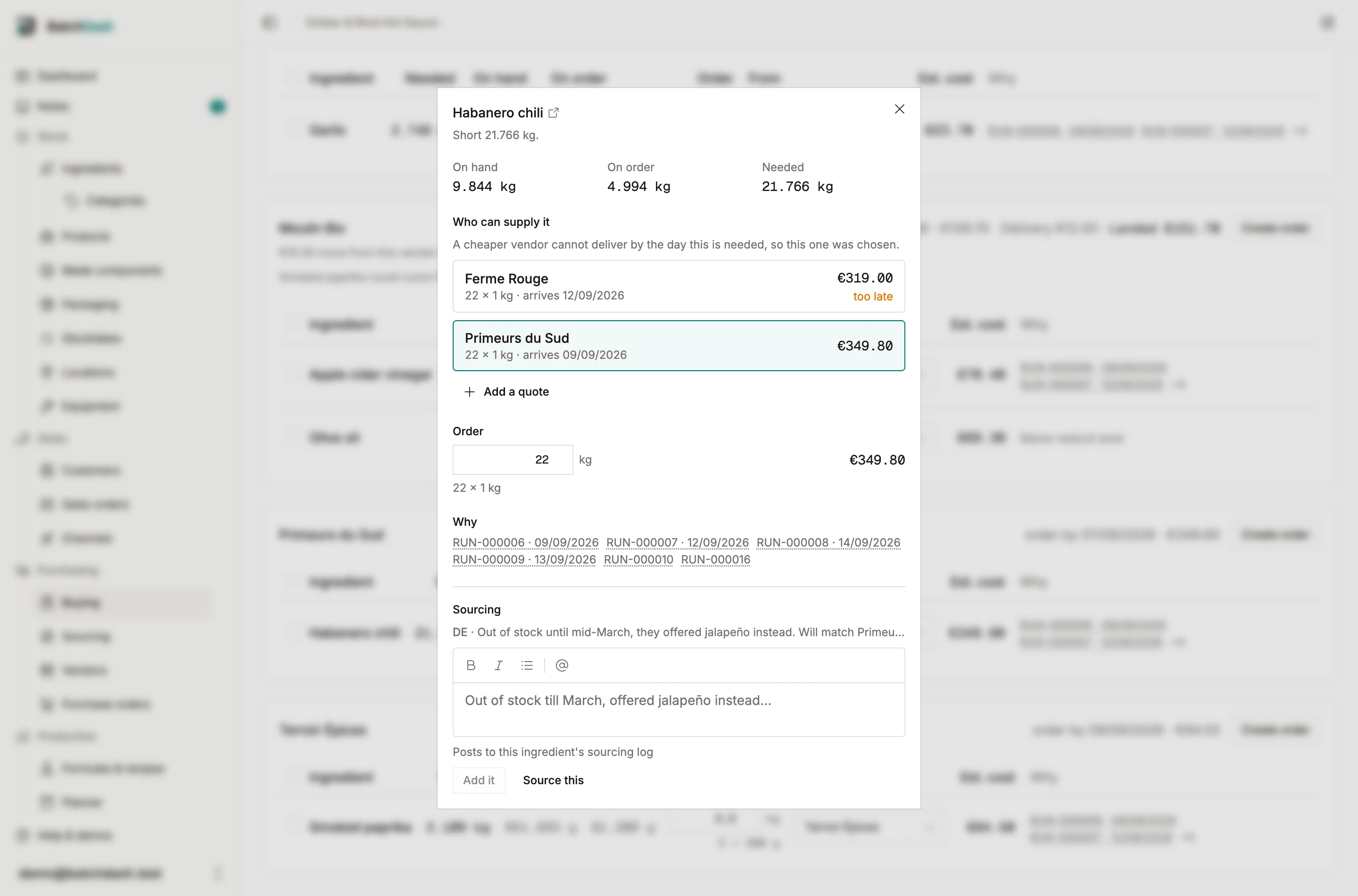
Section titled “One line, one screen”Click anywhere on a row, or tap the card on a phone, and the line opens on its own. Everything about it is there: what you hold, what is on order, what you are short of, every vendor who can supply it with what this line would cost at each, the pack math, and why the line is on the page at all.
The vendor list here is a list, not a dropdown. Comparing three prices is the decision you came to make, so it stays on screen while you make it. Tap one to switch. Add a quote records a new offer without leaving.
Changed your mind? Back to the recommendation drops the vendor you picked and the quantity you typed, and the line follows the cheapest live offer and the pack math again. An override should never be a one-way door.
Leave a trail for the next buyer
Section titled “Leave a trail for the next buyer”A price belongs on an offer. Everything around it has nowhere to live, and that is what gets lost: who you called, what they said, when to ask again.
The Sourcing block at the bottom of the line sheet is where that goes. “Out of stock until March, offered jalapeño instead.” “They will match Ferme Rouge at 50 kg.” Every entry is shared with the whole team the moment you add it, and it carries the time it was written, because a quote heard this morning and one heard three weeks ago are worth different money. You can edit or delete your own; an org admin can edit or delete anyone’s.
The box says where the entry goes before you type. When one sourcing project is open for the ingredient, the line joins that project’s discussion, where the search is already being read; otherwise it lands in the ingredient’s own sourcing log, which the block and the ingredient page both show. When there is a project, its name sits at the top of the block, one click away. The projects themselves, with their candidates, quotes and samples, have their own section: see sourcing.
Order-by dates
Section titled “Order-by dates”Each vendor card carries the day you need to order by: the earliest day a batch needs the ingredient, walked back by that vendor’s lead time. A date already in the past is shown in red so it reads as a deadline you have missed rather than one you can still make.
A price also has a shelf life. Every price change writes a new offer, so the newest one counts as current. That used to mean a figure from years ago could still decide where you shop. Now a price older than your organization’s window (Settings → Prices stay current for, six months by default) is marked old price, loses ties to a fresher one, and the line says when it was recorded so you can confirm it before ordering. It is never hidden: an old figure still beats no figure.
When the price still holds, retype it under Update prices on the vendor page, or re-import the vendor’s list. Either files it as checked on that day and the mark drops, without adding a point to the price history (Vendor offers and price history has the details).
Age cannot tell you a vendor stopped stocking something, so you mark that yourself. On the vendor page, No longer supplied takes an ingredient out of Buying and out of the cheapest-vendor race while keeping every past price in the history the trend is built from. Mark it Supplied again whenever they carry it once more.
Lines whose ingredient has neither a live offer nor a price paid to a vendor still supplying it are not hidden. They gather in a card of their own, because “you need this and there is nowhere to buy it” is worth saying out loud. Add an offer for them and they join a vendor.
Your list is saved
Section titled “Your list is saved”Ticks, quantities and vendor picks are remembered as you make them. Change a filter, reload the page, come back tomorrow: the list is as you left it. Creating one vendor’s order clears only those lines, so the rest of the basket stays put.
Everyone in the organization already sees the same ingredients to buy. That comes from your planned batches and your restock levels, and no setting hides it. What a list adds on top is your arrangement of them: the vendors you picked, the amounts you typed, the lines you ticked. That part is yours until you say otherwise.
Share with the team hands your arrangement over. Anyone who can see orders can then open it and change it, which is how you pass a basket to whoever is placing the orders today. Every edit saves on its own as you make it, so two buyers can work different lines at the same time without overwriting each other, and you pick up their changes when the page reloads. Turn it off and they keep their own picks; nothing is lost either way, and draft orders you create belong to the team regardless. A list picker appears only once there is more than one to choose from.
Turn it into orders
Section titled “Turn it into orders”Click Create orders and you order the whole list. Tick a few lines first and you order only those. Each vendor card’s own Create order works the same way for that card, and the figures beside it follow along: the total is always what the button next to it will create, and it says which lines when that is a subset. You get one draft purchase order per vendor you chose, each holding only that vendor’s lines, and land on the orders list filtered to drafts. Nothing is sent anywhere: a draft is yours to review, adjust and send.
If a vendor already has an open draft, the dialog offers it. Two trips to the same supplier in one afternoon is one order in real life, so you can add the new lines to PO-1041 instead of opening a second one, and an ingredient already on that draft has its quantity added rather than appearing twice. Only drafts are offered: an order you have sent says what the vendor was told, and growing it behind their back would be a lie.
The vendor and the quantity you see are the ones that get ordered. If you moved a line or typed a different amount, that is what lands on the order.
Each vendor card also has its own Create order button, for when you only want to deal with one supplier today.
What is checked at the moment you click is whether each line is still worth ordering. If stock moved or someone else ordered in between, a line that is no longer short is refused rather than quietly bought, and a vendor with neither a live offer nor a price paid for an ingredient, or one marked no longer supplied, can never be attached to it.
Export downloads the same rows as a CSV, for handing to someone who does not use the app. It appears only on plans that include CSV, like every other export in the app; the page itself works either way.
The same answer inside a run
Section titled “The same answer inside a run”A run’s own shopping panel asks the same question about the same shortfall, so it now gets the same answer: the vendor it picks weighs delivery against price the way this page does, respects your price-trust window, and warns you when the vendor it chose lands after the batch it is for. The panel stays compact, because “can I make this batch” is a smaller question than “what should I buy this week”. Only the decision is shared, not the screen.
When you do want the full comparison, Compare vendors in Buying on the panel opens this page with the run’s reference in the search box, so you land on exactly that batch’s ingredients with every alternative vendor beside them.
What Buying does not do
Section titled “What Buying does not do”It never contacts a vendor. It creates draft orders; a person sends them. See purchase orders for what happens next, and receiving for booking a delivery into stock.