
Read the paperwork
The delivery note is in your hand when you receive. The invoice arrives by email a week later. The confirmation came the day the order went out. Each carries figures this app wants, and typing them in twice is the part of receiving nobody enjoys.
The reader takes one document and proposes what it can make out. You keep what you trust.
Where it is
Section titled “Where it is”On any purchase order that is neither a draft nor canceled, Read the paperwork sits beside Receive all. It appears when your plan includes the reader and there are readings left this month.
The same button sits in the Purchase orders list heading, and again in the Ingredients list heading, for a purchase that never had an order: the cash-and-carry run, the market, the online shop whose invoice arrives after the box. That path is its own page, and it is described further down.
The dialog takes one of two things: an email pasted into the box, or a file (PDF, JPEG, PNG or WebP, up to 8 MB). On a phone the file picker offers the camera, so a photo of the note on the loading dock is the whole input. Choosing a file empties the box; typing puts the file back down.
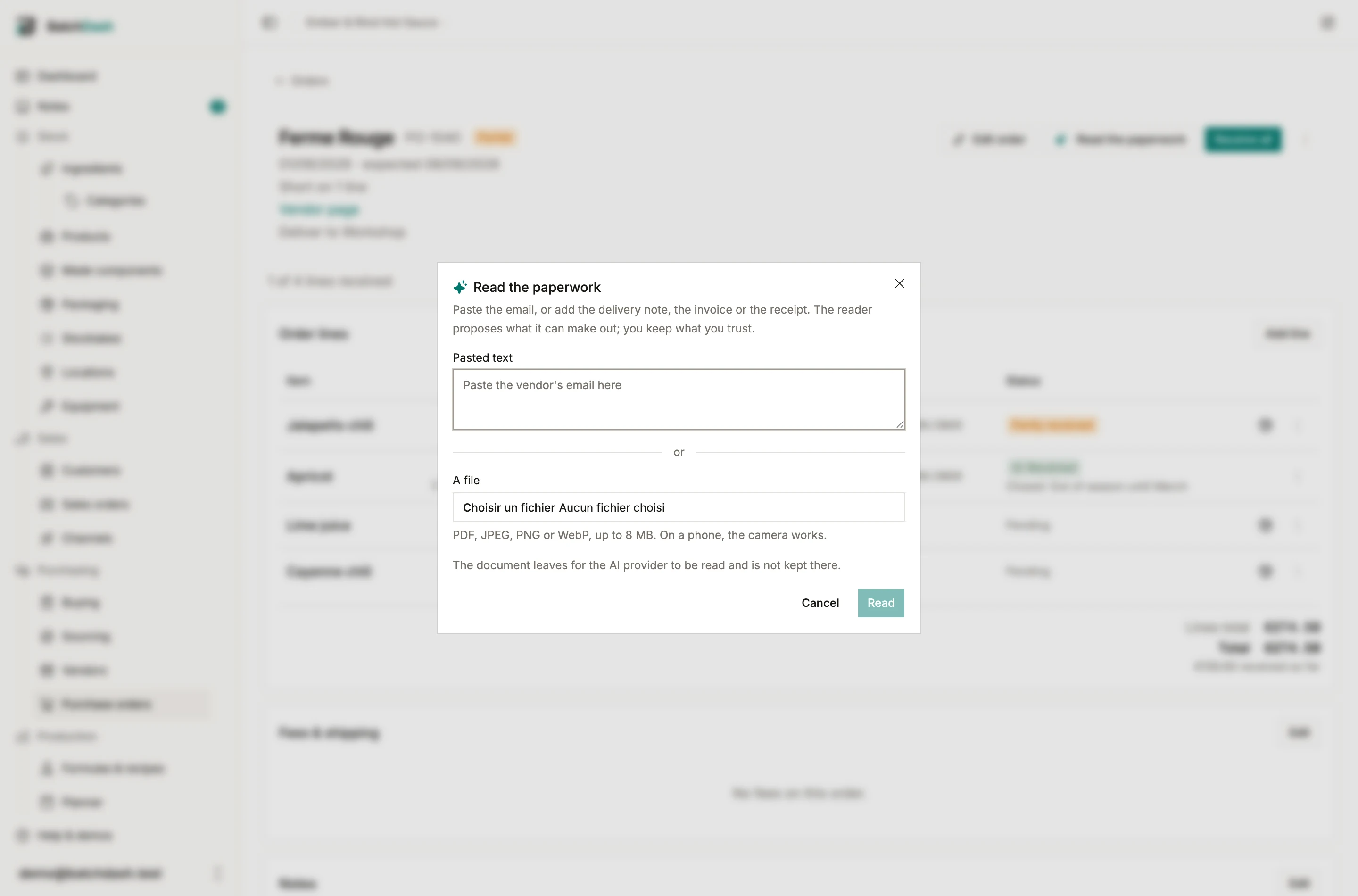
Reading runs in the background. The button says “Reading…” for a few seconds and the review sheet opens on its own when the answer lands. Close the sheet to look at the order first if you like: the button then reads Review the reading and brings it back, with everything you ticked still ticked, until you confirm or discard.
What it reads
Section titled “What it reads”One document, whatever kind it is. An order confirmation carries a date, confirmed prices and the vendor’s reference. A delivery note carries quantities per line, lot codes and best-before dates. An invoice carries line prices, fees and totals. A mixed document proposes a mixed draft, and the sheet says at the top which it turned out to be.
A field the reader cannot make out stays blank. A blank is never a zero: “I could not read this” and “the document says nothing arrived” are different facts, and only the first is common on a photo of a crumpled note.
The review sheet
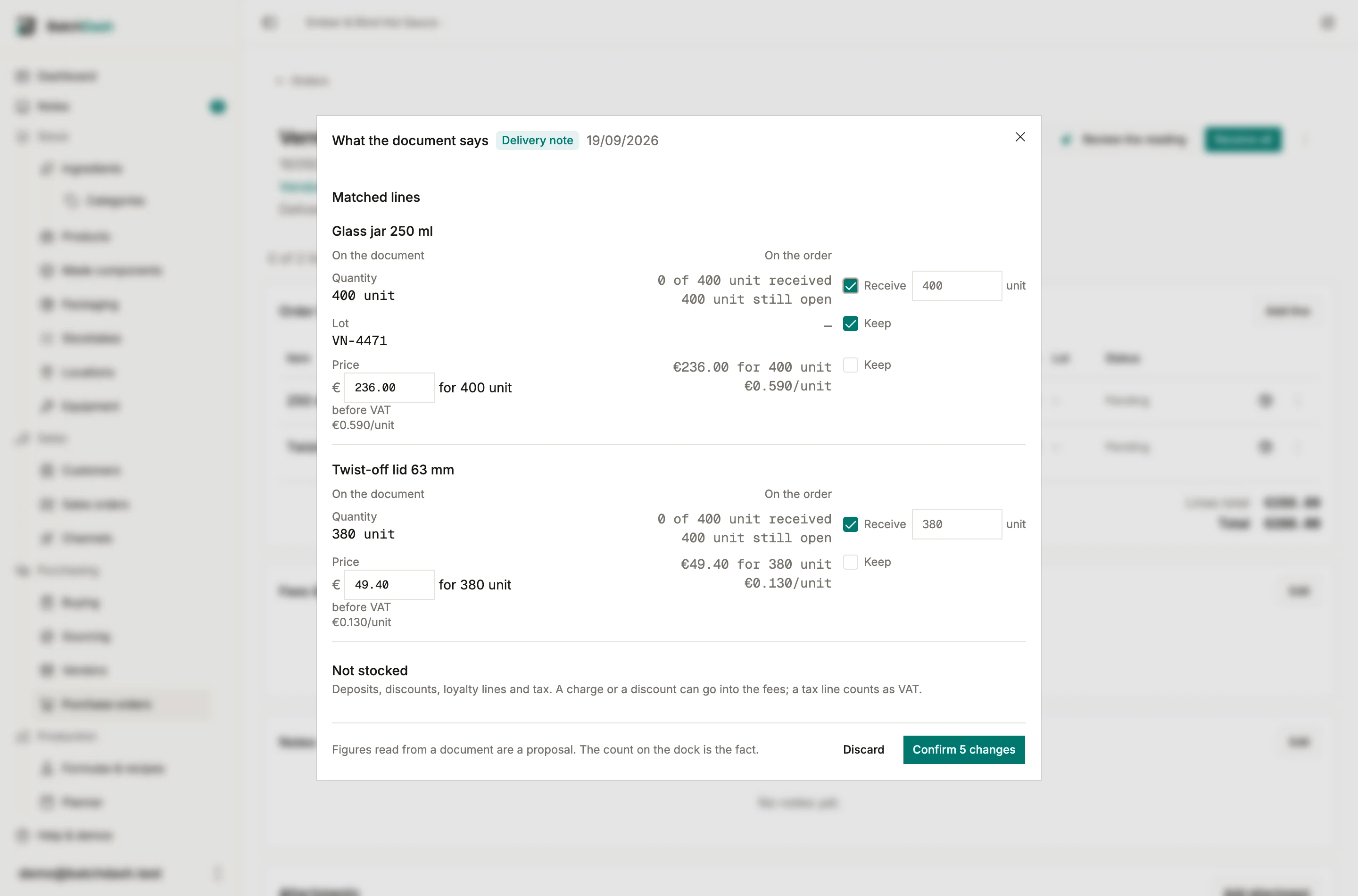
Section titled “The review sheet”Every line the document names sits beside what the order says, under two heads: On the document and On the order. Each field has its own box:
| Field | On the order | The box |
|---|---|---|
| Quantity | what the line has received, and what is still open | Receive, with the figure it will book beside it |
| Lot code, best-before | the line’s last receipt | Keep: written on the receipt |
| Price | the order’s own money for the same quantity | Keep: the invoice’s money for the line, to the cent |
| Expected date, vendor reference | the order’s | Keep: the order’s own fields |
| Delivery and other fees | the Fees & shipping card | Keep: the card’s figures |
| Rounding on the invoice | the card’s rounding line | Keep: the difference to the printed total, plus or minus |
| VAT on the document | the card’s VAT line | Keep: the amount, the rates it splits by, and whether the prices include it |
The quantity is the one field that writes stock, so its box says what it does. The figure beside Receive is the receipt the line can still take, in the unit the line was ordered in, and you can change it. It is the document’s own figure while the line has room for it. When the document says more than the line still has open, the figure is the rest, and a note says so: an invoice for the whole order after a first delivery names what was ordered, not a second crate. A line received in full receives nothing, and the row says so; type a figure there only if more actually came. An order confirmation says what was ordered, not what arrived, so its quantities are shown and left unticked.
The price is money, never a rate. The row shows what the document charges for the quantity it priced, beside what the order’s own money comes to for that same quantity, both to the cent, and the rate each works out to underneath, per the unit you say the quantity in. Keeping it writes the money onto the line exactly as printed; the rate on the line is arithmetic on that money afterwards. A rate rounded per gram and multiplied back up is not what you paid: €16.94 for a kilo is 0.0169 a gram, and 0.0169 × 1000 is €16.90. Where the document printed only a rate, the money is worked out from it and the row says so.
Every other box is ticked wherever something was actually read, with two exceptions. A quantity the app could not convert into the unit the line is booked in starts empty, and the row asks you for the figure in that unit: a conversion it cannot make is not one it will guess at. And a figure the order already carries, the same price or the same lot on the last receipt, starts unticked, so the count on the Confirm button is a count of changes.
Lines the document has and the order does not go under Not on this order, each proposing the ingredient it most likely names with the alternatives it weighed in a select. When the order has lines the document did not name, they sit first in that select, under On this order: pick one and the row moves up among the matched lines, placed on that line by you, with Not this line to undo it. The unit beside the quantity is the chosen ingredient’s own; pick one kept in another unit and the box empties for you to type the figure in that unit. Those lines start unticked: adding a line to an order is a bigger claim than correcting a quantity on one already there.
Order lines the document never mentioned are listed under Not mentioned and left exactly as they are. A delivery note for half an order does not close the other half.
Deposits, discounts, loyalty lines, rounding and tax land under Not stocked, each wearing what the reader made of it (Deposit, Discount, Tax…), with two ways out. Add to fees counts the row into the order’s Other fee: the row then reads “In the fees”, the fee field names what was picked up, and Leave out puts it back. Add as a supply moves it up among the lines instead; untick it there and it goes back down. A discount goes into the fees too, below zero: the order’s Other charge is signed for exactly this, so a rebate or a loyalty line takes the order down to what you paid instead of leaving a gap nothing can close. A tax row is handled before you get there: the reader puts its amount in VAT on the document, a row offered only when it found a tax line, and works out from the printed total whether the prices contained it. So the tax row offers Count as VAT in place of Add to fees, which fills that row again from the tax lines if you emptied or changed it. As a fee, the VAT would count twice. See VAT on what you buy.
At the bottom, the check, as a small ledger: the document’s lines and fees as read, the VAT when it was printed on top of the prices, what they come to, and the total it printed. It does not move with your boxes. It asks one question, whether the reading is right: a figure that does not add up usually means a line was read wrong, and finding that here beats finding it in a month’s spend report. When the figures are off the printed total, the difference is offered under the fees as a line of its own, Rounding on the invoice, plus or minus, like any fee the document printed. A cent or two is the invoice’s own rounding, its lines printed rounded and its total summed from the unrounded figures, so that line starts kept and the order comes to what you paid. A bigger gap is more likely a misread: the line is there, unticked, for you to decide. The order’s Fees & shipping card shows the rounding as its own line afterwards, and its dialog lets you type one by hand.
Confirm, or discard
Section titled “Confirm, or discard”Confirm applies exactly what is ticked, all at once: receipts dated the document’s own day, the price changes, the expected date, the fees. Nothing at all is written before that click. If any row cannot be applied, none of them are, and the sheet says which row and why.
Discard leaves the order exactly as it was. The reading still counts against the month: the model read the document either way.
The document is filed in the order’s Attachments, named by what it turned out to be (“Delivery note 2026-06-12.jpg”) and marked as filed by BatchDash. The order’s header then says “Read from Delivery note 2026-06-12.jpg on 12/06/2026”.
A purchase that never had an order
Section titled “A purchase that never had an order”Half of a small workshop’s buying starts with a bag on the bench rather than an order on the screen. Read the paperwork in the Purchase orders or Ingredients heading takes the till receipt or the invoice and builds the record afterwards.
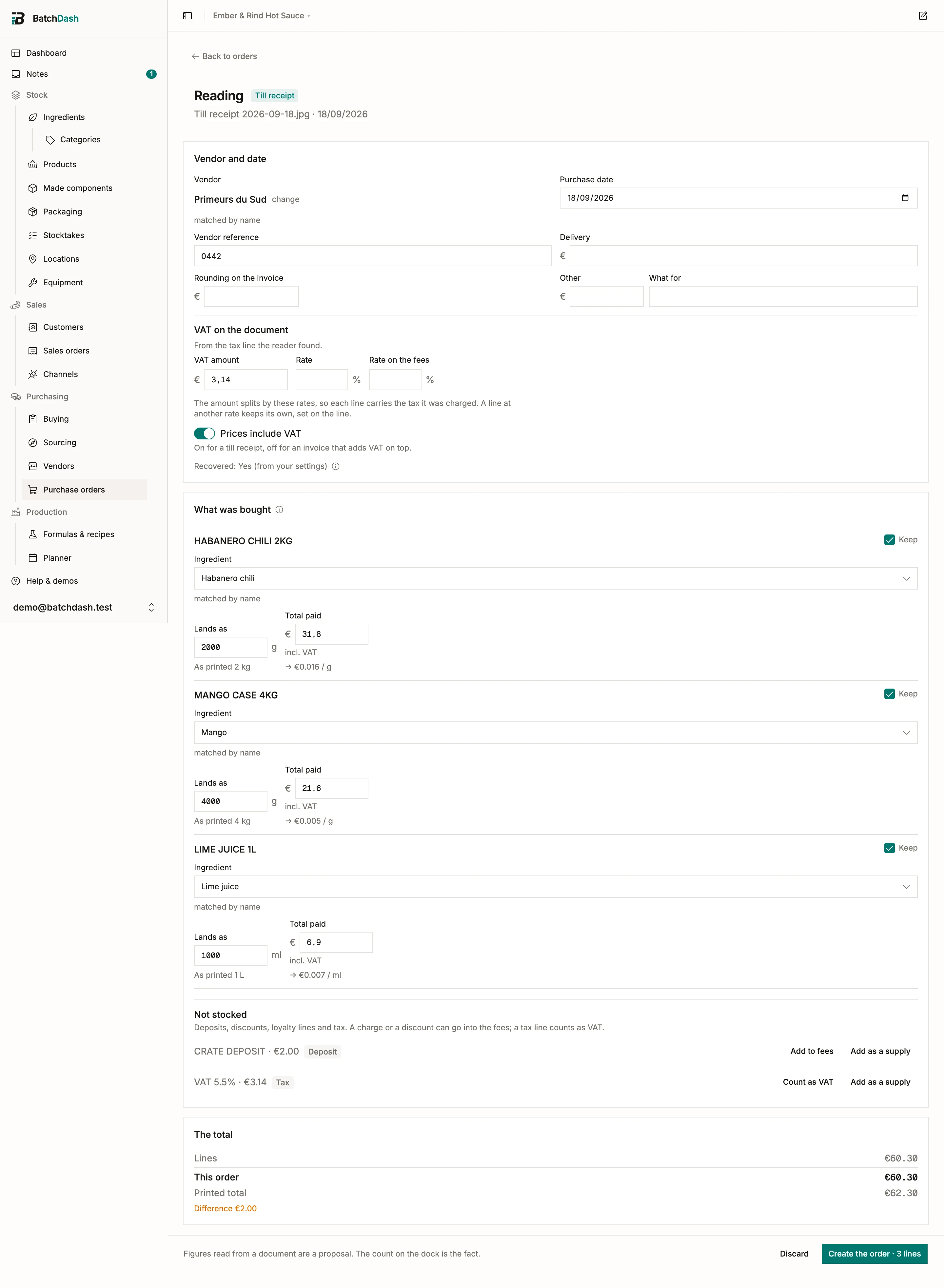
The reading opens on its own page, in three parts:
- Vendor and date. The vendor matched to one of yours by name, with the runners up as one-click picks and the printed name ready to become a new vendor if it is one. Then the purchase date read off the document, the receipt or invoice number, and the delivery and other charges the document printed. Under them, VAT on the document: the amount from the tax line, the rates the document charges, and whether the prices include it. When the page prints a rate per line, the reader takes those too: the rate most of the goods carry becomes the document’s, and a row at another rate hands its own to the line it creates.
- What was bought. One row per item, each proposing the ingredient it names, the quantity in that ingredient’s own unit, and the money: the row’s Total paid as the document prints it, with the price per unit worked out from it underneath. Rows start kept here, unlike the sheet over an order: on a receipt every line is one of the purchase’s lines, so you only touch the ones to leave out. Not-stocked rows sit at the bottom as they do on an order, with the same Add to fees and Add as a supply.
- The total. A ledger of what you keep: lines, fees, the VAT when it is on top of the prices, what the order comes to, and the printed total, with the gap when a row or a deposit is left out.
Create the order makes one received purchase order for that vendor: one line per kept row, each received through the ordinary path, dated the purchase. So the stock lands, the fees spread into the landed cost, and each line leaves the price snapshot the buying engine reads. New ingredients are created with the name you gave, the unit the row landed in, and no other field filled. The document is filed in the new order’s Attachments and you land on the order.
An order made this way takes a purchase-order slot like any other, so the button is disabled at your plan’s ceiling the way New order is. Creating a vendor from it needs the vendors permission, and creating an ingredient the inventory one; the page says so on the row rather than after you press the button.
Discard creates nothing, and the document goes with the reading: nothing else was holding it. A reading nobody comes back to is thrown away after a week, with its file.
Walk away and the list heading brings you back: the button reads Reading… while the reader is still working and Review the reading while one waits for your decision, and opens it, even once the month’s readings are used up. A refusal on Confirm lands under the field it is about, the vendor box, the date or the row, not at the foot of the page.
The reader learns your shop’s wording
Section titled “The reader learns your shop’s wording”A vendor prints “MADAME JEANETTE GEEL”; you call it Habanero. When you correct a match on one of these rows, or create the ingredient from it, that printed line is remembered against that ingredient for that vendor. The next receipt from the same shop matches it on its own, and the row says “matched by the vendor’s wording”.
Nothing is learned from a row the reader already had right, and nothing at all from a reading you discarded. A shipping supply teaches nothing either: it records the spend and keeps no price history, so there is no price row to remember the wording on.
How matching works
Section titled “How matching works”Four rules, strongest first, stopping at the first hit:
- The order’s own lines. You already said you expect this from this vendor, and the document is that vendor answering.
- The vendor’s wording: a SKU recorded on one of their offers, or a printed line remembered from a purchase you corrected. Somebody put that string against that ingredient once.
- The ingredient’s name, ignoring case and accents.
- A loose overlap of words, with the runners up offered beside it.
Each match carries how sure it is, in its own words: “matched by the vendor’s wording” is a different claim from “closest match, check it”, and the sheet never presents the two as the same thing. A match is a proposal until you confirm it.
When your plan includes products you buy ready-made, the reader matches them too, by the same rules. A product’s own SKU or barcode printed on a line is an exact match, and the row says “matched by the product’s own code”: a co-packer prints the codes you gave them. A product’s name is matched without its format: a vendor prints “Corn tortilla chips” and leaves the “· bag” off. A kept reading receives a product line like any other, corrects its lot the same way, and remembers the vendor’s wording for it.
What it costs, and what leaves
Section titled “What it costs, and what leaves”Each reading spends one from your plan’s monthly paperwork allowance, separate from the AI requests that recipe import and ingredient enrichment share. A reading that finds nothing readable still counts: the model read the document. A reading that fails before the model answers does not.
The document leaves for the AI provider to be read and is not kept there. The stored copy stays in your own private file storage, counted against your storage allowance like any other attachment.
A document is read in one currency. Against an order, a document printed in the order’s currency keeps its money, and one that names another currency has every money field left empty, with a note naming both codes: a figure filed under the wrong currency is worse than a blank one. With no order behind it, the money is kept in the currency the document printed, and the order it becomes is written in that currency when your plan includes buying in other currencies. Otherwise the document has to be in your base currency.
A purchase in another currency is received the moment you confirm it, so the page asks what it is booked at, the way an order’s Booked at card does: the reference rate for the purchase date, a rate you type, or the amount your bank took. An invoice dated before any rate was published has no reference rate, and the page says so before you confirm; type the rate or enter the amount paid.
What it will not do
Section titled “What it will not do”The foot of the sheet says “The count on the dock is the fact.” A document is what a supplier says arrived. The reader saves you the typing, and you still check the crate.
The reader also never creates a piece of equipment. A unit of equipment is an owned asset with its own record, and a line on a till receipt is not enough to mint one.
Nor does it create a product. A product is created on the Products page, and the next reading matches it.
This module is part of the larger plans.