'%3e%3cg%20transform='matrix(0.737731,0,0,0.737731,1584.657279,93.052323)'%3e%3cg%20transform='matrix(1,0,0,1,-73.197369,-28.78343)'%3e%3cg%20transform='matrix(2.327683,0,0,2.327683,-115.888888,-940.785017)'%3e%3cpath%20d='M610.12,610.782L535.09,610.782L535.09,570.757L618.413,570.757L610.12,610.782ZM628.935,570.757L697.713,570.757C709.523,570.757%20720.131,571.523%20729.536,573.054C738.94,574.585%20746.923,577.373%20753.485,581.42C760.046,585.466%20765.077,591.043%20768.576,598.151C772.076,605.26%20773.825,614.391%20773.825,625.545C773.825,632.107%20772.841,638.504%20770.873,644.737C768.904,650.971%20766.006,656.548%20762.179,661.469C758.351,666.39%20753.758,670.491%20748.4,673.772C743.041,677.052%20736.863,679.13%20729.864,680.005L729.864,680.661C741.018,683.723%20749.603,689.574%20755.617,698.213C761.632,706.852%20764.639,716.858%20764.639,728.231C764.639,740.917%20762.179,752.071%20757.258,761.695C752.337,771.318%20745.721,779.301%20737.409,785.644C729.098,791.987%20719.584,796.798%20708.867,800.079C698.15,803.36%20686.886,805%20675.076,805L580.368,805L581.484,799.615L609.457,665.57L687.543,665.57C696.947,665.57%20705.094,663%20711.984,657.86C718.873,652.72%20722.318,645.011%20722.318,634.731C722.318,625.545%20719.858,619.257%20714.937,615.867C710.015,612.477%20703.399,610.782%20695.088,610.782L620.636,610.782L628.935,570.757ZM638.101,764.975L672.779,764.975C684.59,764.975%20694.268,761.804%20701.814,755.461C709.359,749.119%20713.132,739.714%20713.132,727.247C713.132,721.123%20711.875,716.312%20709.359,712.812C706.844,709.313%20703.618,706.633%20699.681,704.774C695.744,702.915%20691.37,701.767%20686.558,701.33C681.747,700.892%20677.044,700.673%20672.451,700.673L651.88,700.673L638.101,764.975Z'%20style='fill:rgb(25,23,20);'/%3e%3c/g%3e%3cg%20transform='matrix(1,0,0,1,0,220.238764)'%3e%3cpath%20d='M1259.334,480.922L1129.63,480.922L1129.63,387.757L1278.681,388.212L1259.334,480.922Z'%20style='fill:rgb(0,120,111);'/%3e%3c/g%3e%3cg%20transform='matrix(1,0,0,1,0,452.077913)'%3e%3cpath%20d='M1210.953,480.922L1129.63,480.922L1129.63,387.757L1230.395,387.757L1210.953,480.922Z'%20style='fill:rgb(0,120,111);'/%3e%3c/g%3e%3cg%20transform='matrix(1,0,0,1,0,336.158338)'%3e%3cpath%20d='M1235.144,480.922L1129.63,480.922L1129.63,387.757L1254.586,387.757L1235.144,480.922Z'%20style='fill:rgb(0,120,111);'/%3e%3c/g%3e%3c/g%3e%3c/g%3e%3c/g%3e%3c/svg%3e)
Sourcing, remembered.
Finding a new supplier is real work: calls, quote emails, samples on the bench, a spreadsheet with nine columns. Then the purchase order is placed and all of it dies. The quote lives in an inbox. The spreadsheet has a date in its filename. Nobody can say who you rejected in 2026, or why.
BatchDash runs the search as a sourcing project, next to the stock, the prices and the recipes it will feed. The candidates, their quotes, the sample you tested and the reason you picked one all stay on it, and the winner leaves behind a real vendor offer that Buying uses the next morning.
One project per search, from need to decision
State the need once, in your own words: what you are after, how much and how often, the target cost, the paperwork it has to come home with. The target sits against what you pay today, so the gap that makes the search worth doing is on the page from the first day rather than in somebody’s head. Candidates collect under the brief, the discussion stays with the project, and the stage says where things stand. A search going quiet surfaces in Needs attention before its best quote expires.

Every candidate on one row, the rejected ones included
A candidate is a distributor, a manufacturer, a marketplace listing. Each carries what you know about them: the latest quote read back in your own stock unit, the minimum they will sell, the lead time they quote, whether a sample passed, your own rating out of five. Ruling one out strikes it through instead of deleting it, because the question next year is not only who you chose. It is who you already tried, and what was wrong with them.
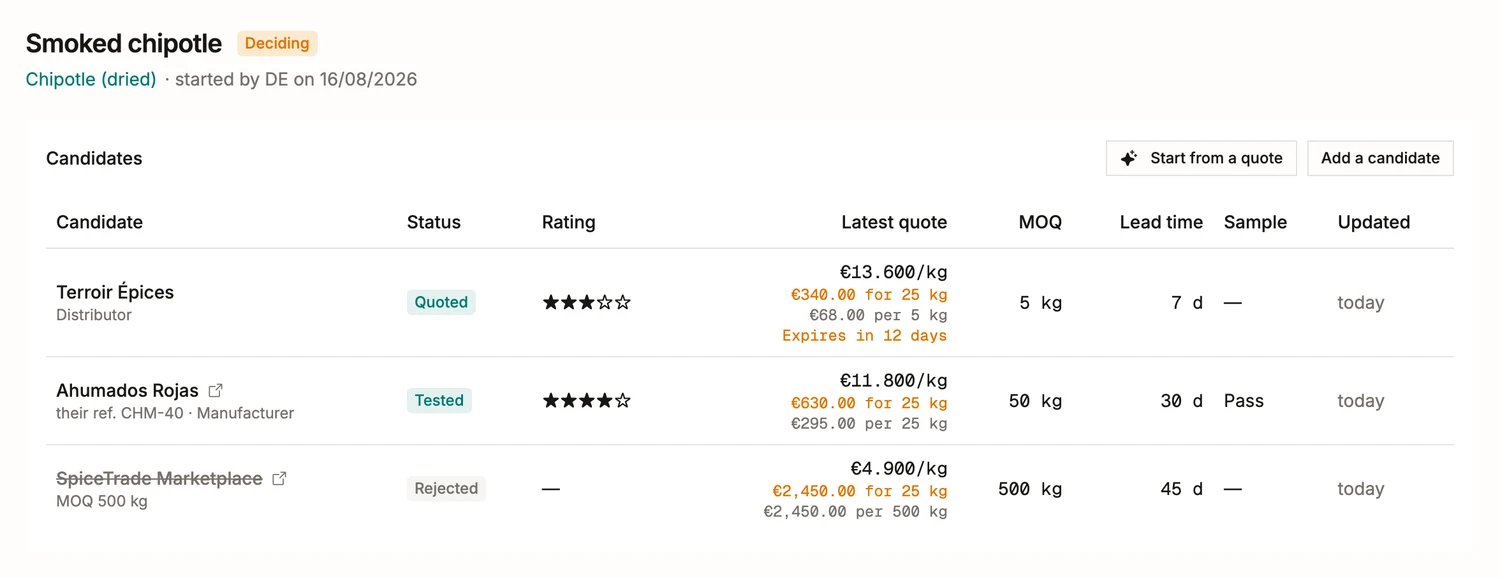
Paste the supplier’s email. It becomes a quote row.
A supplier answers in prose: a price for a pack, a minimum, a lead time, a validity date, somewhere in six lines of email or an attached PDF. Paste the message or hand over the file, and it comes back as a draft beside the original text. Keep the fields that are right, correct the rest. A foreign-currency price is never converted for you, and the supplier’s own wording stays on the quote.
Compared against what you pay today
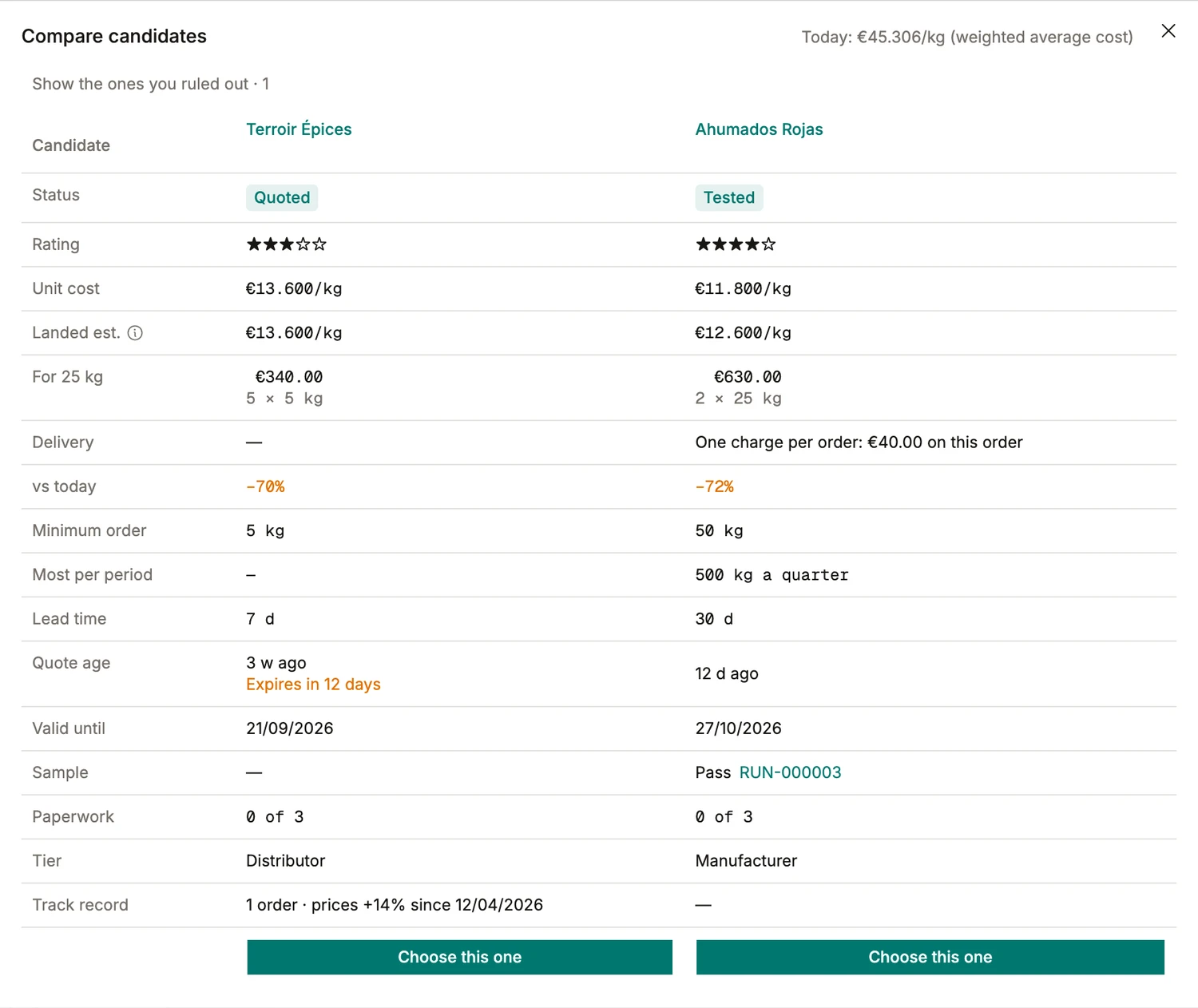
The comparison re-bases every quote into your own stock unit and lines the candidates up in columns: unit cost, landed estimate, what the quantity you actually need costs at each one’s pack size, the minimum, the lead time, how old the quote is and when it expires. At the top sits today’s weighted average cost, and each candidate shows the difference against it in percent. An expired quote is struck through and out of the math. And the sample row links to the production run it was tested in, which is a row no spreadsheet has ever had.
- The landed estimate, not the sticker: a €40 delivery charge on one order moves €11.800/kg to €12.600/kg, and the column says so before you commit.
- A minimum of 500 kg against a need of 25 kg is a fact about the candidate, sitting in its own row rather than in a footnote you remember too late.
- Cover the need works out whether one supplier or two comes out cheaper once delivery is counted. Usually it answers: one, and says why.
Say how you choose, once
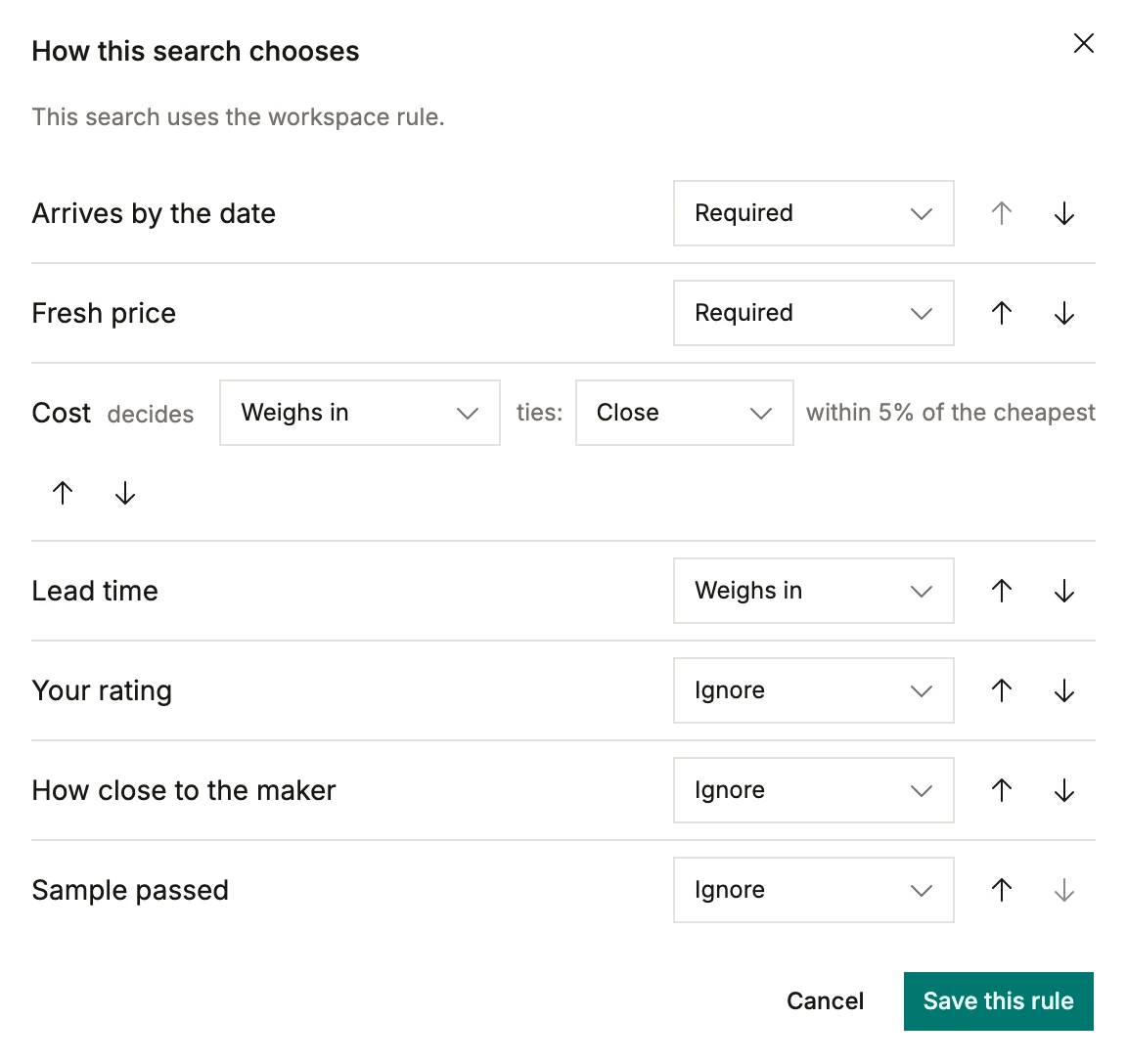
Every workshop has a rule it applies without ever writing it down: it has to arrive before the run, the price has to be current, then take the cheapest unless the difference is noise. BatchDash lets you state it. Arriving in time and a fresh price are requirements, so a candidate failing one is out rather than quietly ranked lower. Cost decides. Ties inside five percent go to the shorter lead time. Set it once for the workspace and both Sourcing and Buying obey it, so the recommendation you get on a Tuesday is the one you would have made yourself.
Adopting the winner writes real records
Choose this one turns the search into the things the rest of the app runs on, in a single step:
- The vendor, created with the contact details you typed once, or matched to the one you already buy from.
- The ingredient, if your catalog never held it, and a vendor offer taken from the chosen quote. That offer is the price Buying uses from then on.
- The decision note, which the flow insists on: one honest paragraph on why, kept with the runners-up and their rejection reasons. Two years later, when the price doubles, the whole file is still there.