'%3e%3cg%20transform='matrix(0.737731,0,0,0.737731,1584.657279,93.052323)'%3e%3cg%20transform='matrix(1,0,0,1,-73.197369,-28.78343)'%3e%3cg%20transform='matrix(2.327683,0,0,2.327683,-115.888888,-940.785017)'%3e%3cpath%20d='M610.12,610.782L535.09,610.782L535.09,570.757L618.413,570.757L610.12,610.782ZM628.935,570.757L697.713,570.757C709.523,570.757%20720.131,571.523%20729.536,573.054C738.94,574.585%20746.923,577.373%20753.485,581.42C760.046,585.466%20765.077,591.043%20768.576,598.151C772.076,605.26%20773.825,614.391%20773.825,625.545C773.825,632.107%20772.841,638.504%20770.873,644.737C768.904,650.971%20766.006,656.548%20762.179,661.469C758.351,666.39%20753.758,670.491%20748.4,673.772C743.041,677.052%20736.863,679.13%20729.864,680.005L729.864,680.661C741.018,683.723%20749.603,689.574%20755.617,698.213C761.632,706.852%20764.639,716.858%20764.639,728.231C764.639,740.917%20762.179,752.071%20757.258,761.695C752.337,771.318%20745.721,779.301%20737.409,785.644C729.098,791.987%20719.584,796.798%20708.867,800.079C698.15,803.36%20686.886,805%20675.076,805L580.368,805L581.484,799.615L609.457,665.57L687.543,665.57C696.947,665.57%20705.094,663%20711.984,657.86C718.873,652.72%20722.318,645.011%20722.318,634.731C722.318,625.545%20719.858,619.257%20714.937,615.867C710.015,612.477%20703.399,610.782%20695.088,610.782L620.636,610.782L628.935,570.757ZM638.101,764.975L672.779,764.975C684.59,764.975%20694.268,761.804%20701.814,755.461C709.359,749.119%20713.132,739.714%20713.132,727.247C713.132,721.123%20711.875,716.312%20709.359,712.812C706.844,709.313%20703.618,706.633%20699.681,704.774C695.744,702.915%20691.37,701.767%20686.558,701.33C681.747,700.892%20677.044,700.673%20672.451,700.673L651.88,700.673L638.101,764.975Z'%20style='fill:rgb(25,23,20);'/%3e%3c/g%3e%3cg%20transform='matrix(1,0,0,1,0,220.238764)'%3e%3cpath%20d='M1259.334,480.922L1129.63,480.922L1129.63,387.757L1278.681,388.212L1259.334,480.922Z'%20style='fill:rgb(0,120,111);'/%3e%3c/g%3e%3cg%20transform='matrix(1,0,0,1,0,452.077913)'%3e%3cpath%20d='M1210.953,480.922L1129.63,480.922L1129.63,387.757L1230.395,387.757L1210.953,480.922Z'%20style='fill:rgb(0,120,111);'/%3e%3c/g%3e%3cg%20transform='matrix(1,0,0,1,0,336.158338)'%3e%3cpath%20d='M1235.144,480.922L1129.63,480.922L1129.63,387.757L1254.586,387.757L1235.144,480.922Z'%20style='fill:rgb(0,120,111);'/%3e%3c/g%3e%3c/g%3e%3c/g%3e%3c/g%3e%3c/svg%3e)
BatchMaster alternative: the manufacturing layer beside the ERP you already run.
BatchMaster has sold ERP to process manufacturers since 1981 and counts more than 2,000 of them, in food, nutraceuticals, pharmaceuticals, chemicals and personal care. It comes whole, with a general ledger of its own, or as a manufacturing application integrated with QuickBooks, Sage, Business Central, Dynamics GP or SAP Business One, and its own team puts it in.
BatchDash runs the manufacturing side of the business in full: formulas, stock, buying, batches, what each batch cost and where each lot went. Your books stay in the system that already keeps them, with nothing to connect to it. There is one version, the current one, it opens in any browser, and it goes live without an implementation project.
Two ways to run the plant
BatchMaster’s column is taken from batchmaster.com, in its own words wherever they carry the claim. BatchDash’s column is shown on the screens in the sections that follow.
Who it was made for
- BatchMaster
- Process manufacturing only, since 1981: food and beverage, nutraceuticals, pharmaceuticals, chemicals, personal care and CBD, for “growing, mid-market recipe- and formula-based manufacturers”.
- BatchDash
- Anyone who makes from a recipe in batches, food and cosmetics first, from two people and a kettle to a line that runs in shifts.
What it covers
- BatchMaster
- Process ERP in three tiers, “Web add-on, Web ERP, and SAP Business One”. The add-on joins the accounting you run, the Web ERP brings a general ledger of its own, and the third is built into SAP Business One.
- BatchDash
- The whole manufacturing side in one system: formulas, stock, purchasing, batches, costs, lots, label data and sales orders. The general ledger stays in your accounting, so there is never a second one to reconcile.
Your accounting
- BatchMaster
- The add-on integrates with “QuickBooks, SAP Business One, Microsoft Dynamics 365 Business Central, Microsoft Dynamics GP, Sage 100 & 300”, synchronizing financial data in real time. With QuickBooks, BatchMaster takes over inventory, purchase orders and sales orders, and QuickBooks keeps cash flow, payables and receivables.
- BatchDash
- Whatever keeps your books goes on keeping them, and takes the plant’s figures from BatchDash: what the stock was worth on a given day, what the goods sold cost, what each vendor was paid and what went to waste.
Versions in service
- BatchMaster
- BatchMaster Desktop 8.8, supported in “Helpdesk Support mode only”, where “bug fixes, and other compatibility and security updates have ended”, and BatchMaster Web, where all new development goes. Moving from one to the other is a migration project.
- BatchDash
- One, the current one. Every workspace runs the same BatchDash, a change reaches all of them on the same day, and there is no older edition to move off.
Where it runs
- BatchMaster
- On your own server, in a “private cloud” with “no other shared instances”, or as BatchMaster Web in the browser.
- BatchDash
- In the browser, on the office computer, a tablet on the line or a phone in the cold room, with nothing to install or patch. A company with hosting rules of its own can have its own instance.
Going live
- BatchMaster
- For the QuickBooks edition: “Up and running in 10–14 weeks. Our team does it.” Its implementation runs in eight phases, from kickoff and data conversion through configuration, customization, training and testing to go-live.
- BatchDash
- Accounts open on request for now, so start by describing what you make. From there, no implementation project to schedule: your recipes first, then what you already have, every row checked before it lands. A larger operation can have our team run the setup and the move with it; ask us.
Formulas
- BatchMaster
- A formulation module with version control, approvals, “what if” analysis and non-linear scaling, and packaging kept in “a separate Bills of Material module”.
- BatchDash
- Each line follows its own rule as the batch changes size: it scales with the batch, holds a set weight, counts per portion or jumps in whole steps. Shares are written as percentages, grams or baker’s percent, sub-recipes keep batches of their own, and every quantity lands in grams, rounded to the step your scale reads.
The cost of a batch
- BatchMaster
- Rolled up in the formula from ingredients, consumables and “fixed, tiered and variable labor costs”, adjusted to the batch size at production, then “actual cost in production” set against the expected one.
- BatchDash
- Read off the run itself: ingredients at what their lots cost delivered, freight and duty in, then packaging, each operator’s minutes at their own rate, equipment for its use and overhead on the basis you choose. Each unit carries its share of what the yield lost, with the planned figure kept beside the actual one.
Lots and recalls
- BatchMaster
- Lot numbers captured from receiving through production to shipment, and a graphical tool that runs “bi-directional” searches and “can generate recall letters for suppliers and customers”.
- BatchDash
- A lot code opens on who has the product, which confirmed orders can still be stopped and how much is left on your shelves. Each source reads certain when the lot was named at the bench, possible when it came out of shared stock.
How the price is set
- BatchMaster
- Through a live demo that opens with “a personalized consultation to understand your specific business requirements”. Its checklist for buyers adds that “initial license cost is rarely the full picture” and says to ask for “a fully loaded TCO estimate”.
- BatchDash
- One price for the workspace carries the daily work, lot tracing, sites, label data and batch costing with it, and nothing is charged per user, per order or per location. An operation that needs more than that settles its own terms with us.
BatchMaster is a whole process ERP, sold in tiers and editions, on your own server or in its cloud, and put in by its own team over weeks. BatchDash covers the whole manufacturing side in one current version, in the browser, live without an implementation project, with the figures your books need and no second ledger to reconcile.
Batch manufacturing software, from formula to recallIs something here no longer true of BatchMaster? Write to us and we will fix the page.
The figures your books need from the plant
BatchMaster
BatchMaster’s add-on synchronizes financial data in real time with the accounting you run. In its QuickBooks edition, BatchMaster manages inventory, vendors, purchase orders and sales orders, and QuickBooks goes on “monitoring cash flow and managing accounts payable and receivable”. The Web ERP carries a finance module of its own, with which you “can replace QuickBooks entirely”.
BatchDash
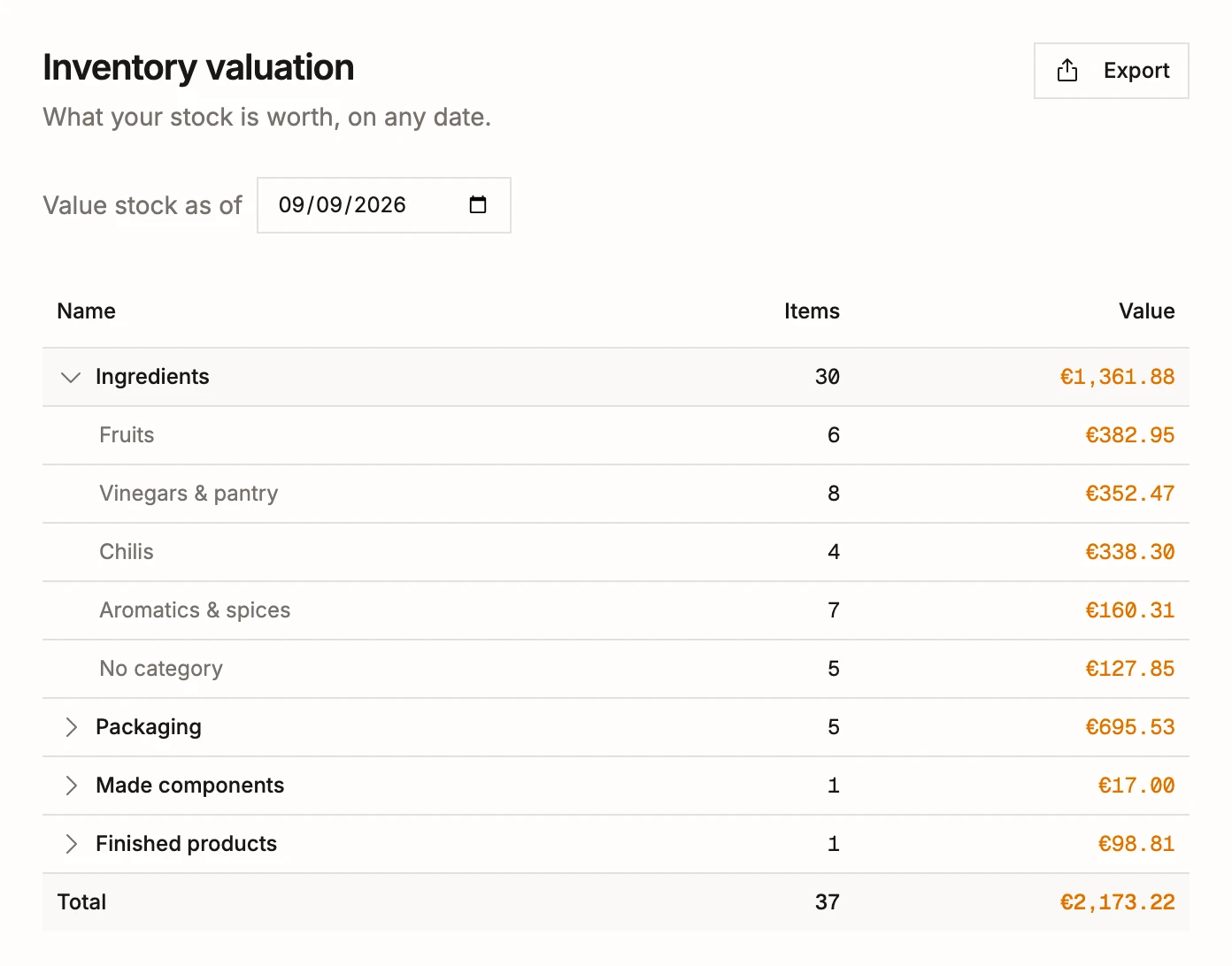
BatchDash keeps no ledger. It keeps what a ledger asks the plant for, worked out from every movement of stock. On screen is the stock as it stood on September 9, 2026, replayed from those movements: €1,361.88 of ingredients, the fruit alone €382.95, then €695.53 of packaging, €17.00 of made components and €98.81 of finished products, €2,173.22 in all. Every subtotal adds up to the cent.
- Any past day can be asked for, so a month-end figure can still be read weeks after the month has closed.
- The cost of goods sold for a period has a report of its own, product by product, with the revenue and the margin beside it.
- Purchases add up vendor by vendor, in your base currency at the rate each order was booked at, and what was thrown away is valued by reason in a waste report.
Running without an implementation project
BatchMaster
“Up and running in 10–14 weeks. Our team does it.” That is BatchMaster’s own line for its QuickBooks edition, where its team handles the setup, integration and training. Its implementation method runs in eight steps: kickoff and discovery, data conversion and migration, setup and integrations, customization and reports, user training, testing and acceptance, go-live, and support after it.
BatchDash
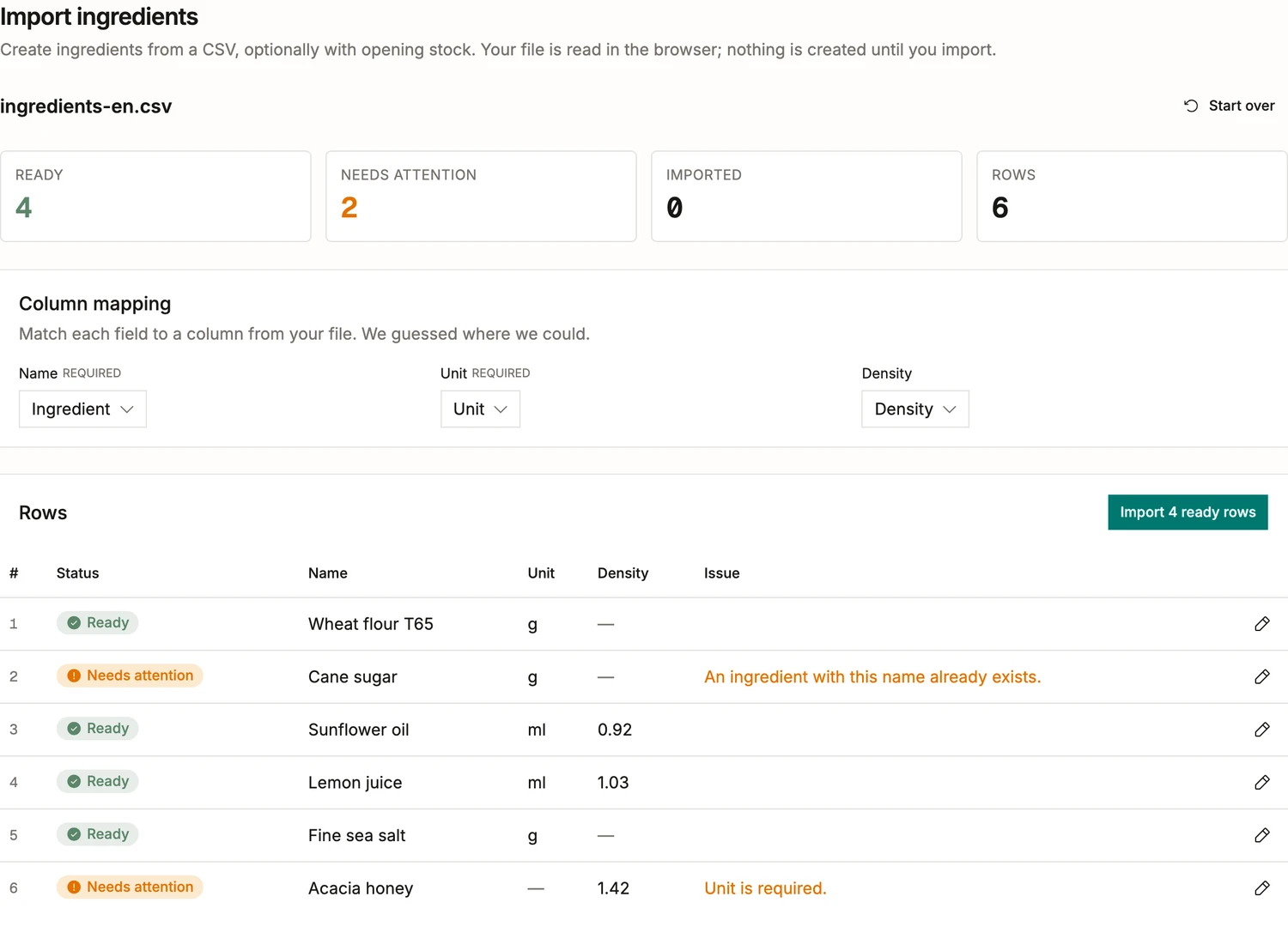
What you already have comes across once, and lives in BatchDash from then on. On screen, an ingredient list brought over as a file: six rows, four ready to go in, and two held back with the reason written beside each, a cane sugar the workspace already knows and an acacia honey that came without a unit. Nothing is created until you press import, and then only the four ready rows are.
- Every other list comes in the same way: what each vendor sells and at what price, deliveries with their lot codes, opening stock, products, customers and past sales.
- A recipe goes in as it is written: paste the text, or hand over a photo or a PDF, and it is read into a formula for you to check, line after line. A single click undoes the whole import.
- If you would rather hand the move to someone, our team takes on migrations too: ask us what yours would involve.
The same BatchDash on every screen in the building
BatchMaster
BatchMaster says Desktop 8.8 keeps help desk support while “bug fixes, and other compatibility and security updates have ended”, and that “all new development and enhancements are delivered exclusively on BatchMaster Web”. Desktop customers reach Web through a migration, with fixed-fee options that include a 90-day Express Migration for qualified customers. Its mobile warehousing app runs in the browser on phones, tablets and RF scanners.
BatchDash
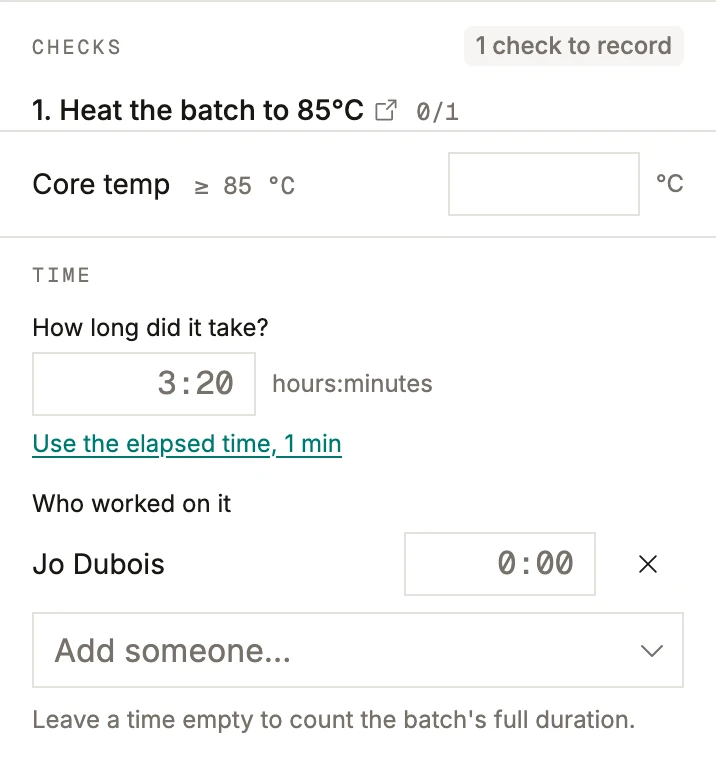
There is one BatchDash, and every workspace runs its current version: nothing to install, no server to patch, no edition to leave behind. The pages you use at a desk are the ones that open on a phone at the bench. On screen, a batch of mango-chili jam in progress, at a phone’s width: the one check its recipe asks for, a core temperature of at least 85 °C, waits for its reading, and under it go how long the batch took and whose time it was.
- Fields and buttons are sized for a finger, and dialogs stay above the phone’s keyboard while you type.
- Roles decide who sees costs and who can change a formula, down to a single person, and every change is kept in an audit trail.
- Your data can leave whenever you want: any list exports as a spreadsheet, and the whole workspace in one download.
From what a jar costs to what it earns
BatchMaster
BatchMaster costs a product in its formulation, from ingredients, consumables and “fixed, tiered and variable labor costs”, and runs a What If cost analysis there. Projected costs are adjusted to the batch size at production, the “actual cost in production” is captured, and management compares “expected vs actual costs”.
BatchDash
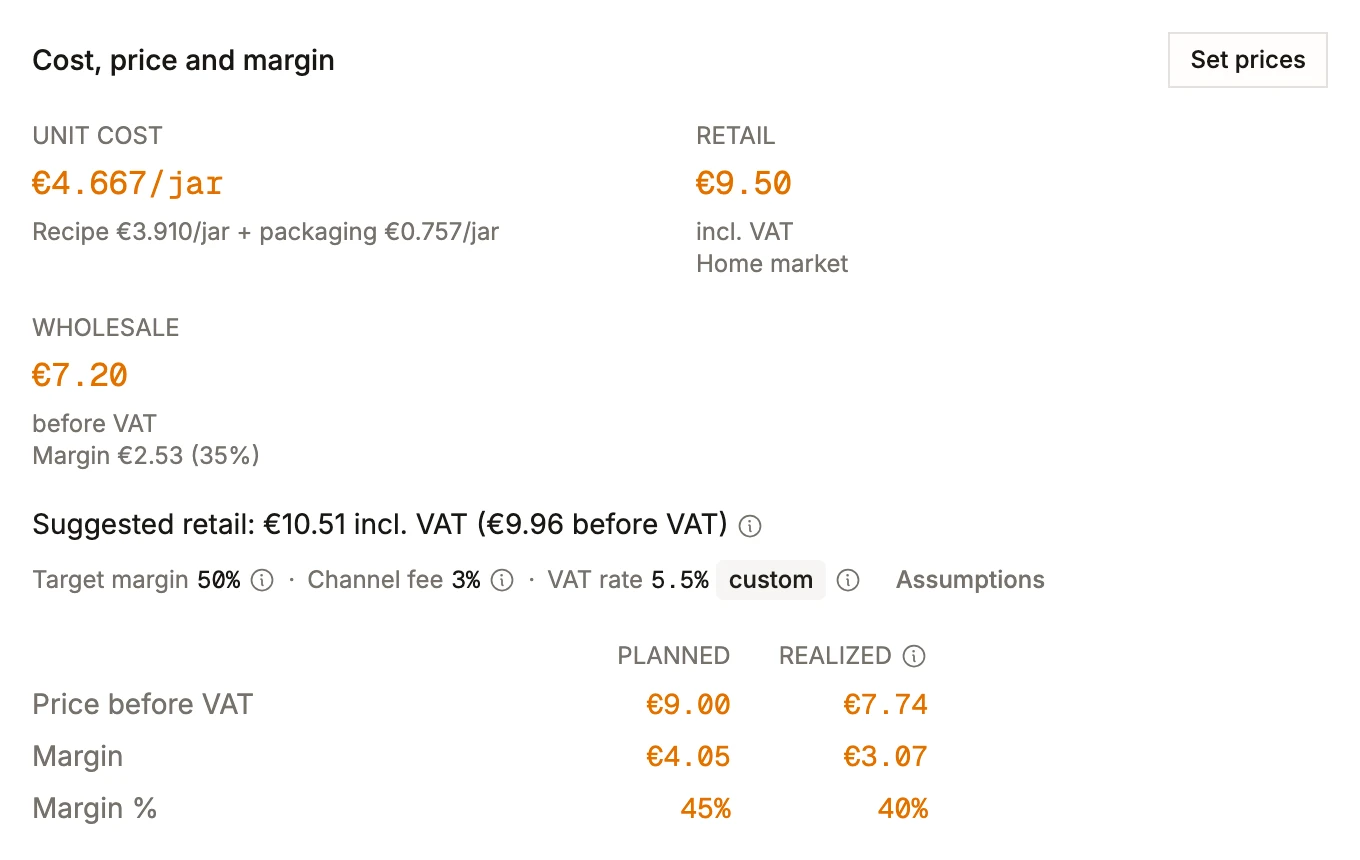
BatchDash carries the cost through to the price. The jar on screen costs €4.667 to make, €3.910 of recipe and €0.757 of packaging, from what was actually paid for them. Sold wholesale at €7.20 it leaves €2.53, a 35 % margin. Aim for 50 % after a 3 % channel fee, and the shelf price BatchDash suggests is €10.51, VAT included.
- Planned beside realized: the list price leaves €4.05 a jar, 45 %, and the sales recorded so far averaged €7.74 before VAT, which left €3.07, 40 %.
- The suggested price works back from the unit cost, the margin you aim for and the channel’s fee, then adds VAT, here at a rate of 5.5 % set for this product alone.
- When a vendor changes a price, the next delivery carries it into every formula that uses that ingredient, and into this card with it.
A recall starts with who has the jars
BatchMaster
BatchMaster captures lot numbers at receiving, in production and at shipping, co-products and by-products included. Its graphical traceability tool runs “bi-directional” searches from a delivery to customer shipments and back, and can “generate recall letters for suppliers and customers”.
BatchDash
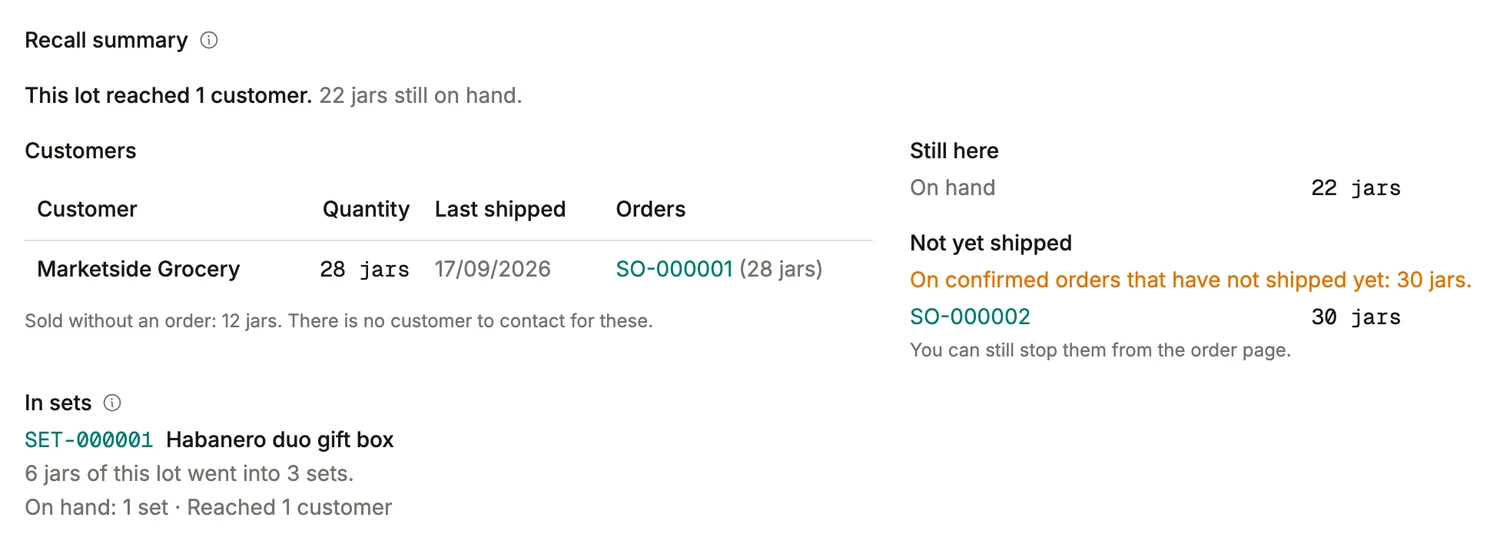
BatchDash lays a recall out in the order the calls get made. Lot HS-24-112 of the smoked habanero sauce reached one customer, Marketside Grocery, which received 28 jars on SO-000001. Another 30 are booked on SO-000002, confirmed but not shipped, and that order’s page can still stop them. Twenty-two remain on your shelves, and the 12 that left without an order are in the count too, with no one to contact about them.
- Six of its jars are packed in three Habanero duo gift boxes: one box is still in stock, and the rest went to a single customer, which the summary shows as well.
- The same page walks back upstream, to the batch of fermented chili mash in the sauce and on to the deliveries behind every ingredient.
- When two vendors happen to stamp the same code, the trace shows each delivery under it as its own record, and you pick the one the call is about.
Asked by teams looking at BatchMaster
- What separates BatchDash from BatchMaster?
- BatchMaster is a process ERP with more than forty years behind it, sold whole or integrated with one of five accounting systems, and put in by its own team. BatchDash is the system batch manufacturers run on (recipes, costs, production, stock, and the records that prove each batch), complete on the manufacturing side and made to sit beside whatever keeps your books. It comes in one version, in the browser, and starts without an integration project.
- When does BatchMaster fit better?
- BatchMaster is the better fit when you want one vendor for the whole ERP, general ledger included, or manufacturing built into SAP Business One. It also suits a plant that runs on validated systems, since it offers 21 CFR Part 11 e-signatures and GMP validation as a service, with IQ, OQ and PQ testing. Warehouse work on RF scanners, certificates of analysis and FDA nutrition fact panels drawn from the batch, and batches that yield co-products and by-products are its ground too. Outside those, the sections above show where the two part ways.
- We are on BatchMaster Desktop. Is this the moment to look elsewhere?
- BatchMaster’s own answer is to move to Web. Desktop 8.8 keeps its help desk while bug fixes and security updates have ended, and the move to Web is a migration, with an assessment of your reports and customizations, fixed-fee options and your Desktop license credited toward it. Either way your data moves and your team learns new screens, which makes it a fair moment to compare the two on the work itself, section by section.
- Can we bring our BatchMaster data across?
- Yes. Bring your lists across as spreadsheet files: ingredients and what vendors charge for them, deliveries with their lot codes, stock on hand, your products and customers, and past sales, with each file laid out for you to check before a single record is written. A formula can be pasted as text, or read from a picture or a scan of the page. On a larger move, ask whether our team can run it for you. How a move to BatchDash goes
- Can we keep QuickBooks, or the ERP we already have?
- Yes, whichever it is, and nothing needs connecting first. BatchDash keeps no general ledger of its own, so there is no second set of books and no edition to match to your accounting package. Cash, payables and receivables stay where they are; the month-end stock value, the cost of goods sold and the spend per vendor come from BatchDash.
- What will BatchDash cost next to BatchMaster?
- BatchMaster’s price comes out of a consultation and a live demo, and its own checklist tells buyers to ask for “a fully loaded TCO estimate” over three years, with customization, training and support included. BatchDash charges a single workspace price for the daily work, with nothing per user, per order or per location. BatchMaster serves growing mid-market plants, and a plant that size can ask for an enterprise arrangement: moving your records, a setup run with our team and what your operation needs beyond the daily work, agreed with us. For now accounts open on request: say what you make.
- Can the team use BatchDash on a phone or a tablet?
- Yes, in the browser, with no app to install from a store. Weighing, checks, times and who worked on a batch go in on the same pages as at a desk, laid out for a small screen, and a count or a delivery can be logged from the storeroom floor.
- Will BatchDash fit a US plant’s units and dollars?
- Yes. Pick dollars when you open the workspace and its units start in pounds, ounces and gallons, with grams and liters still there when a supplier sells metric. Batches are costed in dollars, a vendor who bills in euros is paid in euros at a rate you book yourself, and shelf labels carry UPC-A barcodes.