'%3e%3cg%20transform='matrix(0.737731,0,0,0.737731,1584.657279,93.052323)'%3e%3cg%20transform='matrix(1,0,0,1,-73.197369,-28.78343)'%3e%3cg%20transform='matrix(2.327683,0,0,2.327683,-115.888888,-940.785017)'%3e%3cpath%20d='M610.12,610.782L535.09,610.782L535.09,570.757L618.413,570.757L610.12,610.782ZM628.935,570.757L697.713,570.757C709.523,570.757%20720.131,571.523%20729.536,573.054C738.94,574.585%20746.923,577.373%20753.485,581.42C760.046,585.466%20765.077,591.043%20768.576,598.151C772.076,605.26%20773.825,614.391%20773.825,625.545C773.825,632.107%20772.841,638.504%20770.873,644.737C768.904,650.971%20766.006,656.548%20762.179,661.469C758.351,666.39%20753.758,670.491%20748.4,673.772C743.041,677.052%20736.863,679.13%20729.864,680.005L729.864,680.661C741.018,683.723%20749.603,689.574%20755.617,698.213C761.632,706.852%20764.639,716.858%20764.639,728.231C764.639,740.917%20762.179,752.071%20757.258,761.695C752.337,771.318%20745.721,779.301%20737.409,785.644C729.098,791.987%20719.584,796.798%20708.867,800.079C698.15,803.36%20686.886,805%20675.076,805L580.368,805L581.484,799.615L609.457,665.57L687.543,665.57C696.947,665.57%20705.094,663%20711.984,657.86C718.873,652.72%20722.318,645.011%20722.318,634.731C722.318,625.545%20719.858,619.257%20714.937,615.867C710.015,612.477%20703.399,610.782%20695.088,610.782L620.636,610.782L628.935,570.757ZM638.101,764.975L672.779,764.975C684.59,764.975%20694.268,761.804%20701.814,755.461C709.359,749.119%20713.132,739.714%20713.132,727.247C713.132,721.123%20711.875,716.312%20709.359,712.812C706.844,709.313%20703.618,706.633%20699.681,704.774C695.744,702.915%20691.37,701.767%20686.558,701.33C681.747,700.892%20677.044,700.673%20672.451,700.673L651.88,700.673L638.101,764.975Z'%20style='fill:rgb(25,23,20);'/%3e%3c/g%3e%3cg%20transform='matrix(1,0,0,1,0,220.238764)'%3e%3cpath%20d='M1259.334,480.922L1129.63,480.922L1129.63,387.757L1278.681,388.212L1259.334,480.922Z'%20style='fill:rgb(0,120,111);'/%3e%3c/g%3e%3cg%20transform='matrix(1,0,0,1,0,452.077913)'%3e%3cpath%20d='M1210.953,480.922L1129.63,480.922L1129.63,387.757L1230.395,387.757L1210.953,480.922Z'%20style='fill:rgb(0,120,111);'/%3e%3c/g%3e%3cg%20transform='matrix(1,0,0,1,0,336.158338)'%3e%3cpath%20d='M1235.144,480.922L1129.63,480.922L1129.63,387.757L1254.586,387.757L1235.144,480.922Z'%20style='fill:rgb(0,120,111);'/%3e%3c/g%3e%3c/g%3e%3c/g%3e%3c/g%3e%3c/svg%3e)
Manufacturing software instead of Excel, for the day the file and the shelf disagree.
The recipes are in a Word document, and the version that made the good batch is the one somebody printed and wrote on. The purchases and the production share one spreadsheet. The stock is what you can see when you walk into the room. It all works, right up to the morning somebody asks which delivery went into which bottle.
BatchDash is the system the making runs on: the ingredients, the recipes, the batches, the lot codes and what any of it cost, on records that update each other. Your orders, your delivery notes and your invoices stay exactly where they are.
You already know which files these are
None of this is a failure of discipline. A spreadsheet is very good at holding numbers and has no way of knowing what they are to each other, so keeping them in step is a job somebody has to do by hand, every week, forever.
The recipe lives in a document, and the last correction lives in somebody’s head.
A formula is a record with versions. The one that made the good batch is still readable, still costed, still runnable.
Stock is visual. You know what is on the shelf by looking at the shelf.
Every delivery, every batch and every sale writes a line. What the screen says is what is there, and it says why.
One spreadsheet carries the buying and the making, and the two tabs stopped agreeing months ago.
They stop being two lists. A batch draws from the same stock a delivery booked, so there is nothing left to reconcile.
The auditor asks which lot went into which batch, and the answer is three files and an afternoon.
One code, typed once, and the trail opens both ways with the quantities adding up.
It starts with the spreadsheet you already have
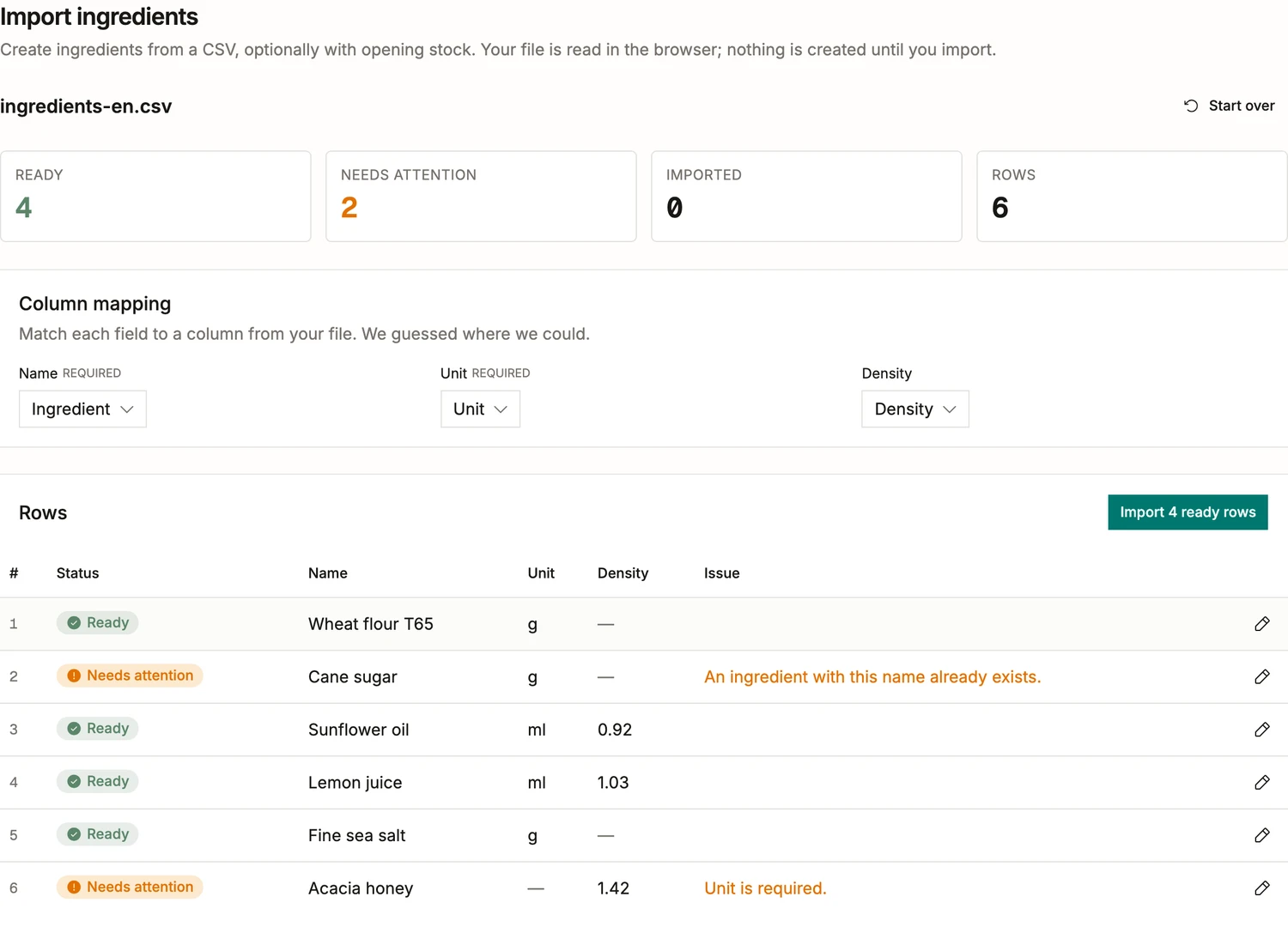
Nobody types their ingredient list in again. Drop the file on the import and it is read in the browser: six rows here, four ready to go and two worth a look, and nothing is created until you say so.
- It reads the headers your file already uses. A column called Ingredient lands on the name, Unit on the unit, Density on the density, and anything it did not guess you point at yourself.
- Every row is checked against what the workspace already holds. Cane sugar comes back marked because an ingredient of that name exists, rather than quietly becoming a second one.
- A row missing something required says so in its own words. The acacia honey has no unit, you fix it in place, and the four that were ready import.
- The same import takes your vendors, your deliveries, your products, your customers and the sales you have already made, one file each.
The recipe comes out of the document
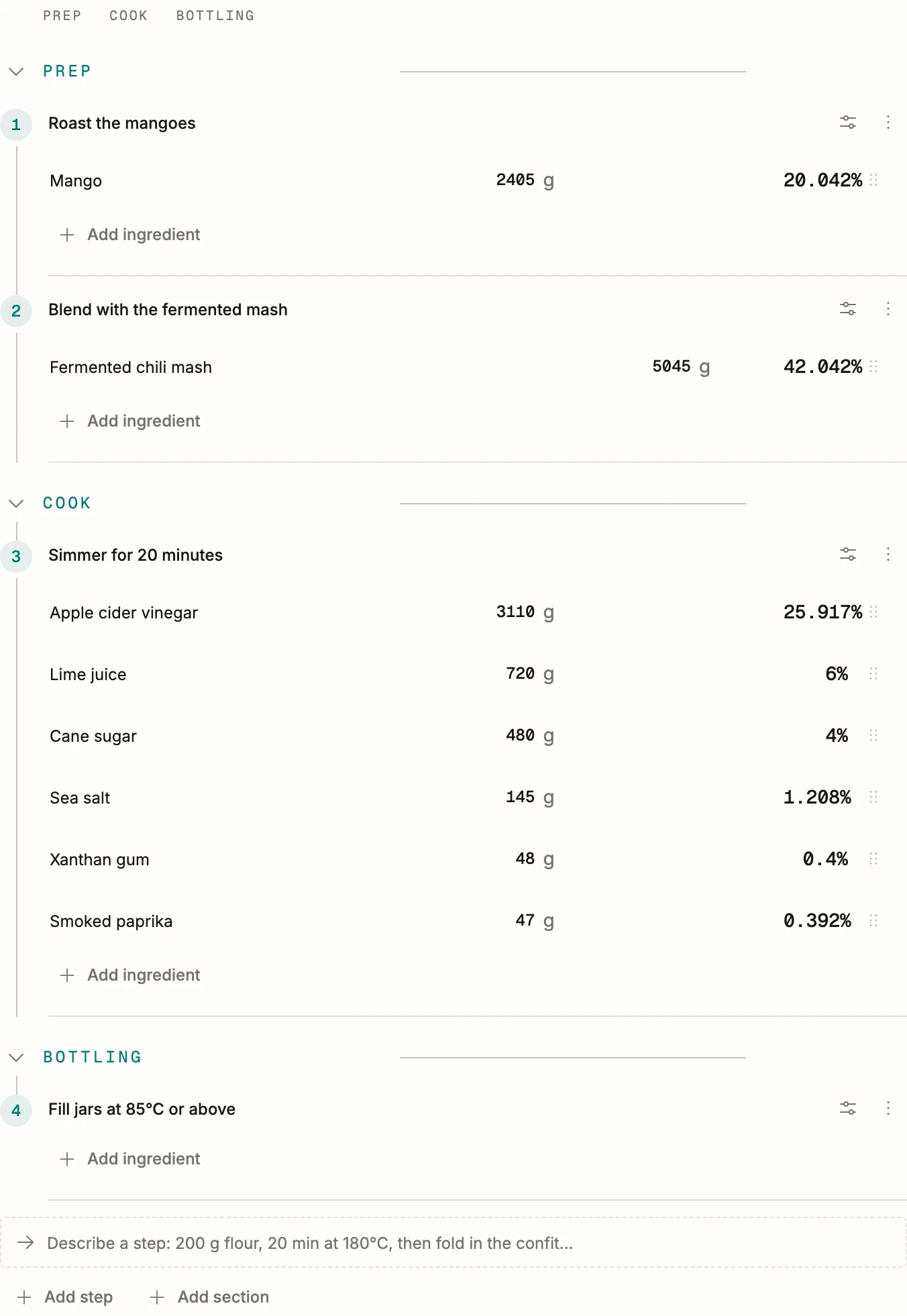
Type it once, in the percentages or the grams you already think in, with the phases and the steps the work really has. From then on it is a record rather than a file: ask it for 40 liters and it answers in 40 liters, and the cost appears underneath because the ingredients are now things the system knows.
- Editing writes a version instead of overwriting one, and a batch keeps the version it was made from: changing the recipe next month cannot rewrite what went out last month.
- Two people read the same recipe. The correction somebody made at the bench is on the record itself, where the next person will find it.
- A base you make yourself is a recipe of its own, used by everything built on it, so a change lands everywhere at once.
Stock stops being something you look at
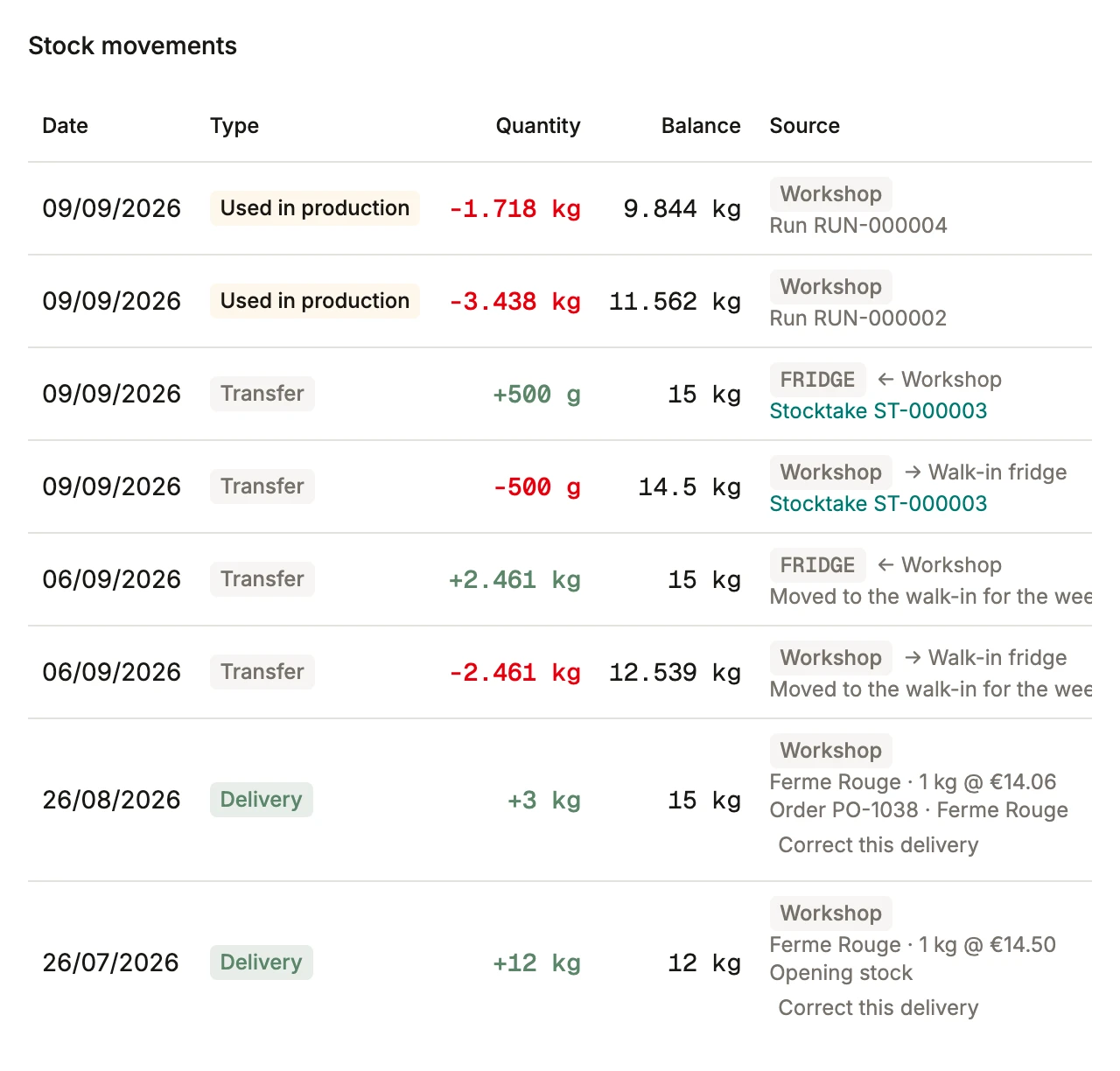
A delivery comes in at what it cost: 1 kg from Ferme Rouge at €14.06. A batch draws through the same ledger its output lands in, so RUN-000004 is a line here with a quantity and a link. A transfer of 500 g into the walk-in is a line out of one room and a line into the other, and the balance beside every entry is the balance that day. Scroll an ingredient and you read its whole life.
- Every entry names what caused it and links to it: the run, the order, the count, the transfer between two rooms.
- In stock is not the same as available. What is already promised to a planned batch or a confirmed order is held back, so you never sell it twice.
- More than one place to keep things is normal: your own room, the hall downstairs, a logistics partner in another country.
The question a spreadsheet cannot answer
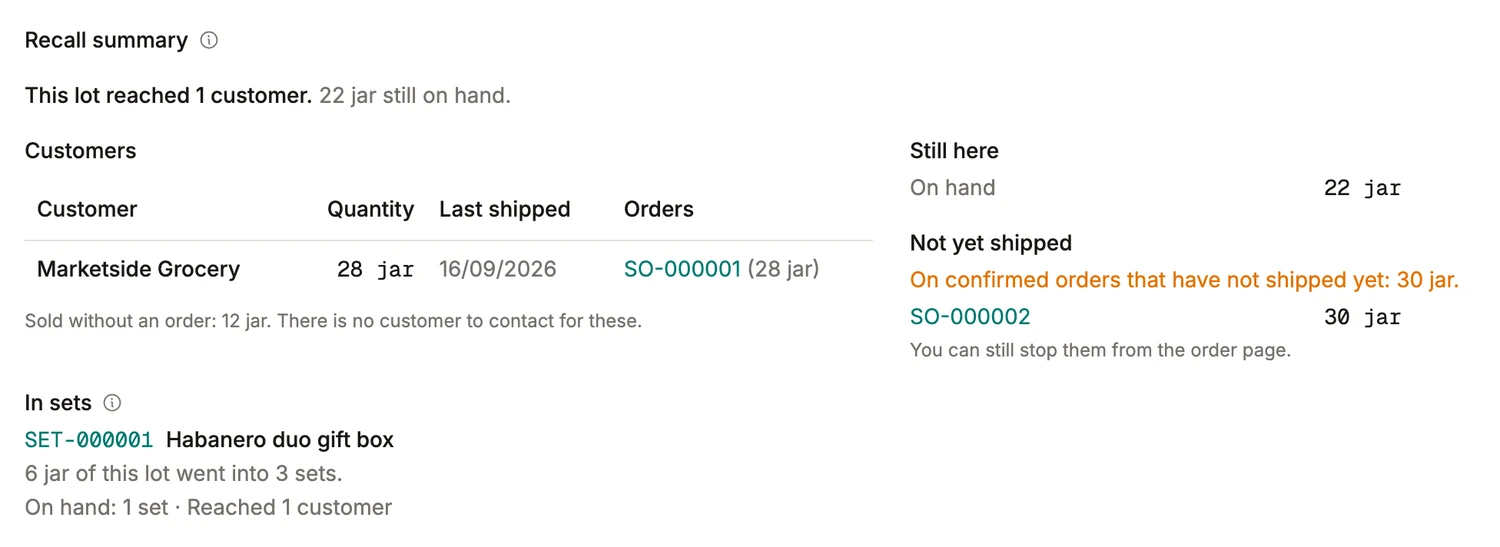
Which delivery went into which bottle, and where did that bottle go? A batch books its output under a lot code and records the lots it drew, as a side effect of being run at all, so the answer is already written when the question arrives. This lot reached one customer, who took 28 jars on an order you can open from the row, and 22 are still on the shelf.
- Twelve more were sold without an order, and the screen says plainly that there is nobody to contact for those.
- Thirty sit on a confirmed order that has not shipped, which you can still stop, and six went into gift boxes the trail follows too.
- Each batch takes its best-before from the shelf life on its recipe, so the date on the label and the date in stock are the same date.
What stays where it is
This is not an ERP migration, and the question is worth answering before anything else. What has no home today is production, and that is what BatchDash is for. What you keep beside it is yours to decide: some workshops run it next to an ERP that invoices, some run it with an accountant and nothing in between.
What the first week costs you
Not a project. An afternoon to have something real on screen, and one production run to know whether it holds.
- The first afternoon. The ingredients and the suppliers, from the file you already keep them in.
- The same day. One recipe, typed once. The cost per liter appears under it, from the prices you just imported.
- The next production. Run one batch in it with the spreadsheet open beside you. From the second, the spreadsheet stays shut.
What people ask before they move
- What can this do that a spreadsheet cannot?
- Hold the relations. A spreadsheet holds numbers beautifully and forgets what they are to each other, so the price you paid in March, the recipe you changed in April and the stock you counted in May sit in three places and agree by hand. Here a delivery moves the ingredient’s average cost, which moves every recipe holding it, which moves the margin on the jar, and a batch moves the stock it drew and the lot it created. The work you stop doing is the reconciling.
- We already have an ERP. Do we have to replace it?
- No, and you should not want to. An ERP handles orders, delivery notes and invoices; almost none of them hold a formula, a batch or a lot, which is why a spreadsheet ended up standing in for that half. BatchDash is the system for that half: formulas, production, stock, lot codes and what any of it cost. Run it beside your ERP as the manufacturing subledger, with the figures a bookkeeper needs coming out as files, or run it as the thing you work in all day and let the ERP do the billing.
- Can we bring our data in, or do we type it all again?
- Bring it in. Ingredients, vendor offers, deliveries, products, customers and past sales each import from a CSV, which is what your spreadsheet exports. The file is read in your browser, matched against what is already here, and shown to you row by row before anything is created. Recipes are the one thing you type, because a recipe in a document is prose rather than data, and a person reading it once is what turns it into a formula.
- How long before we are running on it?
- One person, part-time, over a week. The file goes in on the first afternoon, whoever knows the recipes best types one that day, and the first batch made from the screen is the moment you find out. Nothing else has to move on a schedule: the rest of the recipes, the history of past sales and the label templates come across when they come up. If the file is a mess, the import says which rows and why, and you fix them in place or leave them for later.
- Do we have to stop using Excel?
- For what a spreadsheet is actually good at, keep it: a one-off calculation, a chart for the bank, a list sorted five ways on a Tuesday afternoon. Feed it from an export and it is never the record, only a view of one. What stops is the other kind, the file that had to be right for the stock to be right, and was kept right by hand.
- We make a handful of products a few times a month. Is this too big for us?
- No, and there is nothing to grow out of either. Eight products and three or four runs a month is about what a spreadsheet can nearly carry, which is why yours lasted this long; the same records hold at eighty products and a run a day, on the same screens, and roles and stock locations follow when the people and the rooms multiply. Nothing needs configuring before the first recipe, no consultant stands in the way, and lots and costs are not modules to buy later: they are how the batches work.
- Our certification is audited. Does this cover it?
- It is the exercise the trail is built around. From a lot code, or from a supplier’s own delivery code, one screen names what came in, the batches that drew on it and the sales that shipped, each row opening onto its record, and the quantities reconcile because every one of them is a movement in the register rather than a count made afterwards. Best-before dates come off the recipe’s shelf life, and the whole walk exports as a file for whoever is asking.